| <!--- Licensed to the Apache Software Foundation (ASF) under one --> |
| <!--- or more contributor license agreements. See the NOTICE file --> |
| <!--- distributed with this work for additional information --> |
| <!--- regarding copyright ownership. The ASF licenses this file --> |
| <!--- to you under the Apache License, Version 2.0 (the --> |
| <!--- "License"); you may not use this file except in compliance --> |
| <!--- with the License. You may obtain a copy of the License at --> |
| |
| <!--- http://www.apache.org/licenses/LICENSE-2.0 --> |
| |
| <!--- Unless required by applicable law or agreed to in writing, --> |
| <!--- software distributed under the License is distributed on an --> |
| <!--- "AS IS" BASIS, WITHOUT WARRANTIES OR CONDITIONS OF ANY --> |
| <!--- KIND, either express or implied. See the License for the --> |
| <!--- specific language governing permissions and limitations --> |
| <!--- under the License. --> |
| |
| |
| # Module - Neural network training and inference |
| |
| Training a neural network involves quite a few steps. One need to specify how |
| to feed input training data, initialize model parameters, perform forward and |
| backward passes through the network, update weights based on computed gradients, do |
| model checkpoints, etc. During prediction, one ends up repeating most of these |
| steps. All this can be quite daunting to both newcomers as well as experienced |
| developers. |
| |
| Luckily, MXNet modularizes commonly used code for training and inference in |
| the `module` (`mod` for short) package. `Module` provides both high-level and |
| intermediate-level interfaces for executing predefined networks. One can use |
| both interfaces interchangeably. We will show the usage of both interfaces in |
| this tutorial. |
| |
| ## Prerequisites |
| |
| To complete this tutorial, we need: |
| |
| - MXNet. See the instructions for your operating system in [Setup and Installation](http://mxnet.io/install/index.html). |
| |
| - [Jupyter Notebook](http://jupyter.org/index.html) and [Python Requests](http://docs.python-requests.org/en/master/) packages. |
| ``` |
| pip install jupyter requests |
| ``` |
| |
| ## Preliminary |
| |
| In this tutorial we will demonstrate `module` usage by training a |
| [Multilayer Perceptron](https://en.wikipedia.org/wiki/Multilayer_perceptron) (MLP) |
| on the [UCI letter recognition](https://archive.ics.uci.edu/ml/datasets/letter+recognition) |
| dataset. |
| |
| The following code downloads the dataset and creates an 80:20 train:test |
| split. It also initializes a training data iterator to return a batch of 32 |
| training examples each time. A separate iterator is also created for test data. |
| |
| |
| ```python |
| import logging |
| import random |
| logging.getLogger().setLevel(logging.INFO) |
| |
| import mxnet as mx |
| import numpy as np |
| |
| mx.random.seed(1234) |
| np.random.seed(1234) |
| random.seed(1234) |
| |
| fname = mx.test_utils.download('https://s3.us-east-2.amazonaws.com/mxnet-public/letter_recognition/letter-recognition.data') |
| data = np.genfromtxt(fname, delimiter=',')[:,1:] |
| label = np.array([ord(l.split(',')[0])-ord('A') for l in open(fname, 'r')]) |
| |
| batch_size = 32 |
| ntrain = int(data.shape[0]*0.8) |
| train_iter = mx.io.NDArrayIter(data[:ntrain, :], label[:ntrain], batch_size, shuffle=True) |
| val_iter = mx.io.NDArrayIter(data[ntrain:, :], label[ntrain:], batch_size) |
| ``` |
| |
| |
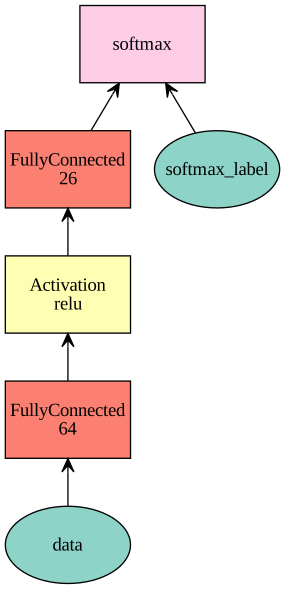
| Next, we define the network. |
| |
| |
| ```python |
| net = mx.sym.Variable('data') |
| net = mx.sym.FullyConnected(net, name='fc1', num_hidden=64) |
| net = mx.sym.Activation(net, name='relu1', act_type="relu") |
| net = mx.sym.FullyConnected(net, name='fc2', num_hidden=26) |
| net = mx.sym.SoftmaxOutput(net, name='softmax') |
| mx.viz.plot_network(net, node_attrs={"shape":"oval","fixedsize":"false"}) |
| ``` |
| |
| |
| |
| |
|  |
| |
| |
| |
| ## Creating a Module |
| |
| Now we are ready to introduce module. The commonly used module class is |
| `Module`. We can construct a module by specifying the following parameters: |
| |
| - `symbol`: the network definition |
| - `context`: the device (or a list of devices) to use for execution |
| - `data_names` : the list of input data variable names |
| - `label_names` : the list of input label variable names |
| |
| For `net`, we have only one data named `data`, and one label named `softmax_label`, |
| which is automatically named for us following the name `softmax` we specified for the `SoftmaxOutput` operator. |
| |
| |
| ```python |
| mod = mx.mod.Module(symbol=net, |
| context=mx.cpu(), |
| data_names=['data'], |
| label_names=['softmax_label']) |
| ``` |
| |
| ## Intermediate-level Interface |
| |
| We have created module. Now let us see how to run training and inference using module's intermediate-level APIs. These APIs give developers flexibility to do step-by-step |
| computation by running `forward` and `backward` passes. It's also useful for debugging. |
| |
| To train a module, we need to perform following steps: |
| |
| - `bind` : Prepares environment for the computation by allocating memory. |
| - `init_params` : Assigns and initializes parameters. |
| - `init_optimizer` : Initializes optimizers. Defaults to `sgd`. |
| - `metric.create` : Creates evaluation metric from input metric name. |
| - `forward` : Forward computation. |
| - `update_metric` : Evaluates and accumulates evaluation metric on outputs of the last forward computation. |
| - `backward` : Backward computation. |
| - `update` : Updates parameters according to the installed optimizer and the gradients computed in the previous forward-backward batch. |
| |
| This can be used as follows: |
| |
| |
| ```python |
| # allocate memory given the input data and label shapes |
| mod.bind(data_shapes=train_iter.provide_data, label_shapes=train_iter.provide_label) |
| # initialize parameters by uniform random numbers |
| mod.init_params(initializer=mx.init.Uniform(scale=.1)) |
| # use SGD with learning rate 0.1 to train |
| mod.init_optimizer(optimizer='sgd', optimizer_params=(('learning_rate', 0.1), )) |
| # use accuracy as the metric |
| metric = mx.metric.create('acc') |
| # train 5 epochs, i.e. going over the data iter one pass |
| for epoch in range(5): |
| train_iter.reset() |
| metric.reset() |
| for batch in train_iter: |
| mod.forward(batch, is_train=True) # compute predictions |
| mod.update_metric(metric, batch.label) # accumulate prediction accuracy |
| mod.backward() # compute gradients |
| mod.update() # update parameters |
| print('Epoch %d, Training %s' % (epoch, metric.get())) |
| ``` |
| |
| |
| Expected output: |
| |
| |
| ``` |
| Epoch 0, Training ('accuracy', 0.434625) |
| Epoch 1, Training ('accuracy', 0.6516875) |
| Epoch 2, Training ('accuracy', 0.6968125) |
| Epoch 3, Training ('accuracy', 0.7273125) |
| Epoch 4, Training ('accuracy', 0.7575625) |
| ``` |
| |
| |
| To learn more about these APIs, visit [Module API](http://mxnet.io/api/python/module/module.html). |
| |
| ## High-level Interface |
| |
| ### Train |
| |
| Module also provides high-level APIs for training, predicting and evaluating for |
| user convenience. Instead of doing all the steps mentioned in the above section, |
| one can simply call [fit API](http://mxnet.io/api/python/module/module.html#mxnet.module.BaseModule.fit) |
| and it internally executes the same steps. |
| |
| To fit a module, call the `fit` function as follows: |
| |
| |
| ```python |
| # reset train_iter to the beginning |
| train_iter.reset() |
| |
| # create a module |
| mod = mx.mod.Module(symbol=net, |
| context=mx.cpu(), |
| data_names=['data'], |
| label_names=['softmax_label']) |
| |
| # fit the module |
| mod.fit(train_iter, |
| eval_data=val_iter, |
| optimizer='sgd', |
| optimizer_params={'learning_rate':0.1}, |
| eval_metric='acc', |
| num_epoch=7) |
| ``` |
| |
| |
| Expected output: |
| |
| |
| ``` |
| INFO:root:Epoch[0] Train-accuracy=0.325437 |
| INFO:root:Epoch[0] Time cost=0.550 |
| INFO:root:Epoch[0] Validation-accuracy=0.568500 |
| INFO:root:Epoch[1] Train-accuracy=0.622188 |
| INFO:root:Epoch[1] Time cost=0.552 |
| INFO:root:Epoch[1] Validation-accuracy=0.656500 |
| INFO:root:Epoch[2] Train-accuracy=0.694375 |
| INFO:root:Epoch[2] Time cost=0.566 |
| INFO:root:Epoch[2] Validation-accuracy=0.703500 |
| INFO:root:Epoch[3] Train-accuracy=0.732187 |
| INFO:root:Epoch[3] Time cost=0.562 |
| INFO:root:Epoch[3] Validation-accuracy=0.748750 |
| INFO:root:Epoch[4] Train-accuracy=0.755375 |
| INFO:root:Epoch[4] Time cost=0.484 |
| INFO:root:Epoch[4] Validation-accuracy=0.761500 |
| INFO:root:Epoch[5] Train-accuracy=0.773188 |
| INFO:root:Epoch[5] Time cost=0.383 |
| INFO:root:Epoch[5] Validation-accuracy=0.715000 |
| INFO:root:Epoch[6] Train-accuracy=0.794687 |
| INFO:root:Epoch[6] Time cost=0.378 |
| INFO:root:Epoch[6] Validation-accuracy=0.802250 |
| ``` |
| |
| By default, `fit` function has `eval_metric` set to `accuracy`, `optimizer` to `sgd` |
| and optimizer_params to `(('learning_rate', 0.01),)`. |
| |
| ### Predict and Evaluate |
| |
| To predict with module, we can call `predict()`. It will collect and |
| return all the prediction results. |
| |
| |
| ```python |
| y = mod.predict(val_iter) |
| assert y.shape == (4000, 26) |
| ``` |
| |
| If we do not need the prediction outputs, but just need to evaluate on a test |
| set, we can call the `score()` function. It runs prediction in the input validation |
| dataset and evaluates the performance according to the given input metric. |
| |
| It can be used as follows: |
| |
| |
| ```python |
| score = mod.score(val_iter, ['acc']) |
| print("Accuracy score is %f" % (score[0][1])) |
| assert score[0][1] > 0.76, "Achieved accuracy (%f) is less than expected (0.76)" % score[0][1] |
| ``` |
| |
| |
| Expected output: |
| |
| |
| ``` |
| Accuracy score is 0.802250 |
| ``` |
| |
| Some of the other metrics which can be used are `top_k_acc`(top-k-accuracy), |
| `F1`, `RMSE`, `MSE`, `MAE`, `ce`(CrossEntropy). To learn more about the metrics, |
| visit [Evaluation metric](http://mxnet.io/api/python/metric/metric.html). |
| |
| One can vary number of epochs, learning_rate, optimizer parameters to change the score |
| and tune these parameters to get best score. |
| |
| ### Save and Load |
| |
| We can save the module parameters after each training epoch by using a checkpoint callback. |
| |
| |
| ```python |
| # construct a callback function to save checkpoints |
| model_prefix = 'mx_mlp' |
| checkpoint = mx.callback.do_checkpoint(model_prefix) |
| |
| mod = mx.mod.Module(symbol=net) |
| mod.fit(train_iter, num_epoch=5, epoch_end_callback=checkpoint) |
| ``` |
| |
| |
| Expected output: |
| |
| |
| ``` |
| INFO:root:Epoch[0] Train-accuracy=0.098437 |
| INFO:root:Epoch[0] Time cost=0.421 |
| INFO:root:Saved checkpoint to "mx_mlp-0001.params" |
| INFO:root:Epoch[1] Train-accuracy=0.257437 |
| INFO:root:Epoch[1] Time cost=0.520 |
| INFO:root:Saved checkpoint to "mx_mlp-0002.params" |
| INFO:root:Epoch[2] Train-accuracy=0.457250 |
| INFO:root:Epoch[2] Time cost=0.562 |
| INFO:root:Saved checkpoint to "mx_mlp-0003.params" |
| INFO:root:Epoch[3] Train-accuracy=0.558187 |
| INFO:root:Epoch[3] Time cost=0.434 |
| INFO:root:Saved checkpoint to "mx_mlp-0004.params" |
| INFO:root:Epoch[4] Train-accuracy=0.617750 |
| INFO:root:Epoch[4] Time cost=0.414 |
| INFO:root:Saved checkpoint to "mx_mlp-0005.params" |
| ``` |
| |
| To load the saved module parameters, call the `load_checkpoint` function. It |
| loads the Symbol and the associated parameters. We can then set the loaded |
| parameters into the module. |
| |
| |
| ```python |
| sym, arg_params, aux_params = mx.model.load_checkpoint(model_prefix, 3) |
| assert sym.tojson() == net.tojson() |
| |
| # assign the loaded parameters to the module |
| mod.set_params(arg_params, aux_params) |
| ``` |
| |
| Or if we just want to resume training from a saved checkpoint, instead of |
| calling `set_params()`, we can directly call `fit()`, passing the loaded |
| parameters, so that `fit()` knows to start from those parameters instead of |
| initializing randomly from scratch. We also set the `begin_epoch` parameter so that |
| `fit()` knows we are resuming from a previously saved epoch. |
| |
| |
| ```python |
| mod = mx.mod.Module(symbol=sym) |
| mod.fit(train_iter, |
| num_epoch=21, |
| arg_params=arg_params, |
| aux_params=aux_params, |
| begin_epoch=3) |
| assert score[0][1] > 0.77, "Achieved accuracy (%f) is less than expected (0.77)" % score[0][1] |
| ``` |
| |
| |
| Expected output: |
| |
| |
| ``` |
| INFO:root:Epoch[3] Train-accuracy=0.555438 |
| INFO:root:Epoch[3] Time cost=0.377 |
| INFO:root:Epoch[4] Train-accuracy=0.616625 |
| INFO:root:Epoch[4] Time cost=0.457 |
| INFO:root:Epoch[5] Train-accuracy=0.658438 |
| INFO:root:Epoch[5] Time cost=0.518 |
| ........................................... |
| INFO:root:Epoch[18] Train-accuracy=0.788687 |
| INFO:root:Epoch[18] Time cost=0.532 |
| INFO:root:Epoch[19] Train-accuracy=0.789562 |
| INFO:root:Epoch[19] Time cost=0.531 |
| INFO:root:Epoch[20] Train-accuracy=0.796250 |
| INFO:root:Epoch[20] Time cost=0.531 |
| ``` |
| |
| |
| |
| <!-- INSERT SOURCE DOWNLOAD BUTTONS --> |
