Module - Neural network training and inference
Training a neural network involves quite a few steps. One need to specify how to feed input training data, initialize model parameters, perform forward and backward passes through the network, update weights based on computed gradients, do model checkpoints, etc. During prediction, one ends up repeating most of these steps. All this can be quite daunting to both newcomers as well as experienced developers.
Luckily, MXNet modularizes commonly used code for training and inference in the module (mod for short) package. Module provides both high-level and intermediate-level interfaces for executing predefined networks. One can use both interfaces interchangeably. We will show the usage of both interfaces in this tutorial.
Prerequisites
To complete this tutorial, we need:
MXNet. See the instructions for your operating system in Setup and Installation.
Jupyter Notebook and Python Requests packages.
pip install jupyter requests
Preliminary
In this tutorial we will demonstrate module usage by training a Multilayer Perceptron (MLP) on the UCI letter recognition dataset.
The following code downloads the dataset and creates an 80:20 train:test split. It also initializes a training data iterator to return a batch of 32 training examples each time. A separate iterator is also created for test data.
import logging
import random
logging.getLogger().setLevel(logging.INFO)

import mxnet as mx
import numpy as np

mx.random.seed(1234)
np.random.seed(1234)
random.seed(1234)

fname = mx.test_utils.download('https://s3.us-east-2.amazonaws.com/mxnet-public/letter_recognition/letter-recognition.data')
data = np.genfromtxt(fname, delimiter=',')[:,1:]
label = np.array([ord(l.split(',')[0])-ord('A') for l in open(fname, 'r')])

batch_size = 32
ntrain = int(data.shape[0]*0.8)
train_iter = mx.io.NDArrayIter(data[:ntrain, :], label[:ntrain], batch_size, shuffle=True)
val_iter = mx.io.NDArrayIter(data[ntrain:, :], label[ntrain:], batch_size)
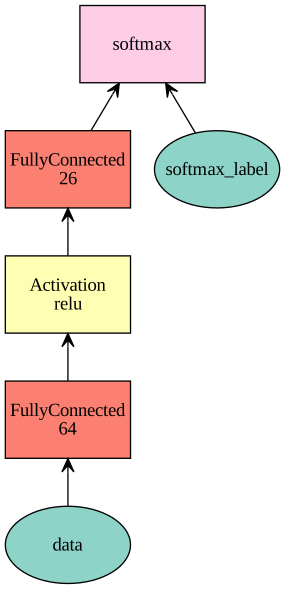
Next, we define the network.
net = mx.sym.Variable('data')
net = mx.sym.FullyConnected(net, name='fc1', num_hidden=64)
net = mx.sym.Activation(net, name='relu1', act_type="relu")
net = mx.sym.FullyConnected(net, name='fc2', num_hidden=26)
net = mx.sym.SoftmaxOutput(net, name='softmax')
mx.viz.plot_network(net, node_attrs={"shape":"oval","fixedsize":"false"})
Creating a Module
Now we are ready to introduce module. The commonly used module class is Module. We can construct a module by specifying the following parameters:
symbol: the network definitioncontext: the device (or a list of devices) to use for executiondata_names: the list of input data variable nameslabel_names: the list of input label variable names
For net, we have only one data named data, and one label named softmax_label, which is automatically named for us following the name softmax we specified for the SoftmaxOutput operator.
mod = mx.mod.Module(symbol=net,
                    context=mx.cpu(),
                    data_names=['data'],
                    label_names=['softmax_label'])
Intermediate-level Interface
We have created module. Now let us see how to run training and inference using module‘s intermediate-level APIs. These APIs give developers flexibility to do step-by-step computation by running forward and backward passes. It’s also useful for debugging.
To train a module, we need to perform following steps:
bind: Prepares environment for the computation by allocating memory.init_params: Assigns and initializes parameters.init_optimizer: Initializes optimizers. Defaults tosgd.metric.create: Creates evaluation metric from input metric name.forward: Forward computation.update_metric: Evaluates and accumulates evaluation metric on outputs of the last forward computation.backward: Backward computation.update: Updates parameters according to the installed optimizer and the gradients computed in the previous forward-backward batch.
This can be used as follows:
# allocate memory given the input data and label shapes
mod.bind(data_shapes=train_iter.provide_data, label_shapes=train_iter.provide_label)
# initialize parameters by uniform random numbers
mod.init_params(initializer=mx.init.Uniform(scale=.1))
# use SGD with learning rate 0.1 to train
mod.init_optimizer(optimizer='sgd', optimizer_params=(('learning_rate', 0.1), ))
# use accuracy as the metric
metric = mx.metric.create('acc')
# train 5 epochs, i.e. going over the data iter one pass
for epoch in range(5):
    train_iter.reset()
    metric.reset()
    for batch in train_iter:
        mod.forward(batch, is_train=True)       # compute predictions
        mod.update_metric(metric, batch.label)  # accumulate prediction accuracy
        mod.backward()                          # compute gradients
        mod.update()                            # update parameters
    print('Epoch %d, Training %s' % (epoch, metric.get()))
Expected output:
Epoch 0, Training ('accuracy', 0.434625)
Epoch 1, Training ('accuracy', 0.6516875)
Epoch 2, Training ('accuracy', 0.6968125)
Epoch 3, Training ('accuracy', 0.7273125)
Epoch 4, Training ('accuracy', 0.7575625)
To learn more about these APIs, visit Module API.
High-level Interface
Train
Module also provides high-level APIs for training, predicting and evaluating for user convenience. Instead of doing all the steps mentioned in the above section, one can simply call fit API and it internally executes the same steps.
To fit a module, call the fit function as follows:
# reset train_iter to the beginning
train_iter.reset()

# create a module
mod = mx.mod.Module(symbol=net,
                    context=mx.cpu(),
                    data_names=['data'],
                    label_names=['softmax_label'])

# fit the module
mod.fit(train_iter,
        eval_data=val_iter,
        optimizer='sgd',
        optimizer_params={'learning_rate':0.1},
        eval_metric='acc',
        num_epoch=7)
Expected output:
INFO:root:Epoch[0] Train-accuracy=0.325437
INFO:root:Epoch[0] Time cost=0.550
INFO:root:Epoch[0] Validation-accuracy=0.568500
INFO:root:Epoch[1] Train-accuracy=0.622188
INFO:root:Epoch[1] Time cost=0.552
INFO:root:Epoch[1] Validation-accuracy=0.656500
INFO:root:Epoch[2] Train-accuracy=0.694375
INFO:root:Epoch[2] Time cost=0.566
INFO:root:Epoch[2] Validation-accuracy=0.703500
INFO:root:Epoch[3] Train-accuracy=0.732187
INFO:root:Epoch[3] Time cost=0.562
INFO:root:Epoch[3] Validation-accuracy=0.748750
INFO:root:Epoch[4] Train-accuracy=0.755375
INFO:root:Epoch[4] Time cost=0.484
INFO:root:Epoch[4] Validation-accuracy=0.761500
INFO:root:Epoch[5] Train-accuracy=0.773188
INFO:root:Epoch[5] Time cost=0.383
INFO:root:Epoch[5] Validation-accuracy=0.715000
INFO:root:Epoch[6] Train-accuracy=0.794687
INFO:root:Epoch[6] Time cost=0.378
INFO:root:Epoch[6] Validation-accuracy=0.802250
By default, fit function has eval_metric set to accuracy, optimizer to sgd and optimizer_params to (('learning_rate', 0.01),).
Predict and Evaluate
To predict with module, we can call predict(). It will collect and return all the prediction results.
y = mod.predict(val_iter)
assert y.shape == (4000, 26)
If we do not need the prediction outputs, but just need to evaluate on a test set, we can call the score() function. It runs prediction in the input validation dataset and evaluates the performance according to the given input metric.
It can be used as follows:
score = mod.score(val_iter, ['acc'])
print("Accuracy score is %f" % (score[0][1]))
assert score[0][1] > 0.76, "Achieved accuracy (%f) is less than expected (0.76)" % score[0][1]
Expected output:
Accuracy score is 0.802250
Some of the other metrics which can be used are top_k_acc(top-k-accuracy), F1, RMSE, MSE, MAE, ce(CrossEntropy). To learn more about the metrics, visit Evaluation metric.
One can vary number of epochs, learning_rate, optimizer parameters to change the score and tune these parameters to get best score.
Save and Load
We can save the module parameters after each training epoch by using a checkpoint callback.
# construct a callback function to save checkpoints
model_prefix = 'mx_mlp'
checkpoint = mx.callback.do_checkpoint(model_prefix)

mod = mx.mod.Module(symbol=net)
mod.fit(train_iter, num_epoch=5, epoch_end_callback=checkpoint)
Expected output:
INFO:root:Epoch[0] Train-accuracy=0.098437
INFO:root:Epoch[0] Time cost=0.421
INFO:root:Saved checkpoint to "mx_mlp-0001.params"
INFO:root:Epoch[1] Train-accuracy=0.257437
INFO:root:Epoch[1] Time cost=0.520
INFO:root:Saved checkpoint to "mx_mlp-0002.params"
INFO:root:Epoch[2] Train-accuracy=0.457250
INFO:root:Epoch[2] Time cost=0.562
INFO:root:Saved checkpoint to "mx_mlp-0003.params"
INFO:root:Epoch[3] Train-accuracy=0.558187
INFO:root:Epoch[3] Time cost=0.434
INFO:root:Saved checkpoint to "mx_mlp-0004.params"
INFO:root:Epoch[4] Train-accuracy=0.617750
INFO:root:Epoch[4] Time cost=0.414
INFO:root:Saved checkpoint to "mx_mlp-0005.params"
To load the saved module parameters, call the load_checkpoint function. It loads the Symbol and the associated parameters. We can then set the loaded parameters into the module.
sym, arg_params, aux_params = mx.model.load_checkpoint(model_prefix, 3)
assert sym.tojson() == net.tojson()

# assign the loaded parameters to the module
mod.set_params(arg_params, aux_params)
Or if we just want to resume training from a saved checkpoint, instead of calling set_params(), we can directly call fit(), passing the loaded parameters, so that fit() knows to start from those parameters instead of initializing randomly from scratch. We also set the begin_epoch parameter so that fit() knows we are resuming from a previously saved epoch.
mod = mx.mod.Module(symbol=sym)
mod.fit(train_iter,
        num_epoch=21,
        arg_params=arg_params,
        aux_params=aux_params,
        begin_epoch=3)
assert score[0][1] > 0.77, "Achieved accuracy (%f) is less than expected (0.77)" % score[0][1]
Expected output:
INFO:root:Epoch[3] Train-accuracy=0.555438
INFO:root:Epoch[3] Time cost=0.377
INFO:root:Epoch[4] Train-accuracy=0.616625
INFO:root:Epoch[4] Time cost=0.457
INFO:root:Epoch[5] Train-accuracy=0.658438
INFO:root:Epoch[5] Time cost=0.518
...........................................
INFO:root:Epoch[18] Train-accuracy=0.788687
INFO:root:Epoch[18] Time cost=0.532
INFO:root:Epoch[19] Train-accuracy=0.789562
INFO:root:Epoch[19] Time cost=0.531
INFO:root:Epoch[20] Train-accuracy=0.796250
INFO:root:Epoch[20] Time cost=0.531