| <!-- |
| |
| Licensed to the Apache Software Foundation (ASF) under one |
| or more contributor license agreements. See the NOTICE file |
| distributed with this work for additional information |
| regarding copyright ownership. The ASF licenses this file |
| to you under the Apache License, Version 2.0 (the |
| "License"); you may not use this file except in compliance |
| with the License. You may obtain a copy of the License at |
| |
| http://www.apache.org/licenses/LICENSE-2.0 |
| |
| Unless required by applicable law or agreed to in writing, |
| software distributed under the License is distributed on an |
| "AS IS" BASIS, WITHOUT WARRANTIES OR CONDITIONS OF ANY |
| KIND, either express or implied. See the License for the |
| specific language governing permissions and limitations |
| under the License. |
| |
| --> |
| |
| # TsFile Format |
| |
| ## 1. TsFile Design |
| |
| This is an introduction to the design details of TsFile. |
| |
| ### 1.1 Variable Storage |
| |
| - **Data Type Hardcode** |
| - 0: BOOLEAN |
| - 1: INT32 (`int`) |
| - 2: INT64 (`long`) |
| - 3: FLOAT |
| - 4: DOUBLE |
| - 5: TEXT (`String`) |
| |
| - **Encoding Type Hardcode** |
| |
| To improve the efficiency of data storage, it is necessary to encode data during data writing, thereby reducing the amount of disk space used. In the process of writing and reading data, the amount of data involved in the I/O operations can be reduced to improve performance. IoTDB supports the following encoding methods for different data types: |
| |
| - **0: PLAIN** |
| |
| - PLAIN encoding, the default encoding mode, i.e, no encoding, supports multiple data types. It has high compression and decompression efficiency while suffering from low space storage efficiency. |
| |
| - **1: DICTIONARY** |
| |
| - DICTIONARY encoding is lossless. It is suitable for TEXT data with low cardinality (i.e. low number of distinct values). It is not recommended to use it for high-cardinality data. |
| |
| - **2: RLE** |
| |
| - Run-length encoding is suitable for storing sequence with continuous integer values, and is not recommended for sequence data with most of the time different values. |
| |
| - Run-length encoding can also be used to encode floating-point numbers, while it is necessary to specify reserved decimal digits (MAX_POINT_NUMBER) when creating time series. It is more suitable to store sequence data where floating-point values appear continuously, monotonously increasing or decreasing, and it is not suitable for storing sequence data with high precision requirements after the decimal point or with large fluctuations. |
| |
| > TS_2DIFF and RLE have precision limit for data type of float and double. By default, two decimal places are reserved. GORILLA is recommended. |
| |
| - **3: DIFF** |
| |
| - **4: TS_2DIFF** |
| |
| - Second-order differential encoding is more suitable for encoding monotonically increasing or decreasing sequence data, and is not recommended for sequence data with large fluctuations. |
| |
| - **5: BITMAP** |
| |
| - **6: GORILLA_V1** |
| |
| - GORILLA encoding is lossless. It is more suitable for numerical sequence with similar values and is not recommended for sequence data with large fluctuations. |
| - Currently, there are two versions of GORILLA encoding implementation, it is recommended to use `GORILLA` instead of `GORILLA_V1` (deprecated). |
| - Usage restrictions: When using GORILLA to encode INT32 data, you need to ensure that there is no data point with the value `Integer.MIN_VALUE` in the sequence. When using GORILLA to encode INT64 data, you need to ensure that there is no data point with the value `Long.MIN_VALUE` in the sequence. |
| |
| - **7: REGULAR** |
| |
| - **8: GORILLA** |
| |
| - **The correspondence between the data type and its supported encodings** |
| |
| | Data Type | Supported Encoding | |
| | :-------: | :---------------------------: | |
| | BOOLEAN | PLAIN, RLE | |
| | INT32 | PLAIN, RLE, TS_2DIFF, GORILLA | |
| | INT64 | PLAIN, RLE, TS_2DIFF, GORILLA | |
| | FLOAT | PLAIN, RLE, TS_2DIFF, GORILLA | |
| | DOUBLE | PLAIN, RLE, TS_2DIFF, GORILLA | |
| | TEXT | PLAIN, DICTIONARY | |
| |
| ### 1.2 TsFile Overview |
| |
| <!-- TODO |
| |
| Here is the structure diagram of TsFile. |
| |
| <img style="width:100%; max-width:800px; max-height:600px; margin-left:auto; margin-right:auto; display:block;" src="https://user-images.githubusercontent.com/33376433/123052025-f47aab80-d434-11eb-94c2-9b75429e5c54.png"> |
| |
| This TsFile contains two entities: d1, d2. Each entity contains two measurements: s1, s2. 4 timeseries in total. Each timeseries contains 2 Chunks. |
| |
| --> |
| |
| There are two parts in TsFile: **Data Area** and **Index Area**. |
| |
| There are three concepts, from small to large, in **Data Area:** |
| |
| * **Page**: A page is a sequence of timeseries. It is the smallest unit in which a data block is deserialized. |
| |
| * **Chunk**: A chunk contains several pages in one timeseries. It is the smallest unit in which a data block is read by IO. |
| |
| * **ChunkGroup**: A chunk group contains several chunks in one entity. |
| |
| There are three parts in **Index Area**: |
| |
| * **TimeseriesIndex** organized by timeseries, containing a header and list of ChunkIndex. The header records data type and statistics (maximum and minimum timestamps, etc.) of a time series in the file. The data block index list records the offsets of the chunks in the file, and the related statistics (maximum and minimum timestamps, etc.). |
| * **IndexOfTimeseriesIndex** for index the offsets of TimeseriesIndex in the file. |
| * **BloomFilter** for entities. |
| |
| |
| |
| Here is the structure diagram of TsFile: |
| |
| <img style="width:100%; max-width:800px; max-height:600px; margin-left:auto; margin-right:auto; display:block;" src="https://user-images.githubusercontent.com/19167280/123542462-6710c180-d77c-11eb-9afb-a1b495c82ea9.png"> |
| |
| This TsFile contains two entities: d1, d2. Each entity contains three measurements: s1, s2, s3. 6 timeseries in total. Each timeseries contains 2 Chunks. |
| |
| Query Process of reading d1.s1: |
| |
| * Deserialize IndexOfTimeseriesIndex, get the position of TimeseriesIndex of d1.s1 |
| * Deserialize and get the TimeseriesIndex of d1.s1 |
| * According to TimeseriesIndex of d1.s1, deserialize all ChunkIndex of d1.s1 |
| * According to each ChunkIndex of d1.s1, read its Chunk |
| |
| #### 1.2.1 Magic String and Version Number |
| |
| A TsFile begins with a 6-byte magic string (`TsFile`) and a 6-byte version number (`000002`). |
| |
| #### 1.2.2 Data Area |
| |
| ##### ChunkGroup |
| |
| A `ChunkGroup` stores the data of an entity for a period of time. It consists of several `Chunk`, a byte delimiter`0x00` and a `ChunkFooter`. |
| |
| ##### Chunk |
| |
| A `Chunk` stores the data of a measurement for a period of time. The data in a chunk is stored in time increment order. It consists of a byte `0x01` as the marker, following a `ChunkHeader` and an array of `Page`. |
| |
| ##### ChunkHeader |
| | Member | Type | Description | |
| | :--------------------------: | :----: | :----: | |
| | measurementID | String | Name of measurement | |
| | dataSize | int | Size of this chunk | |
| | dataType | TSDataType | Data type of this chuck | |
| | compressionType | CompressionType | Compression Type | |
| | encodingType | TSEncoding | Encoding Type | |
| | numOfPages | int | Number of pages | |
| |
| ##### Page |
| |
| A `Page` stores a sequence of timeseries. It is the smallest unit in which a data block is deserialized. It contains a `PageHeader` and the actual data (encoded time-value pairs). |
| |
| PageHeader Structure: |
| |
| | Member | Type | Description | |
| | :----------------------------------: | :--------------: | :----: | |
| | uncompressedSize | int | Data size before compressing | |
| | compressedSize | int | Data size after compressing(if use SNAPPY) | |
| | statistics | Statistics | Statistics values | |
| |
| Here is the detailed information for `statistics`: |
| |
| | Member | Description | DoubleStatistics | FloatStatistics | IntegerStatistics | LongStatistics | BinaryStatistics | BooleanStatistics | |
| | :----------------------------------: | :--------------: | :----: | :----: | :----: | :----: | :----: | :----: | |
| | count | number of time-value points | long | long | long | long | long | long | |
| | startTime | start time | long | long | long | long | long | long | |
| | endTime | end time | long | long | long | long | long | long | |
| | minValue | min value | double | float | int | long | - | - | |
| | maxValue | max value | double | float | int | long | - | - | |
| | firstValue | first value | double | float | int | long | Binary | boolean| |
| | lastValue | last value | double | float | int | long | Binary | boolean| |
| | sumValue | sum value | double | double | double | double | - | - | |
| |
| ##### ChunkGroupFooter |
| |
| | Member | Type | Description | |
| | :--------------------------------: | :----: | :----: | |
| | entityID | String | Name of entity | |
| | dataSize | long | Data size of the ChunkGroup | |
| | numberOfChunks | int | Number of chunks | |
| |
| #### 1.2.3 Index Area |
| |
| ##### 1.2.3.1 ChunkIndex |
| |
| The first part of index is `ChunkIndex` : |
| |
| | Member | Type | Description | |
| | :------------------------------------------------: | :------: | :----: | |
| | measurementUid | String | Name of measurement | |
| | offsetOfChunkHeader | long | Start offset of ChunkHeader | |
| | tsDataType | TSDataType | Data type | |
| | statistics | Statistics | Statistic values | |
| |
| ##### 1.2.3.2 TimeseriesIndex |
| |
| The second part of index is `TimeseriesIndex`: |
| |
| | Member | Type | Description | |
| | :------------------------------------------------: | :------: | :------: | |
| | measurementUid | String | Name of measurement | |
| | tsDataType | short | Data type | |
| | startOffsetOfChunkIndexList | long | Start offset of ChunkIndex list | |
| | ChunkIndexListDataSize | int | ChunkIndex list size | |
| | statistics | Statistics | Statistic values | |
| |
| ##### 1.2.3.3 IndexOfTimeseriesIndex (Secondary Index) |
| |
| The third part of index is `IndexOfTimeseriesIndex`: |
| |
| | Member | Type | Description | |
| | :-------------------------------------------------: | :---------------------: | :---: | |
| | IndexTree | IndexNode | Root index node of IndexTree | |
| | offsetOfIndexArea | long | offset of index area | |
| | bloomFilter | BloomFilter | bloom filter | |
| |
| IndexNode has members as below: |
| |
| | Member | Type | Description | |
| | :------------------------------------: | :----: | :---: | |
| | children | List<IndexEntry> | IndexEntry list | |
| | endOffset | long | EndOffset of this IndexNode | |
| | nodeType | IndexNodeType | IndexNode type | |
| |
| IndexEntry has members as below: |
| |
| | Member | Type | Description | |
| | :------------------------------------: | :----: | :---: | |
| | name | String | Name of related entity or measurement | |
| | offset | long | offset | |
| |
| All IndexNode forms an **index tree (secondary index)** like a B+ tree, which consists of two levels: entity index level and measurement index level. The IndexNodeType has four enums: `INTERNAL_ENTITY`, `LEAF_ENTITY`, `INTERNAL_MEASUREMENT`, `LEAF_MEASUREMENT`, which indicates the internal or leaf node of entity index level and measurement index level respectively. Only the `LEAF_MEASUREMENT` nodes point to `TimeseriesIndex`. |
| |
| Consider the introduction of multi-variable timeseries, each multi-variable timeseries is called a vector with a `TimeColumn`. For example, the multi-variable timeseries *vector1* belongs to the entity *d* , with two measurements *s1, s2*. i.e. `d1.vector1.(s1,s2)`, we call vector1 as `TimeColumn`. In the storage, you need to store an extra Chunk of vector1. |
| |
| Except for `TimeColumn`, measurements of a multi-variable timeseries are concatenated with `TimeColumn` when constructing `IndexOfTimeseriesIndex`, e.g. we Indicates `vector1.s1` as a measurement. |
| |
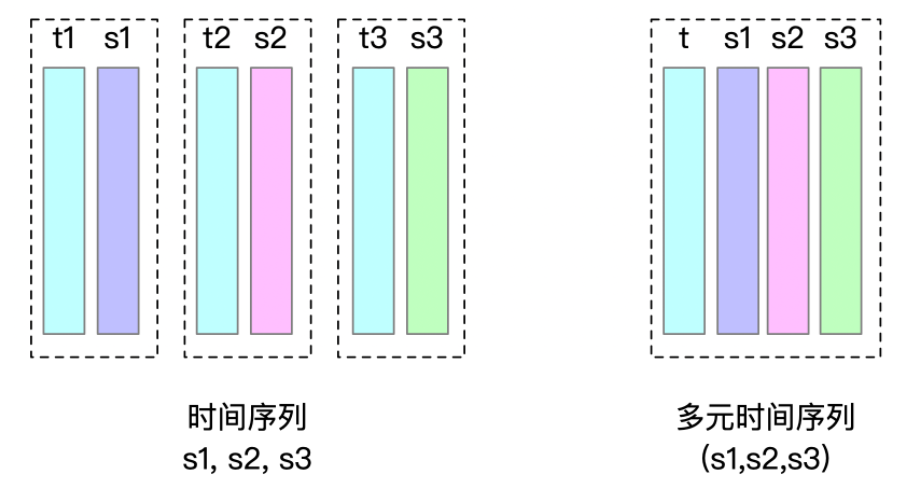
| > From v0.13, IoTDB supports [Multi-variable Timeseries](https://iotdb.apache.org/UserGuide/Master/Data-Concept/Data-Model-and-Terminology.html). A multi-variable measurements of an entity corresponds to a multi-variable timeseries. These timeseries are called **multi-variable timeseries**, also called **aligned timeseries**. |
| > |
| > Multi-variable timeseries need to be created, inserted and deleted at the same time. However, when querying, you can query each sub-measurement separately. |
| > |
| > By using multi-variable timeseries, the timestamp columns of a group of multi-variable timeseries need to be stored only once in memory and disk when inserting data, instead of once per timeseries. |
| > |
| >  |
| |
| Here are seven detailed examples. |
| |
| The degree of the index tree (that is, the max number of each node's children) could be configured by users, and is 256 by default. In the examples below, we assume `max_degree_of_index_node = 10`. |
| |
| Note that the keys are arranged in dictionary order in each type of nodes (ENTITY, MEASUREMENT) of the index tree. In the following example, we assumed that the dictionary order **di<dj** if i<j. (Otherwise, in fact, the dictionary order of [d1,d2,... .d10] should be [d1,d10,d2,.... .d9]) |
| |
| Example 1\~4 is an example of a single-variable timeseries. |
| |
| Example 5\~6 is an example of a multi-variale timeseries. |
| Example 7 is a comprehensive example. |
| |
| * **Example 1: 5 entities with 5 measurements each** |
| |
| <img style="width:100%; max-width:800px; max-height:600px; margin-left:auto; margin-right:auto; display:block;" src="https://user-images.githubusercontent.com/19167280/125254013-9d2d7400-e32c-11eb-9f95-1663e14cffbb.png"> |
| In the case of 5 entities with 5 measurements each: Since the numbers of entities and measurements are both no more than `max_degree_of_index_node`, the tree has only measurement index level by default. In this level, each IndexNode is composed of no more than 10 index entries. The root node is `INTERNAL_ENTITY` type, and the 5 index entries point to index nodes of related entities. These nodes point to `TimeseriesIndex` directly, as they are `LEAF_MEASUREMENT` type. |
| |
| * **Example 2: 1 entity with 150 measurements** |
| |
| <img style="width:100%; max-width:800px; max-height:600px; margin-left:auto; margin-right:auto; display:block;" src="https://user-images.githubusercontent.com/19167280/125254022-a0c0fb00-e32c-11eb-8fd1-462936358288.png"> |
| |
| In the case of 1 entity with 150 measurements: The number of measurements exceeds `max_degree_of_index_node`, so the tree has only measurement index level by default. In this level, each IndexNode is composed of no more than 10 index entries. The nodes that point to `TimeseriesIndex` directly are `LEAF_MEASUREMENT` type. Other nodes are not leaf nodes of measurement index level, so they are `INTERNAL_MEASUREMENT` type. The root node is `INTERNAL_ENTITY` type. |
| |
| * **Example 3: 150 entities with 1 measurement each** |
| |
| <img style="width:100%; max-width:800px; max-height:600px; margin-left:auto; margin-right:auto; display:block;" src="https://user-images.githubusercontent.com/19167280/122771008-9a64d380-d2d8-11eb-9044-5ac794dd38f7.png"> |
| |
| In the case of 150 entities with 1 measurement each: The number of entities exceeds `max_degree_of_index_node`, so the entity index level and measurement index level of the tree are both formed. In these two levels, each IndexNode is composed of no more than 10 index entries. The nodes that point to `TimeseriesIndex` directly are `LEAF_MEASUREMENT` type. The root nodes of measurement index level are also the leaf nodes of entity index level, which are `LEAF_ENTITY` type. Other nodes and root node of index tree are not leaf nodes of entity level, so they are `INTERNAL_ENTITY` type. |
| |
| * **Example 4: 150 entities with 150 measurements each** |
| |
| <img style="width:100%; max-width:800px; max-height:600px; margin-left:auto; margin-right:auto; display:block;" src="https://user-images.githubusercontent.com/19167280/122677241-1a753580-d214-11eb-817f-17bcf797251f.png"> |
| |
| In the case of 150 entities with 150 measurements each: The numbers of entities and measurements both exceed `max_degree_of_index_node`, so the entity index level and measurement index level are both formed. In these two levels, each IndexNode is composed of no more than 10 index entries. As is described before, from the root node to the leaf nodes of entity index level, their types are `INTERNAL_ENTITY` and `LEAF_ENTITY`; each leaf node of entity index level can be seen as the root node of measurement index level, and from here to the leaf nodes of measurement index level, their types are `INTERNAL_MEASUREMENT` and `LEAF_MEASUREMENT`. |
| |
| * **Example 5: 1 entities with 2 vectors, 9 measurements for each vector** |
| |
| 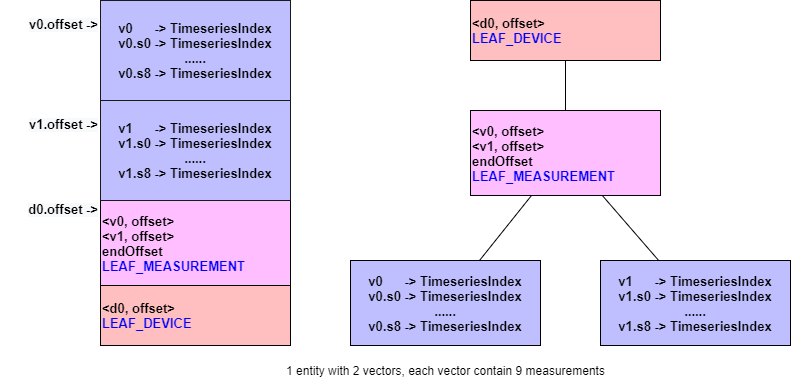 |
| |
| * **Example 6: 1 entities with 2 vectors, 15 measurements for each vector** |
| |
| 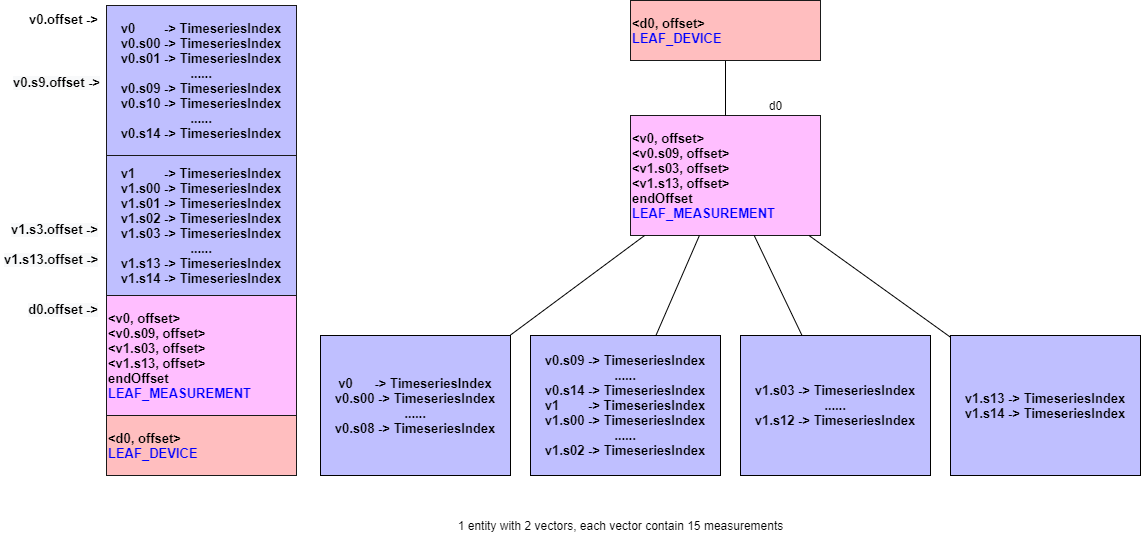 |
| |
| * **Example 7: 2 entities, measurements of entities are shown in the following table** |
| |
| | entity: d0 | entity: d1 | |
| | :---------------------------------------------- | :---------------------------------------------- | |
| | 【Single-variable Tmeseries】s0,s1...,s4 | 【Single-variable Tmeseries】s0,s1,...s14 | |
| | 【Multi-variable Timeseries】v0.(s5,s6,...,s14) | 【Multi-variable Timeseries】v0.(s15,s16,..s18) | |
| | 【Single-variable Tmeseries】z15,z16,..,z18 | | |
| |
| 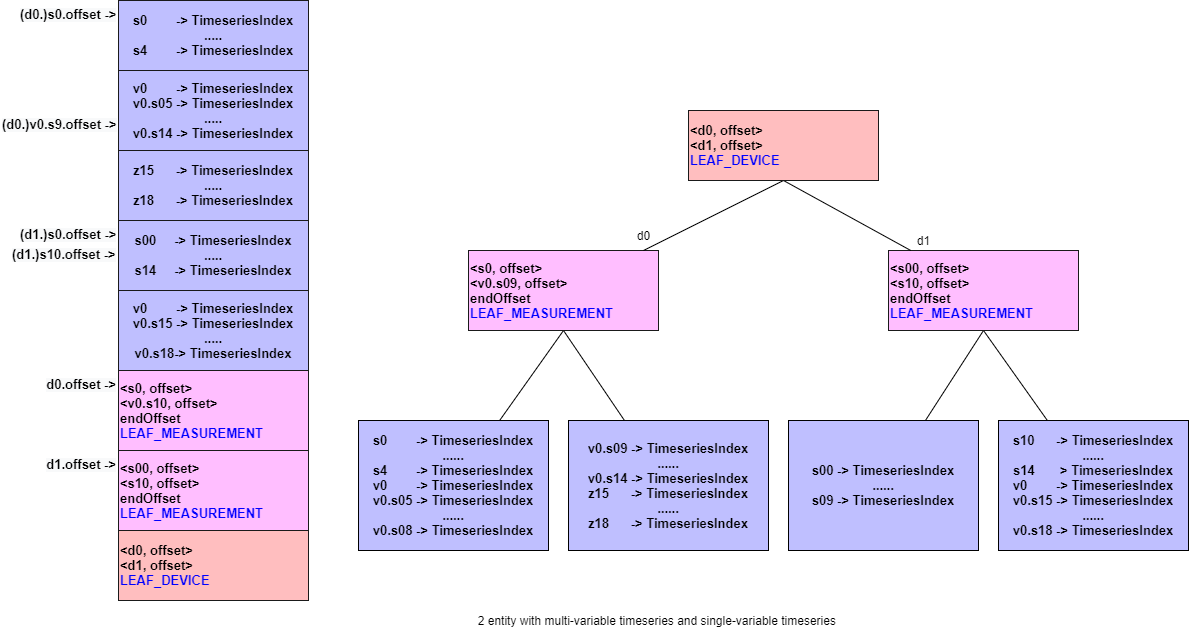 |
| |
| The IndexTree is designed as tree structure so that not all the `TimeseriesIndex` need to be read when the number of entities or measurements is too large. Only reading specific IndexTree nodes according to requirement and reducing I/O could speed up the query. More reading process of TsFile in details will be described in the last section of this chapter. |
| |
| |
| #### 1.2.4 Magic String |
| |
| A TsFile ends with a 6-byte magic string (`TsFile`). |
| |
| |
| Congratulations! You have finished the journey of discovering TsFile. |
| |
| ## 2. A TsFile Visualization Example |
| |
| ### v0.8 |
| |
| <img style="width:100%; max-width:800px; max-height:600px; margin-left:auto; margin-right:auto; display:block;" src="https://user-images.githubusercontent.com/33376433/65209576-2bd36000-dacb-11e9-9e43-49e0dd01274e.png"> |
| |
| ### v0.9 / 000001 |
| |
| <img style="width:100%; max-width:800px; max-height:600px; margin-left:auto; margin-right:auto; display:block;" src="https://user-images.githubusercontent.com/33376433/69341240-26012300-0ca4-11ea-91a1-d516810cad44.png"> |
| |
| ### v0.10 / 000002 |
| |
| <img style="width:100%; max-width:800px; max-height:600px; margin-left:auto; margin-right:auto; display:block;" src="https://user-images.githubusercontent.com/19167280/95296983-492cc500-08ac-11eb-9f66-c9c78401c61d.png"> |
| |
| ### v0.12 / 000003 |
| <img style="width:100%; max-width:800px; max-height:600px; margin-left:auto; margin-right:auto; display:block;" src="https://user-images.githubusercontent.com/33376433/123052025-f47aab80-d434-11eb-94c2-9b75429e5c54.png"> |
| |
| |
| ## 3. TsFile Tool Set |
| |
| ### 3.1 IoTDB Data Directory Overview Tool |
| |
| After building the server, the startup script of this tool will appear under the `server\target\iotdb-server-{version}\tools\tsfileToolSet` directory. |
| |
| Command: |
| |
| For Windows: |
| |
| ``` |
| .\print-iotdb-data-dir.bat <path of your IoTDB data directory or directories separated by comma> (<path of the file for saving the output result>) |
| ``` |
| |
| For Linux or MacOs: |
| |
| ``` |
| ./print-iotdb-data-dir.sh <path of your IoTDB data directory or directories separated by comma> (<path of the file for saving the output result>) |
| ``` |
| |
| An example on Windows: |
| |
| ``` |
| D:\iotdb\server\target\iotdb-server-{version}\tools\tsfileToolSet>.\print-iotdb-data-dir.bat D:\\data\data |
| |```````````````````````` |
| Starting Printing the IoTDB Data Directory Overview |
| |```````````````````````` |
| output save path:IoTDB_data_dir_overview.txt |
| TsFile data dir num:1 |
| 21:17:38.841 [main] WARN org.apache.iotdb.tsfile.common.conf.TSFileDescriptor - Failed to find config file iotdb-engine.properties at classpath, use default configuration |
| |============================================================== |
| |D:\\data\data |
| |--sequence |
| | |--root.ln.wf01.wt01 |
| | | |--1575813520203-101-0.tsfile |
| | | |--1575813520203-101-0.tsfile.resource |
| | | | |--device root.ln.wf01.wt01, start time 1 (1970-01-01T08:00:00.001+08:00[GMT+08:00]), end time 5 (1970-01-01T08:00:00.005+08:00[GMT+08:00]) |
| | | |--1575813520669-103-0.tsfile |
| | | |--1575813520669-103-0.tsfile.resource |
| | | | |--device root.ln.wf01.wt01, start time 100 (1970-01-01T08:00:00.100+08:00[GMT+08:00]), end time 300 (1970-01-01T08:00:00.300+08:00[GMT+08:00]) |
| | | |--1575813521372-107-0.tsfile |
| | | |--1575813521372-107-0.tsfile.resource |
| | | | |--device root.ln.wf01.wt01, start time 500 (1970-01-01T08:00:00.500+08:00[GMT+08:00]), end time 540 (1970-01-01T08:00:00.540+08:00[GMT+08:00]) |
| |--unsequence |
| | |--root.ln.wf01.wt01 |
| | | |--1575813521063-105-0.tsfile |
| | | |--1575813521063-105-0.tsfile.resource |
| | | | |--device root.ln.wf01.wt01, start time 10 (1970-01-01T08:00:00.010+08:00[GMT+08:00]), end time 50 (1970-01-01T08:00:00.050+08:00[GMT+08:00]) |
| |============================================================== |
| ``` |
| |
| |
| |
| ### 3.2 TsFileResource Print Tool |
| |
| After building the server, the startup script of this tool will appear under the `server\target\iotdb-server-{version}\tools\tsfileToolSet` directory. |
| |
| Command: |
| |
| For Windows: |
| |
| ``` |
| .\print-tsfile-resource-files.bat <path of your TsFileResource directory> |
| ``` |
| |
| For Linux or MacOs: |
| |
| ``` |
| ./print-tsfile-resource-files.sh <path of your TsFileResource directory> |
| ``` |
| |
| An example on Windows: |
| |
| ```shell |
| D:\iotdb\server\target\iotdb-server-{version}\tools\tsfileToolSet>.\print-tsfile-resource-files.bat D:\data\data\sequence\root.vehicle |
| |```````````````````````` |
| Starting Printing the TsFileResources |
| |```````````````````````` |
| 12:31:59.861 [main] WARN org.apache.iotdb.db.conf.IoTDBDescriptor - Cannot find IOTDB_HOME or IOTDB_CONF environment variable when loading config file iotdb-engine.properties, use default configuration |
| analyzing D:\data\data\sequence\root.vehicle\1572496142067-101-0.tsfile ... |
| device root.vehicle.d0, start time 3000 (1970-01-01T08:00:03+08:00[GMT+08:00]), end time 100999 (1970-01-01T08:01:40.999+08:00[GMT+08:00]) |
| analyzing the resource file finished. |
| ``` |
| |
| ### 3.3 TsFile Sketch Tool |
| |
| After building the server, the startup script of this tool will appear under the `server\target\iotdb-server-{version}\tools\tsfileToolSet` directory. |
| |
| Command: |
| |
| For Windows: |
| |
| ``` |
| .\print-tsfile-sketch.bat <path of your TsFile> (<path of the file for saving the output result>) |
| ``` |
| |
| - Note that if `<path of the file for saving the output result>` is not set, the default path "TsFile_sketch_view.txt" will be used. |
| |
| For Linux or MacOs: |
| |
| ``` |
| ./print-tsfile-sketch.sh <path of your TsFile> (<path of the file for saving the output result>) |
| ``` |
| |
| - Note that if `<path of the file for saving the output result>` is not set, the default path "TsFile_sketch_view.txt" will be used. |
| |
| An example on macOS: |
| |
| ``` |
| /iotdb/server/target/iotdb-server-{version}/tools/tsfileToolSet$ ./print-tsfile-sketch.sh test.tsfile |
| |```````````````````````` |
| Starting Printing the TsFile Sketch |
| |```````````````````````` |
| TsFile path:test.tsfile |
| Sketch save path:TsFile_sketch_view.txt |
| -------------------------------- TsFile Sketch -------------------------------- |
| file path: test.tsfile |
| file length: 15462 |
| 14:40:55.619 [main] INFO org.apache.iotdb.tsfile.read.TsFileSequenceReader - Start reading file test.tsfile metadata from 15356, length 96 |
| |
| POSITION| CONTENT |
| -------- ------- |
| 0| [magic head] TsFile |
| 6| [version number] 3 |
| ||||||||||||||||||||| [Chunk Group] of root.sg_1.d1, num of Chunks:4 |
| 7| [Chunk Group Header] |
| | [marker] 0 |
| | [deviceID] root.sg_1.d1 |
| 21| [Chunk] of s6, numOfPoints:1000, time range:[0,999], tsDataType:INT64, |
| startTime: 0 endTime: 999 count: 1000 [minValue:6,maxValue:9996,firstValue:6,lastValue:9996,sumValue:5001000.0] |
| | [chunk header] marker=5, measurementId=s6, dataSize=1826, serializedSize=9 |
| | [chunk] java.nio.HeapByteBuffer[pos=0 lim=1826 cap=1826] |
| | [page] CompressedSize:1822, UncompressedSize:1951 |
| 1856| [Chunk] of s4, numOfPoints:1000, time range:[0,999], tsDataType:INT64, |
| startTime: 0 endTime: 999 count: 1000 [minValue:4,maxValue:9994,firstValue:4,lastValue:9994,sumValue:4999000.0] |
| | [chunk header] marker=5, measurementId=s4, dataSize=1826, serializedSize=9 |
| | [chunk] java.nio.HeapByteBuffer[pos=0 lim=1826 cap=1826] |
| | [page] CompressedSize:1822, UncompressedSize:1951 |
| 3691| [Chunk] of s2, numOfPoints:1000, time range:[0,999], tsDataType:INT64, |
| startTime: 0 endTime: 999 count: 1000 [minValue:3,maxValue:9993,firstValue:3,lastValue:9993,sumValue:4998000.0] |
| | [chunk header] marker=5, measurementId=s2, dataSize=1826, serializedSize=9 |
| | [chunk] java.nio.HeapByteBuffer[pos=0 lim=1826 cap=1826] |
| | [page] CompressedSize:1822, UncompressedSize:1951 |
| 5526| [Chunk] of s5, numOfPoints:1000, time range:[0,999], tsDataType:INT64, |
| startTime: 0 endTime: 999 count: 1000 [minValue:5,maxValue:9995,firstValue:5,lastValue:9995,sumValue:5000000.0] |
| | [chunk header] marker=5, measurementId=s5, dataSize=1826, serializedSize=9 |
| | [chunk] java.nio.HeapByteBuffer[pos=0 lim=1826 cap=1826] |
| | [page] CompressedSize:1822, UncompressedSize:1951 |
| ||||||||||||||||||||| [Chunk Group] of root.sg_1.d1 ends |
| ||||||||||||||||||||| [Chunk Group] of root.sg_1.d2, num of Chunks:4 |
| 7361| [Chunk Group Header] |
| | [marker] 0 |
| | [deviceID] root.sg_1.d2 |
| 7375| [Chunk] of s2, numOfPoints:1000, time range:[0,999], tsDataType:INT64, |
| startTime: 0 endTime: 999 count: 1000 [minValue:3,maxValue:9993,firstValue:3,lastValue:9993,sumValue:4998000.0] |
| | [chunk header] marker=5, measurementId=s2, dataSize=1826, serializedSize=9 |
| | [chunk] java.nio.HeapByteBuffer[pos=0 lim=1826 cap=1826] |
| | [page] CompressedSize:1822, UncompressedSize:1951 |
| 9210| [Chunk] of s4, numOfPoints:1000, time range:[0,999], tsDataType:INT64, |
| startTime: 0 endTime: 999 count: 1000 [minValue:4,maxValue:9994,firstValue:4,lastValue:9994,sumValue:4999000.0] |
| | [chunk header] marker=5, measurementId=s4, dataSize=1826, serializedSize=9 |
| | [chunk] java.nio.HeapByteBuffer[pos=0 lim=1826 cap=1826] |
| | [page] CompressedSize:1822, UncompressedSize:1951 |
| 11045| [Chunk] of s6, numOfPoints:1000, time range:[0,999], tsDataType:INT64, |
| startTime: 0 endTime: 999 count: 1000 [minValue:6,maxValue:9996,firstValue:6,lastValue:9996,sumValue:5001000.0] |
| | [chunk header] marker=5, measurementId=s6, dataSize=1826, serializedSize=9 |
| | [chunk] java.nio.HeapByteBuffer[pos=0 lim=1826 cap=1826] |
| | [page] CompressedSize:1822, UncompressedSize:1951 |
| 12880| [Chunk] of s5, numOfPoints:1000, time range:[0,999], tsDataType:INT64, |
| startTime: 0 endTime: 999 count: 1000 [minValue:5,maxValue:9995,firstValue:5,lastValue:9995,sumValue:5000000.0] |
| | [chunk header] marker=5, measurementId=s5, dataSize=1826, serializedSize=9 |
| | [chunk] java.nio.HeapByteBuffer[pos=0 lim=1826 cap=1826] |
| | [page] CompressedSize:1822, UncompressedSize:1951 |
| ||||||||||||||||||||| [Chunk Group] of root.sg_1.d2 ends |
| 14715| [marker] 2 |
| 14716| [TimeseriesIndex] of root.sg_1.d1.s2, tsDataType:INT64 |
| | [ChunkIndex] s2, offset=3691 |
| | [startTime: 0 endTime: 999 count: 1000 [minValue:3,maxValue:9993,firstValue:3,lastValue:9993,sumValue:4998000.0]] |
| 14788| [TimeseriesIndex] of root.sg_1.d1.s4, tsDataType:INT64 |
| | [ChunkIndex] s4, offset=1856 |
| | [startTime: 0 endTime: 999 count: 1000 [minValue:4,maxValue:9994,firstValue:4,lastValue:9994,sumValue:4999000.0]] |
| 14860| [TimeseriesIndex] of root.sg_1.d1.s5, tsDataType:INT64 |
| | [ChunkIndex] s5, offset=5526 |
| | [startTime: 0 endTime: 999 count: 1000 [minValue:5,maxValue:9995,firstValue:5,lastValue:9995,sumValue:5000000.0]] |
| 14932| [TimeseriesIndex] of root.sg_1.d1.s6, tsDataType:INT64 |
| | [ChunkIndex] s6, offset=21 |
| | [startTime: 0 endTime: 999 count: 1000 [minValue:6,maxValue:9996,firstValue:6,lastValue:9996,sumValue:5001000.0]] |
| 15004| [TimeseriesIndex] of root.sg_1.d2.s2, tsDataType:INT64 |
| | [ChunkIndex] s2, offset=7375 |
| | [startTime: 0 endTime: 999 count: 1000 [minValue:3,maxValue:9993,firstValue:3,lastValue:9993,sumValue:4998000.0]] |
| 15076| [TimeseriesIndex] of root.sg_1.d2.s4, tsDataType:INT64 |
| | [ChunkIndex] s4, offset=9210 |
| | [startTime: 0 endTime: 999 count: 1000 [minValue:4,maxValue:9994,firstValue:4,lastValue:9994,sumValue:4999000.0]] |
| 15148| [TimeseriesIndex] of root.sg_1.d2.s5, tsDataType:INT64 |
| | [ChunkIndex] s5, offset=12880 |
| | [startTime: 0 endTime: 999 count: 1000 [minValue:5,maxValue:9995,firstValue:5,lastValue:9995,sumValue:5000000.0]] |
| 15220| [TimeseriesIndex] of root.sg_1.d2.s6, tsDataType:INT64 |
| | [ChunkIndex] s6, offset=11045 |
| | [startTime: 0 endTime: 999 count: 1000 [minValue:6,maxValue:9996,firstValue:6,lastValue:9996,sumValue:5001000.0]] |
| ||||||||||||||||||||| |
| 15292| [IndexOfTimerseriesIndex Node] type=LEAF_MEASUREMENT |
| | <s2, 14716> |
| | <s6, 14932> |
| | <endOffset, 15004> |
| 15324| [IndexOfTimerseriesIndex Node] type=LEAF_MEASUREMENT |
| | <s2, 15004> |
| | <s6, 15220> |
| | <endOffset, 15292> |
| 15356| [TsFileMetadata] |
| | [meta offset] 14715 |
| | [num of devices] 2 |
| | 2 key&TsMetadataIndex |
| | [bloom filter bit vector byte array length] 32 |
| | [bloom filter bit vector byte array] |
| | [bloom filter number of bits] 256 |
| | [bloom filter number of hash functions] 5 |
| 15452| [TsFileMetadataSize] 96 |
| 15456| [magic tail] TsFile |
| 15462| END of TsFile |
| ---------------------------- IndexOfTimerseriesIndex Tree ----------------------------- |
| [MetadataIndex:LEAF_DEVICE] |
| └───[root.sg_1.d1,15292] |
| [MetadataIndex:LEAF_MEASUREMENT] |
| └───[s2,14716] |
| └───[s6,14932] |
| └───[root.sg_1.d2,15324] |
| [MetadataIndex:LEAF_MEASUREMENT] |
| └───[s2,15004] |
| └───[s6,15220]] |
| ---------------------------------- TsFile Sketch End ---------------------------------- |
| |
| ``` |
| |
| ### 3.4 TsFileSequenceRead |
| |
| You can also use `example/tsfile/org/apache/iotdb/tsfile/TsFileSequenceRead` to sequentially print a TsFile's content. |
| |
| |
| ### 3.5 Vis Tool |
| |
| Vis is a tool that visualizes the time layouts and cout aggregation of chunk data in TsFiles. You can use this tool to facilitate debugging, check the distribution of data, etc. Please feel free to play around with it, and let us know your thoughts. |
| |
|  |
| |
| - A single long narrow rectangle in the figure shows the visdata of a single chunk in a TsFile. |
| Visdata contains \[tsName, fileName, chunkId, startTime, endTime, pointCountNum\]. |
| - The position of a rectangle on the x-axis is defined by the startTime and endTime of the chunk data. |
| - The position of a rectangle on the y-axis is defined simultaneously by |
| - (a)`showSpecific`: the specific set of time series to be plotted; |
| - (b) seqKey/unseqKey display policies: extract seqKey or unseqKey from statisfied keys under |
| different display policies: |
| - b-1) unseqKey identifies tsName and fileName, so chunk data with the same fileName and |
| tsName but different chunkIds are plotted on the same line. |
| - b-2) seqKey identifies tsName, so chunk data with the same tsName but different fileNames |
| and chunkIds are plotted on the same line; |
| - (c)`isFileOrder`: sort seqKey&unseqKey according to `isFileOrder`, true to sort |
| seqKeys&unseqKeys by fileName priority, false to sort seqKeys&unseqKeys by tsName priority. |
| When multiple time series are displayed on a graph at the same time, this parameter can provide |
| users with these two observation perspectives. |
| |
| #### 3.5.1 How to run Vis |
| |
| The source code contains two files: `TsFileExtractVisdata.java` and `vis.m`. `TsFileExtractVisdata.java` extracts, from input tsfiles, necessary visualization information, which is what `vis.m` needs to plot figures. |
| |
| Simply put, you first run `TsFileExtractVisdata.java` and then run `vis.m`. |
| |
| ##### Step 1: run TsFileExtractVisdata.java |
| |
| `TsFileExtractVisdata.java` extracts visdata [tsName, fileName, chunkId, startTime, endTime, pointCountNum] from every chunk of the input TsFiles and write them to the specified output path. |
| |
| After building the server, the startup script of this tool will appear under the `server\target\iotdb-server-{version}\tools\tsfileToolSet` directory. |
| |
| Command: |
| |
| For Windows: |
| |
| ``` |
| .\print-tsfile-visdata.bat path1 seqIndicator1 path2 seqIndicator2 ... pathN seqIndicatorN outputPath |
| ``` |
| |
| For Linux or MacOs: |
| |
| ``` |
| ./print-tsfile-visdata.sh path1 seqIndicator1 path2 seqIndicator2 ... pathN seqIndicatorN outputPath |
| ``` |
| |
| Args: [`path1` `seqIndicator1` `path2` `seqIndicator2` ... `pathN` `seqIndicatorN` `outputPath`] |
| |
| Details: |
| |
| - 2N+1 args in total. |
| - `seqIndicator` should be 'true' or 'false' (not case sensitive). 'true' means is the file is sequence, 'false' means the file is unsequence. |
| - `Path` can be the full path of a tsfile or a directory path. If it is a directory path, make sure that all tsfiles in this directory have the same `seqIndicator`. |
| - The input TsFiles should all be sealed. The handle of unsealed TsFile is left as future work when in need. |
| |
| ##### Step 2: run vis.m |
| |
| `vis.m` load visdata generated by `TsFileExtractVisdata`, and then plot figures given the loaded visdata and two plot parameters: `showSpecific` and `isFileOrder`. |
| |
| ```matlab |
| function [timeMap,countMap] = loadVisData(filePath,timestampUnit) |
| % Load visdata generated by TsFileExtractVisdata. |
| % |
| % filePath: the path of visdata. |
| % The format is [tsName,fileName,chunkId,startTime,endTime,pointCountNum]. |
| % `tsName` and `fileName` are string, the others are long value. |
| % If the tsfile is unsequence file, `fileName` will contain "unseq" as an |
| % indicator, which is guaranteed by TsFileExtractVisdata. |
| % |
| % timestampUnit(not case sensitive): |
| % 'us' if the timestamp is microsecond, e.g., 1621993620816000 |
| % 'ms' if it is millisecond, e.g., 1621993620816 |
| % 's' if it is second, e.g., 1621993620 |
| % |
| % timeMap: record the time range of every chunk. |
| % Key [tsName][fileName][chunkId] identifies the only chunk. Value is |
| % [startTime,endTime] of the chunk. |
| % |
| % countMap: record the point count number of every chunk. Key is the same |
| % as that of timeMap. Value is pointCountNum. |
| ``` |
| |
| ```matlab |
| function draw(timeMap,countMap,showSpecific,isFileOrder) |
| % Plot figures given the loaded data and two plot parameters: |
| % `showSpecific` and `isFileOrder`. |
| % |
| % process: 1) traverse `keys(timeMap)` to get the position arrangements on |
| % the y axis dynamically, which is defined simultaneously by |
| % (a)`showSpecific`: traverse `keys(timeMap)`, filter out keys |
| % that don't statisfy `showSpecific`. |
| % (b) seqKey/unseqKey display policies: extract seqKey or unseqKey |
| % from statisfied keys under different display policies: |
| % b-1) unseqKey identifies tsName and fileName, so chunk data with the |
| % same fileName and tsName but different chunkIds are |
| % plotted on the same line. |
| % b-2) seqKey identifies tsName, so chunk data with the same tsName but |
| % different fileNames and chunkIds are plotted on the same |
| % line. |
| % (c)`isFileOrder`: sort seqKey&unseqKey according to `isFileOrder`, |
| % finally get the position arrangements on the y axis. |
| % 2) traverse `keys(timeMap)` again, get startTime&endTime from |
| % `treeMap` as positions on the x axis, combined with the |
| % positions on the y axis from the last step, finish plot. |
| % |
| % timeMap,countMap: generated by loadVisData function. |
| % |
| % showSpecific: the specific set of time series to be plotted. |
| % If showSpecific is empty{}, then all loaded time series |
| % will be plotted. |
| % Note: Wildcard matching is not supported now. In other |
| % words, showSpecific only support full time series path |
| % names. |
| % |
| % isFileOrder: true to sort seqKeys&unseqKeys by fileName priority, false |
| % to sort seqKeys&unseqKeys by tsName priority. |
| ``` |
| |
| |
| #### 3.5.2 Examples |
| |
| ##### Example 1 |
| |
| Use the tsfiles written by `IoTDBLargeDataIT.insertData` with a little modification: add `statement.execute("flush");` at the end of `IoTDBLargeDataIT.insertData`. |
| |
| Step 1: run `TsFileExtractVisdata.java` |
| |
| ``` |
| .\print-tsfile-visdata.bat data\sequence true data\unsequence false D:\visdata1.csv |
| ``` |
| or equivalently: |
| ``` |
| .\print-tsfile-visdata.bat data\sequence\root.vehicle\0\0\1622743492580-1-0.tsfile true data\sequence\root.vehicle\0\0\1622743505092-2-0.tsfile true data\sequence\root.vehicle\0\0\1622743505573-3-0.tsfile true data\unsequence\root.vehicle\0\0\1622743505901-4-0.tsfile false D:\visdata1.csv |
| ``` |
| |
| Step 2: run `vis.m` |
| |
| ```matlab |
| clear all;close all; |
| |
| % 1. load visdata generated by TsFileExtractVisdata |
| filePath = 'D:\visdata1.csv'; |
| [timeMap,countMap] = loadVisData(filePath,'ms'); % mind the timestamp unit |
| |
| % 2. plot figures given the loaded data and two plot parameters: |
| % `showSpecific` and `isFileOrder` |
| draw(timeMap,countMap,{},false) |
| title("draw(timeMap,countMap,\{\},false)") |
| |
| draw(timeMap,countMap,{},true) |
| title("draw(timeMap,countMap,\{\},true)") |
| |
| draw(timeMap,countMap,{'root.vehicle.d0.s0'},false) |
| title("draw(timeMap,countMap,{'root.vehicle.d0.s0'},false)") |
| |
| draw(timeMap,countMap,{'root.vehicle.d0.s0','root.vehicle.d0.s1'},false) |
| title("draw(timeMap,countMap,{'root.vehicle.d0.s0','root.vehicle.d0.s1'},false)") |
| |
| draw(timeMap,countMap,{'root.vehicle.d0.s0','root.vehicle.d0.s1'},true) |
| title("draw(timeMap,countMap,{'root.vehicle.d0.s0','root.vehicle.d0.s1'},true)") |
| ``` |
| |
| Plot results: |
| |
|  |
|  |
|  |
|  |
|  |
| |
| |
| |
| ## Appendix |
| |
| ### |
| |
| - **Big Endian** |
| - For Example, the `int` `0x8` will be stored as `00 00 00 08`, replace by `08 00 00 00` |
| - **String with Variable Length** |
| - The format is `int size` plus `String literal`. Size can be zero. |
| - Size equals the number of bytes this string will take, and it may not equal to the length of the string. |
| - For example "sensor_1" will be stored as `00 00 00 08` plus the encoding(ASCII) of "sensor_1". |
| - Note that for the file signature "TsFile000001" (`MAGIC STRING` + `Version Number`), the size(12) and encoding(ASCII) |
| is fixed so there is no need to put the size before this string literal. |
| - **Compressing Type Hardcode** |
| - 0: UNCOMPRESSED |
| - 1: SNAPPY |
| - 2: GZIP |
| - 3: LZO |
| - 4: SDT |
| - 5: PAA |
| - 6: PLA |
| - 7: LZ4 |
| |
