




TsFile is a columnar storage file format designed for time series data, which supports efficient compression, high throughput of read and write, and compatibility with various frameworks, such as Spark and Flink. It is easy to integrate TsFile into IoT big data processing frameworks.
Time series data is becoming increasingly important in a wide range of applications, including IoT, intelligent control, finance, log analysis, and monitoring systems.
TsFile is the first existing standard file format for time series data. Despite the widespread presence and significance of temporal data, there has been a longstanding absence of standardized file formats for its management. The advent of TsFile introduces a unified file format to facilitate users in managing temporal data.
TsFile offers several distinctive features and benefits:
Multi Language Independent Use: Multiple language SDK can be used to directly read and write TsFile, making it possible for some lightweight data reading and writing scenarios.
Efficient Writing and Compression: A column storage format tailored for time series, organizing data by device and ensuring continuous storage of data for each sequence, minimizing storage space. Compared to CSV, the compression ratio can be increased by more than 90%.
High Query Performance: By indexing devices, measurement, and time dimensions, TsFile implements fast filtering and querying of temporal data based on specific time ranges. Compared to general file formats, query throughput can be increased by 2-10 times.
Open Integration: TsFile is the underlying storage file format of the temporal database IoTDB, which can form a pluggable storage computing separation architecture with IoTDB. TsFile supports compatibility with Spark Flink and other big data software establish seamless ecosystem integration to ensure compatibility and interoperability across different data processing environments, and achieve deep analysis of temporal data across ecosystems.
TsFile can manage the time series data of multiple devices. Each device can have different measurement.
Each measurement of each device corresponds to a time series.
The TsFile Scheme defines a set of measurement for all devices, as shown in the table below (m1~m5)
| Time | deviceId | m1 | m2 | m3 | m4 | m5 |
|---|---|---|---|---|---|---|
| 1 | device1 | 1 | 2 | 3 | ||
| 2 | device1 | 1 | 2 | 3 | ||
| 3 | device2 | 1 | 3 | 4 | 5 | |
| 4 | device2 | 1 | 3 | 4 | 5 | |
| 5 | device3 | 1 | 2 | 3 | 4 | 5 |
Among them, Time and deviceId are built-in fields that do not need to be defined and can be written directly.
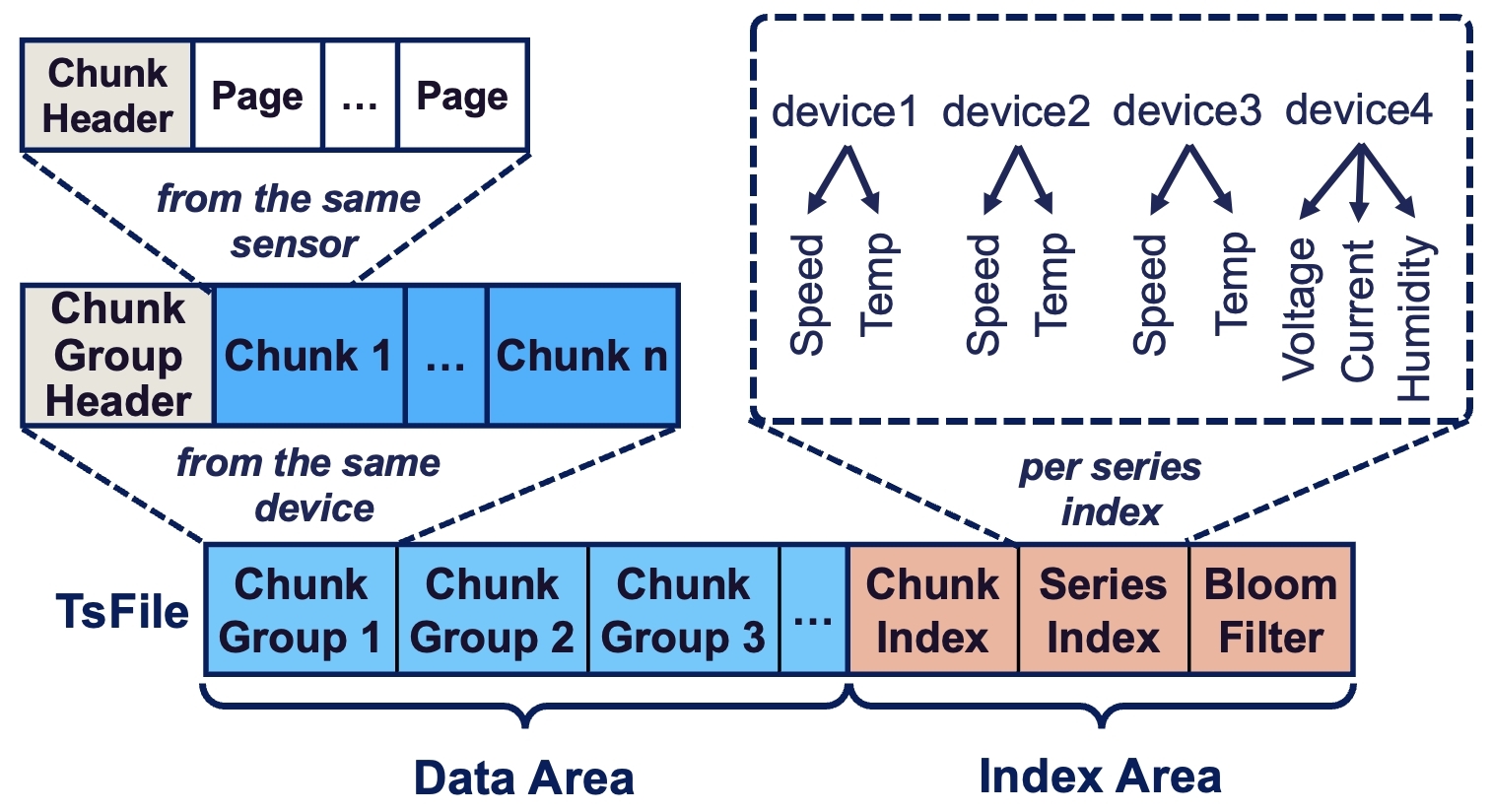
TsFile adopts a columnar storage design, similar to other file formats, primarily to optimize time-series data's storage efficiency and query performance. This design aligns with the nature of time series data, which often involves large volumes of similar data types recorded over time. However, TsFile was developed particularly with a structure of page, chunk, chunk group, and index:
Page: The basic unit for storing time series data, sorted by time in ascending order with separate columns for timestamps and values.
Chunk: Comprising metadata headers and several pages, each chunk belongs to one time series, with variable sizes allowing for different compression and encoding methods.
Chunk Group: Multiple chunks within a chunk group belong to one or multiple series of a device written in the same period, facilitating efficient query processing.
Index: The file metadata at the end of TsFile contains a chunk-level index and file-level statistics for efficient data access.
TsFile employs advanced encoding and compression techniques to optimize storage and access for time series data. It uses methods like run-length encoding (RLE), bit-packing, and Snappy for efficient compression, allowing separate encoding of timestamp and value columns for better data processing. Its unique encoding algorithms are designed specifically for the characteristics of time series data in IoT scenarios, focusing on regular time intervals and the correlation among series.
Its uniqueness lies in the encoding algorithm designed specifically for time series data characteristics, focusing on the correlation between time attributes and data.
The table below compares 3 file formats in different dimensions.
TsFile, CSV and Parquet in Comparison
| Dimension | TsFile | CSV | Parquet |
|---|---|---|---|
| Data Model | IoT | Plain | Nested |
| Write Mode | Tablet, Line | Line | Line |
| Compression | Yes | No | Yes |
| Read Mode | Query, Scan | Scan | Query |
| Index on Series | Yes | No | No |
| Index on Time | Yes | No | No |
Its development facilitates efficient data encoding, compression, and access, reflecting a deep understanding of industry needs, pioneering a path toward efficient, scalable, and flexible data analytics platforms.
| Data Type | Recommended Encoding | Recommended Compression |
|---|---|---|
| INT32 | TS_2DIFF | LZ4 |
| INT64 | TS_2DIFF | LZ4 |
| FLOAT | GORILLA | LZ4 |
| DOUBLE | GORILLA | LZ4 |
| BOOLEAN | RLE | LZ4 |
| TEXT | DICTIONARY | LZ4 |
more see Docs
Apache TsFile ships tsfile-cli, a single, pipe-friendly command-line tool for inspecting and importing .tsfile files directly from the shell. Read commands (ls, meta, schema, stats, count, head, cat, sample) print to stdout and diagnostics to stderr, so they compose with awk, jq, sort, and friends; the write command imports CSV into a new .tsfile. Output formats: csv, tsv, json (NDJSON), and table.
| Command | What it does |
|---|---|
ls | List the tables (table model) or devices (tree model), one name per line |
meta | File summary: data model, table/device/series counts, time range, and file size |
schema | Per-series data type, encoding, and compression |
stats | Per-series statistics: count, time range, min/max, first/last, and sum |
count | Per-series row counts plus a total — read from statistics, without scanning pages |
head | Print the first N rows (default 10; -n to change) |
cat | Stream every matching row |
sample | Take a reproducible reservoir sample of rows (-n, --seed) |
write | Import CSV into a new table-model .tsfile |
The metadata commands (ls, meta, schema, stats, count) answer most questions without decoding data pages, while head, cat, and sample read the actual rows.
tsfile-cli ls data.tsfile                          # list tables / devices
tsfile-cli meta data.tsfile                        # file overview (model, counts, time range, size)
tsfile-cli head -n 20 data.tsfile                  # first 20 rows
tsfile-cli cat -m temp -m humidity -f csv data.tsfile # stream selected columns as CSV

# import CSV into a new table-model .tsfile
printf 'time,id1,s1\n0,dev,0\n1,dev,10\n' \
  | tsfile-cli write --table t1 --tag id1 STRING --field s1 INT64 \
      --stdin -o out.tsfile
Platform support. Building
tsfile-clifrom source is currently supported on Linux and macOS only. Standalone, pre-built releases of the tool are planned for a later date.
tsfile-cli is built together with the C++ module, so building that module with Maven from the repository root includes it in the build output:
./mvnw clean package -P with-cpp
This produces the executable at cpp/target/build/bin/tsfile-cli, alongside the shared library it depends on, libtsfile, under cpp/target/build/lib/ (libtsfile.so on Linux, libtsfile.dylib on macOS). tsfile-cli loads libtsfile at runtime, so to use it the library must sit where the dynamic linker can find it — keep it under cpp/target/build/lib and put that directory on the library search path, or copy libtsfile next to the binary (or into a system library directory):
# Linux
export LD_LIBRARY_PATH=cpp/target/build/lib:$LD_LIBRARY_PATH
# macOS
export DYLD_LIBRARY_PATH=cpp/target/build/lib:$DYLD_LIBRARY_PATH

cpp/target/build/bin/tsfile-cli --version
cpp/target/build/bin/tsfile-cli --help
See cpp/tools/README.md for the full command and option reference.
For changes to the Apache TsFile website, open a pull request with the docs/dev branch as the base branch.