| # Apache OpenDAL™ Python Binding |
| |
| [](https://pypi.org/project/opendal/) |
| [](https://pypi.org/project/opendal/) |
| [](https://opendal.apache.org/docs/python/) |
| |
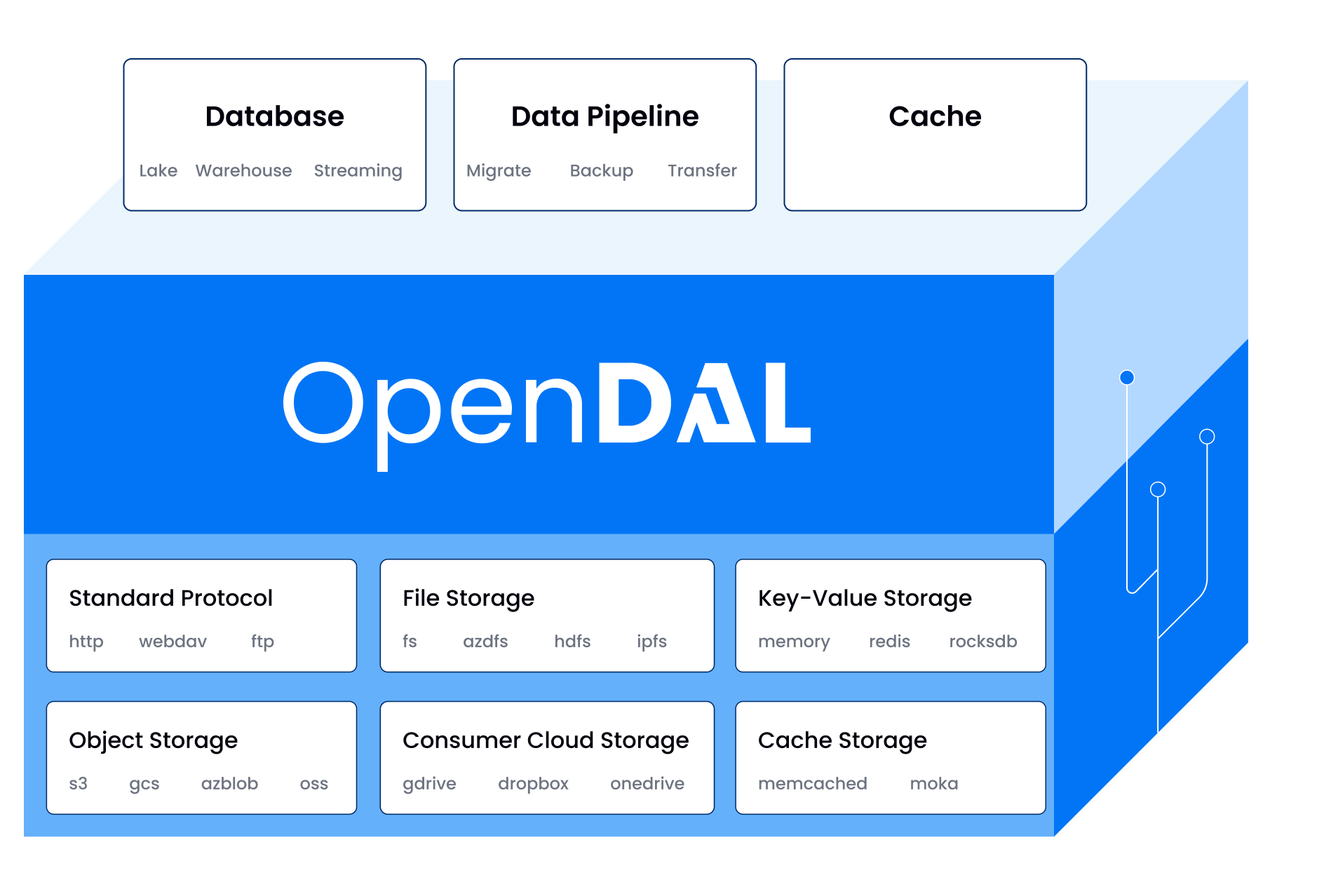
| This package provides a native Python binding for **Apache OpenDAL™**, a data access |
| layer that allows you to access various storage services in a unified way. |
| |
|  |
| |
| > **Note**: This binding has its own independent version number, which may differ from the Rust core version. When checking for updates or compatibility, always refer to this binding's version rather than the core version. |
| |
| ## Useful Links |
| |
| - [Documentation](https://opendal.apache.org/docs/python/) |
| - [Examples](./docs/examples) |
| - [Upgrade Guide](./upgrade.md) |
| |
| --- |
| |
| ## Features |
| |
| - **Unified API**: Access S3, GCS, Azure Blob, HDFS, FTP, and more with the same set of |
| commands. |
| - **Native Performance**: Built in Rust for high performance and safety. |
| - **Async Support**: First-class `async` API for modern Python applications. |
| - **Easy to Use**: Simple and intuitive API design. |
| |
| --- |
| |
| ## Installation |
| |
| Install the package directly from PyPI: |
| |
| ```bash |
| pip install opendal |
| ``` |
| |
| --- |
| |
| ## Usage |
| |
| Here are a few examples of how to use OpenDAL with different storage backends. |
| |
| ### Local Filesystem (`fs`) |
| |
| ```python |
| import opendal |
| |
| # Initialize the operator for the local filesystem |
| op = opendal.Operator("fs", root="/tmp") |
| |
| # Write data to a file |
| op.write("test.txt", b"Hello World") |
| |
| # Read data from the file |
| content = op.read("test.txt") |
| print(op.read("test.txt")) |
| |
| # Get metadata |
| metadata = op.stat("test.txt") |
| print(f"Content length: {metadata.content_length}") # Output: 11 |
| ``` |
| |
| ### Amazon S3 |
| |
| The API remains the same—just change the scheme and credentials. |
| |
| ```python |
| import opendal |
| |
| # Initialize the operator for S3 |
| op = opendal.Operator( |
| "s3", |
| bucket="your_bucket_name", |
| region="your_region", |
| root="/path/to/root" |
| ) |
| |
| op.write("test.txt", b"Hello World") |
| print(op.read("test.txt")) |
| print(op.stat("test.txt").content_length) |
| ``` |
| |
| ### Async Usage (`s3`) |
| |
| OpenDAL also provides a fully asynchronous API. |
| |
| ```python |
| import asyncio |
| import opendal |
| |
| async def main(): |
| # Use AsyncOperator for async operations |
| op = opendal.AsyncOperator("s3", root="/tmp", bucket="your_bucket_name", region="your_region") |
| |
| await op.write("test.txt", b"Hello World") |
| print(await op.read("test.txt")) |
| |
| asyncio.run(main()) |
| ``` |
| |
| --- |
| |
| ## Development |
| |
| This project uses [`just`](https://github.com/casey/just) as a command runner to |
| simplify the development workflow. |
| |
| 1. **Clone the repository and set up the environment:** |
| |
| ```shell |
| # This will create a virtual environment and install all dependencies |
| just setup |
| ``` |
| |
| 2. **Run tests:** |
| |
| ```shell |
| # Example: Run tests for the 'fs' operator |
| OPENDAL_TEST=fs OPENDAL_FS_ROOT=/tmp just test |
| ``` |
| |
| For a complete guide on building, testing, and contributing, please see our |
| **[CONTRIBUTING.md](./CONTRIBUTING.md)** file. |
| |
| --- |
| |
| ## Used By |
| |
| Check out the [users list](./users.md) for more details on who is using OpenDAL. |
| |
| ## License and Trademarks |
| |
| Licensed under the Apache License, Version 2.0: |
| http://www.apache.org/licenses/LICENSE-2.0 |
| |
| Apache OpenDAL, OpenDAL, and Apache are either registered trademarks or trademarks of |
| the Apache Software Foundation. |
