| <!-- |
| |
| Licensed to the Apache Software Foundation (ASF) under one |
| or more contributor license agreements. See the NOTICE file |
| distributed with this work for additional information |
| regarding copyright ownership. The ASF licenses this file |
| to you under the Apache License, Version 2.0 (the |
| "License"); you may not use this file except in compliance |
| with the License. You may obtain a copy of the License at |
| |
| http://www.apache.org/licenses/LICENSE-2.0 |
| |
| Unless required by applicable law or agreed to in writing, |
| software distributed under the License is distributed on an |
| "AS IS" BASIS, WITHOUT WARRANTIES OR CONDITIONS OF ANY |
| KIND, either express or implied. See the License for the |
| specific language governing permissions and limitations |
| under the License. |
| |
| --> |
| |
| ## 0.引入依赖 |
| |
| ```xml |
| <dependency> |
| <groupId>org.apache.iotdb</groupId> |
| <artifactId>influxdb-protocol</artifactId> |
| <version>1.0.0</version> |
| </dependency> |
| ``` |
| |
| 这里是一些使用 InfluxDB-Protocol 适配器连接 IoTDB 的[示例](https://github.com/apache/iotdb/tree/master/example/inflxudb-protocol-example/src/main/java/org/apache/iotdb/influxdb/InfluxDBExample.java) |
| |
| |
| ## 1.切换方案 |
| |
| 假如您原先接入 InfluxDB 的业务代码如下: |
| |
| ```java |
| InfluxDB influxDB = InfluxDBFactory.connect(openurl, username, password); |
| ``` |
| |
| 您只需要将 InfluxDBFactory 替换为 **IoTDBInfluxDBFactory** 即可实现业务向 IoTDB 的切换: |
| |
| ```java |
| InfluxDB influxDB = IoTDBInfluxDBFactory.connect(openurl, username, password); |
| ``` |
| |
| ## 2.方案设计 |
| |
| ### 2.1 InfluxDB-Protocol适配器 |
| |
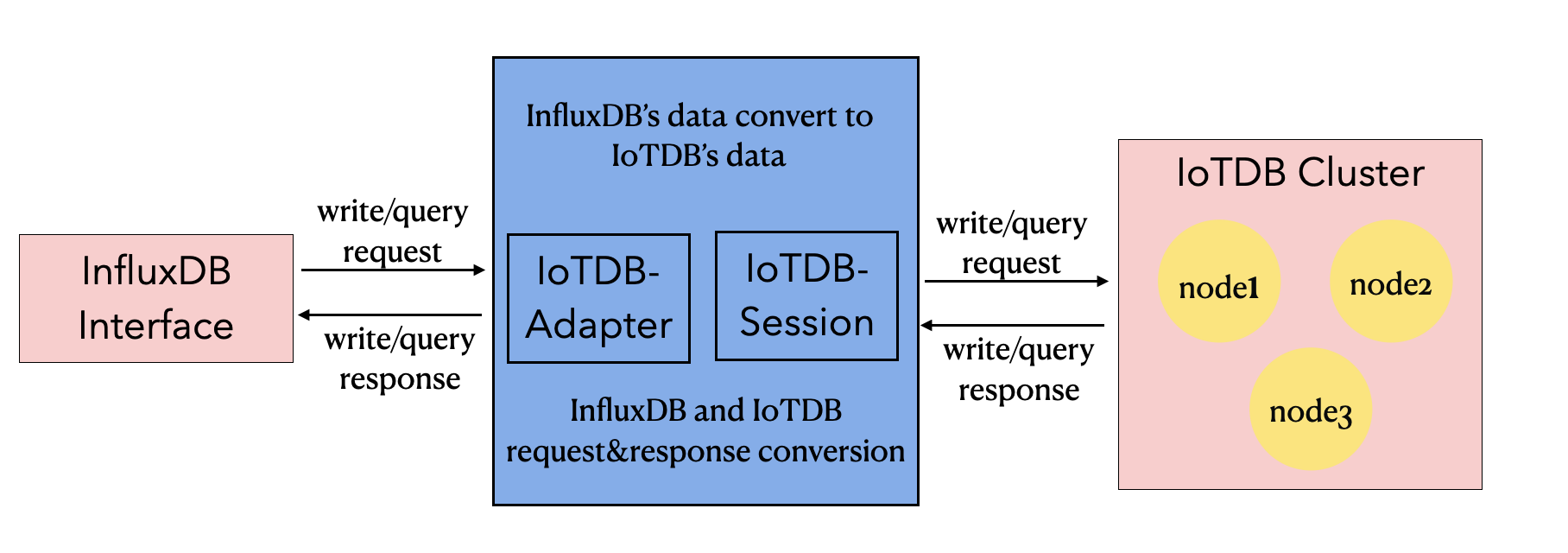
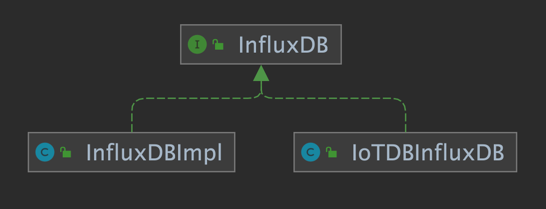
| 该适配器以 IoTDB Java ServiceProvider 接口为底层基础,实现了 InfluxDB 的 Java 接口 `interface InfluxDB`,对用户提供了所有 InfluxDB 的接口方法,最终用户可以无感知地使用 InfluxDB 协议向 IoTDB 发起写入和读取请求。 |
| |
|  |
| |
|  |
| |
| |
| ### 2.2 元数据格式转换 |
| |
| InfluxDB 的元数据是 tag-field 模型,IoTDB 的元数据是树形模型。为了使适配器能够兼容 InfluxDB 协议,需要把 InfluxDB 的元数据模型转换成 IoTDB 的元数据模型。 |
| |
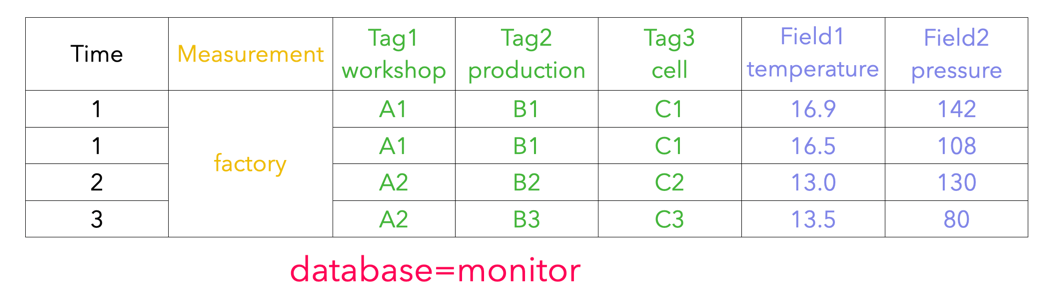
| #### 2.2.1 InfluxDB 元数据 |
| |
| 1. database: 数据库名。 |
| 2. measurement: 测量指标名。 |
| 3. tags : 各种有索引的属性。 |
| 4. fields : 各种记录值(没有索引的属性)。 |
| |
|  |
| |
| #### 2.2.2 IoTDB 元数据 |
| |
| 1. database: 数据库。 |
| 2. path(time series ID):存储路径。 |
| 3. measurement: 物理量。 |
| |
|  |
| |
| #### 2.2.3 两者映射关系 |
| |
| InfluxDB 元数据和 IoTDB 元数据有着如下的映射关系: |
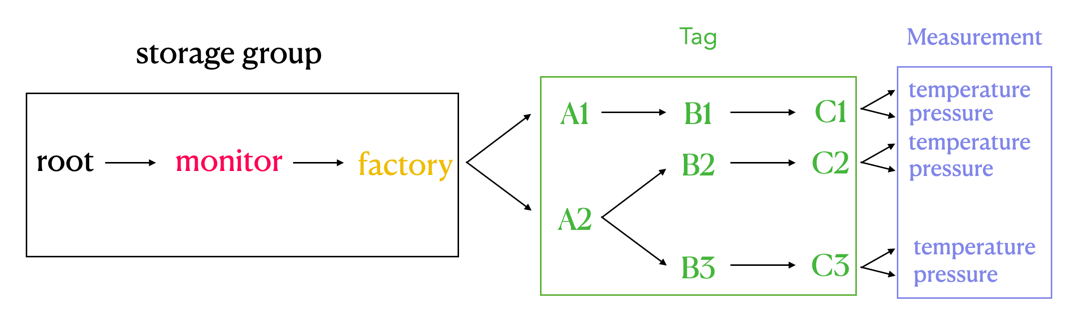
| 1. InfluxDB 中的 database 和 measurement 组合起来作为 IoTDB 中的 database。 |
| 2. InfluxDB 中的 field key 作为 IoTDB 中 measurement 路径,InfluxDB 中的 field value 即是该路径下记录的测点值。 |
| 3. InfluxDB 中的 tag 在 IoTDB 中使用 database 和 measurement 之间的路径表达。InfluxDB 的 tag key 由 database 和 measurement 之间路径的顺序隐式表达,tag value 记录为对应顺序的路径的名称。 |
| |
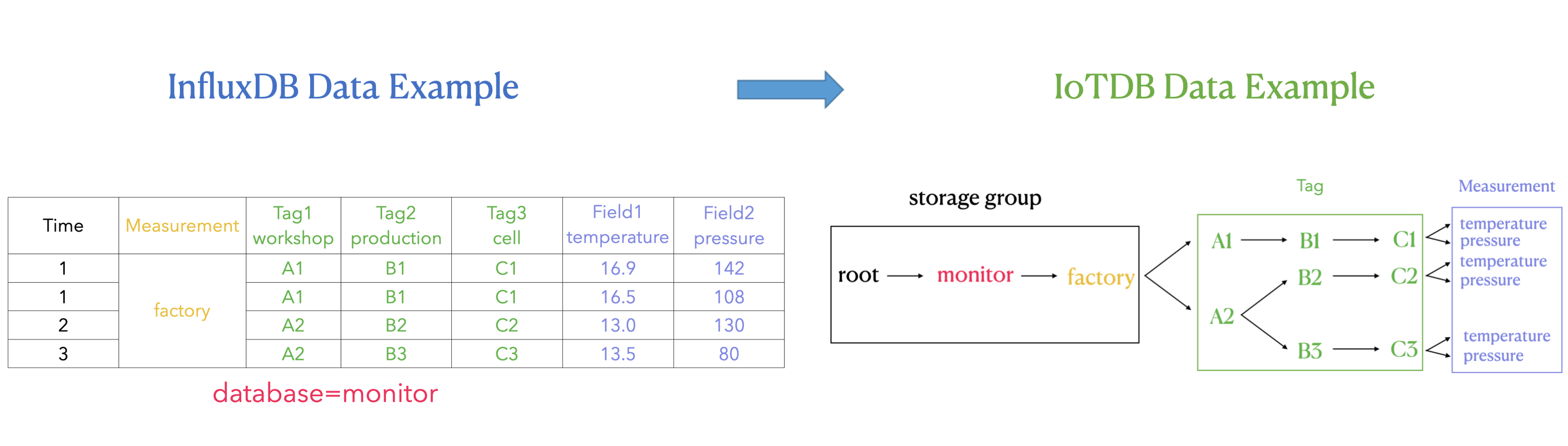
| InfluxDB 元数据向 IoTDB 元数据的转换关系可以由下面的公示表示: |
| |
| `root.{database}.{measurement}.{tag value 1}.{tag value 2}...{tag value N-1}.{tag value N}.{field key}` |
| |
|  |
| |
| 如上图所示,可以看出: |
| |
| 我们在 IoTDB 中使用 database 和 measurement 之间的路径来表达 InfluxDB tag 的概念,也就是图中右侧绿色方框的部分。 |
| |
| database 和 measurement 之间的每一层都代表一个 tag。如果 tag key 的数量为 N,那么 database 和 measurement 之间的路径的层数就是 N。我们对 database 和 measurement 之间的每一层进行顺序编号,每一个序号都和一个 tag key 一一对应。同时,我们使用 database 和 measurement 之间每一层 **路径的名字** 来记 tag value,tag key 可以通过自身的序号找到对应路径层级下的 tag value. |
| |
| #### 2.2.4 关键问题 |
| |
| 在 InfluxDB 的 SQL 语句中,tag 出现的顺序的不同并不会影响实际的执行结果。 |
| |
| 例如:`insert factory, workshop=A1, production=B1 temperature=16.9` 和 `insert factory, production=B1, workshop=A1 temperature=16.9` 两条 InfluxDB SQL 的含义(以及执行结果)相等。 |
| |
| 但在 IoTDB 中,上述插入的数据点可以存储在 `root.monitor.factory.A1.B1.temperature` 下,也可以存储在 `root.monitor.factory.B1.A1.temperature` 下。因此,IoTDB 路径中储存的 InfluxDB 的 tag 的顺序是需要被特别考虑的,因为 `root.monitor.factory.A1.B1.temperature` 和 |
| `root.monitor.factory.B1.A1.temperature` 是两条不同的序列。我们可以认为,IoTDB 元数据模型对 tag 顺序的处理是“敏感”的。 |
| |
| 基于上述的考虑,我们还需要在 IoTDB 中记录 InfluxDB 每个 tag 对应在 IoTDB 路径中的层级顺序,以确保在执行 InfluxDB SQL 时,不论 InfluxDB SQL 中 tag 出现的顺序如何,只要该 SQL 表达的是对同一个时间序列上的操作,那么适配器都可以唯一对应到 IoTDB 中的一条时间序列上进行操作。 |
| |
| 这里还需要考虑的另一个问题是:InfluxDB 的 tag key 及对应顺序关系应该如何持久化到 IoTDB 数据库中,以确保不会丢失相关信息。 |
| |
| **解决方案:** |
| |
| **tag key 对应顺序关系在内存中的形式** |
| |
| 通过利用内存中的`Map<Measurement, Map<Tag Key, Order>>` 这样一个 Map 结构,来维护 tag 在 IoTDB 路径层级上的顺序。 |
| |
| ``` java |
| Map<String, Map<String, Integer>> measurementTagOrder |
| ``` |
| |
| 可以看出 Map 是一个两层的结构。 |
| |
| 第一层的 Key 是 String 类型的 InfluxDB measurement,第一层的 Value 是一个 <String, Integer> 结构的 Map。 |
| |
| 第二层的 Key 是 String 类型的 InfluxDB tag key,第二层的 Value 是 Integer 类型的 tag order,也就是 tag 在 IoTDB 路径层级上的顺序。 |
| |
| 使用时,就可以先通过 InfluxDB measurement 定位,再通过 InfluxDB tag key 定位,最后就可以获得 tag 在 IoTDB 路径层级上的顺序了。 |
| |
| **tag key 对应顺序关系的持久化方案** |
| |
| Database 为`root.TAG_INFO`,分别用 database 下的 `database_name`, `measurement_name`, `tag_name` 和 `tag_order` 测点来存储 tag key及其对应的顺序关系。 |
| |
| ``` |
| +-----------------------------+---------------------------+------------------------------+----------------------+-----------------------+ |
| | Time|root.TAG_INFO.database_name|root.TAG_INFO.measurement_name|root.TAG_INFO.tag_name|root.TAG_INFO.tag_order| |
| +-----------------------------+---------------------------+------------------------------+----------------------+-----------------------+ |
| |2021-10-12T01:21:26.907+08:00| monitor| factory| workshop| 1| |
| |2021-10-12T01:21:27.310+08:00| monitor| factory| production| 2| |
| |2021-10-12T01:21:27.313+08:00| monitor| factory| cell| 3| |
| |2021-10-12T01:21:47.314+08:00| building| cpu| tempture| 1| |
| +-----------------------------+---------------------------+------------------------------+----------------------+-----------------------+ |
| ``` |
| |
| |
| |
| ### 2.3 实例 |
| |
| #### 2.3.1 插入数据 |
| |
| 1. 假定按照以下的顺序插入三条数据到 InfluxDB 中 (database=monitor): |
| |
| (1)`insert student,name=A,phone=B,sex=C score=99` |
| |
| (2)`insert student,address=D score=98` |
| |
| (3)`insert student,name=A,phone=B,sex=C,address=D score=97` |
| |
| 2. 简单对上述 InfluxDB 的时序进行解释,database 是 monitor; measurement 是student;tag 分别是 name,phone、sex 和 address;field 是 score。 |
| |
| 对应的InfluxDB的实际存储为: |
| |
| ``` |
| time address name phone sex socre |
| ---- ------- ---- ----- --- ----- |
| 1633971920128182000 A B C 99 |
| 1633971947112684000 D 98 |
| 1633971963011262000 D A B C 97 |
| ``` |
| |
| |
| 3. IoTDB顺序插入三条数据的过程如下: |
| |
| (1)插入第一条数据时,需要将新出现的三个 tag key 更新到 table 中,IoTDB 对应的记录 tag 顺序的 table 为: |
| |
| | database | measurement | tag_key | Order | |
| | -------- | ----------- | ------- | ----- | |
| | monitor | student | name | 0 | |
| | monitor | student | phone | 1 | |
| | monitor | student | sex | 2 | |
| |
| (2)插入第二条数据时,由于此时记录 tag 顺序的 table 中已经有了三个 tag key,因此需要将出现的第四个 tag key=address 更新记录。IoTDB 对应的记录 tag 顺序的 table 为: |
| |
| | database | measurement | tag_key | order | |
| | -------- | ----------- | ------- | ----- | |
| | monitor | student | name | 0 | |
| | monitor | student | phone | 1 | |
| | monitor | student | sex | 2 | |
| | monitor | student | address | 3 | |
| |
| (3)插入第三条数据时,此时四个 tag key 都已经记录过,所以不需要更新记录,IoTDB 对应的记录 tag 顺序的 table 为: |
| |
| | database | measurement | tag_key | order | |
| | -------- | ----------- | ------- | ----- | |
| | monitor | student | name | 0 | |
| | monitor | student | phone | 1 | |
| | monitor | student | sex | 2 | |
| | monitor | student | address | 3 | |
| |
| 4. (1)第一条插入数据对应 IoTDB 时序为 root.monitor.student.A.B.C |
| |
| (2)第二条插入数据对应 IoTDB 时序为 root.monitor.student.PH.PH.PH.D (其中PH表示占位符)。 |
| |
| 需要注意的是,由于该条数据的 tag key=address 是第四个出现的,但是自身却没有对应的前三个 tag 值,因此需要用 PH 占位符来代替。这样做的目的是保证每条数据中的 tag 顺序不会乱,是符合当前顺序表中的顺序,从而查询数据的时候可以进行指定 tag 过滤。 |
| |
| (3)第三条插入数据对应 IoTDB 时序为 root.monitor.student.A.B.C.D |
| |
| 对应的 IoTDB 的实际存储为: |
| |
| ``` |
| +-----------------------------+--------------------------------+-------------------------------------+----------------------------------+ |
| | Time|root.monitor.student.A.B.C.score|root.monitor.student.PH.PH.PH.D.score|root.monitor.student.A.B.C.D.score| |
| +-----------------------------+--------------------------------+-------------------------------------+----------------------------------+ |
| |2021-10-12T01:21:26.907+08:00| 99| NULL| NULL| |
| |2021-10-12T01:21:27.310+08:00| NULL| 98| NULL| |
| |2021-10-12T01:21:27.313+08:00| NULL| NULL| 97| |
| +-----------------------------+--------------------------------+-------------------------------------+----------------------------------+ |
| ``` |
| |
| 5. 如果上面三条数据插入的顺序不一样,我们可以看到对应的实际path路径也就发生了改变,因为InfluxDB数据中的Tag出现顺序发生了变化,所对应的到IoTDB中的path节点顺序也就发生了变化。 |
| |
| 但是这样实际并不会影响查询的正确性,因为一旦Influxdb的Tag顺序确定之后,查询也会按照这个顺序表记录的顺序进行Tag值过滤。所以并不会影响查询的正确性。 |
| |
| #### 2.3.2 查询数据 |
| |
| 1. 查询student中phone=B的数据。在database=monitor,measurement=student中tag=phone的顺序为1,order最大值是3,对应到IoTDB的查询为: |
| |
| ```sql |
| select * from root.monitor.student.*.B |
| ``` |
| |
| 2. 查询student中phone=B且score>97的数据,对应到IoTDB的查询为: |
| |
| ```sql |
| select * from root.monitor.student.*.B where score>97 |
| ``` |
| |
| 3. 查询student中phone=B且score>97且时间在最近七天内的的数据,对应到IoTDB的查询为: |
| |
| ```sql |
| select * from root.monitor.student.*.B where score>97 and time > now()-7d |
| ``` |
| |
| |
| 4. 查询student中name=A或score>97,由于tag存储在路径中,因此没有办法用一次查询同时完成tag和field的**或**语义查询,因此需要多次查询进行或运算求并集,对应到IoTDB的查询为: |
| |
| ```sql |
| select * from root.monitor.student.A |
| select * from root.monitor.student where score>97 |
| ``` |
| 最后手动对上面两次查询结果求并集。 |
| |
| 5. 查询student中(name=A或phone=B或sex=C)且score>97,由于tag存储在路径中,因此没有办法用一次查询完成tag的**或**语义, 因此需要多次查询进行或运算求并集,对应到IoTDB的查询为: |
| |
| ```sql |
| select * from root.monitor.student.A where score>97 |
| select * from root.monitor.student.*.B where score>97 |
| select * from root.monitor.student.*.*.C where score>97 |
| ``` |
| 最后手动对上面三次查询结果求并集。 |
| |
| ## 3 支持情况 |
| |
| ### 3.1 InfluxDB版本支持情况 |
| |
| 目前支持InfluxDB 1.x 版本,暂不支持InfluxDB 2.x 版本。 |
| |
| `influxdb-java`的maven依赖支持2.21+,低版本未进行测试。 |
| |
| ### 3.2 函数接口支持情况 |
| |
| 目前支持的接口函数如下: |
| |
| ```java |
| public Pong ping(); |
| |
| public String version(); |
| |
| public void flush(); |
| |
| public void close(); |
| |
| public InfluxDB setDatabase(final String database); |
| |
| public QueryResult query(final Query query); |
| |
| public void write(final Point point); |
| |
| public void write(final String records); |
| |
| public void write(final List<String> records); |
| |
| public void write(final String database,final String retentionPolicy,final Point point); |
| |
| public void write(final int udpPort,final Point point); |
| |
| public void write(final BatchPoints batchPoints); |
| |
| public void write(final String database,final String retentionPolicy, |
| final ConsistencyLevel consistency,final String records); |
| |
| public void write(final String database,final String retentionPolicy, |
| final ConsistencyLevel consistency,final TimeUnit precision,final String records); |
| |
| public void write(final String database,final String retentionPolicy, |
| final ConsistencyLevel consistency,final List<String> records); |
| |
| public void write(final String database,final String retentionPolicy, |
| final ConsistencyLevel consistency,final TimeUnit precision,final List<String> records); |
| |
| public void write(final int udpPort,final String records); |
| |
| public void write(final int udpPort,final List<String> records); |
| ``` |
| |
| ### 3.3 查询语法支持情况 |
| |
| 目前支持的查询sql语法为 |
| |
| ```sql |
| SELECT <field_key>[, <field_key>, <tag_key>] |
| FROM <measurement_name> |
| WHERE <conditional_expression > [( AND | OR) <conditional_expression > [...]] |
| ``` |
| |
| WHERE子句在`field`,`tag`和`timestamp`上支持`conditional_expressions`. |
| |
| #### field |
| |
| ```sql |
| field_key <operator> ['string' | boolean | float | integer] |
| ``` |
| |
| #### tag |
| |
| ```sql |
| tag_key <operator> ['tag_value'] |
| ``` |
| |
| #### timestamp |
| |
| ```sql |
| timestamp <operator> ['time'] |
| ``` |
| |
| 目前timestamp的过滤条件只支持now()有关表达式,如:now()-7D,具体的时间戳暂不支持。 |
