| <!-- |
| |
| Licensed to the Apache Software Foundation (ASF) under one |
| or more contributor license agreements. See the NOTICE file |
| distributed with this work for additional information |
| regarding copyright ownership. The ASF licenses this file |
| to you under the Apache License, Version 2.0 (the |
| "License"); you may not use this file except in compliance |
| with the License. You may obtain a copy of the License at |
| |
| http://www.apache.org/licenses/LICENSE-2.0 |
| |
| Unless required by applicable law or agreed to in writing, |
| software distributed under the License is distributed on an |
| "AS IS" BASIS, WITHOUT WARRANTIES OR CONDITIONS OF ANY |
| KIND, either express or implied. See the License for the |
| specific language governing permissions and limitations |
| under the License. |
| |
| --> |
| |
| Integration Testing |
| =================== |
| |
| All integration tests are in this module. |
| |
| Now integration testing supports three modes, the Local Standalone mode, the Cluster mode and the Remote mode. |
| |
| Integration Testing with Local Standalone Mode |
| ------------------- |
| |
| Integration testing with local standalone mode can be run with both maven and IDEs like IntelliJ. |
| |
| If you want to run all tests include UT and IT, the maven command is: |
| ``` |
| mvn clean verify -P '!testcontainer,!influxdb-protocol' |
| ``` |
| |
| Optionally, you can also only run IT, the maven command is: |
| ``` |
| mvn clean verify -Dsession.test.skip=true -Diotdb.test.skip=true -Dcluster.test.skip=true -Dtsfile.test.skip=true -pl integration -am |
| ``` |
| |
| ------- |
| And if you want to run IT in the IDE like IntelliJ, you need to achieve the effect as the `LocalStandalone` profile in maven. Follow Steps 1-4 to achieve it. |
| |
| - Step 1. Run(Menu) -> Edit Configurations... |
| .png?raw=true) |
| |
| |
| - Step 2. Add New Configuration -> JUnit |
| 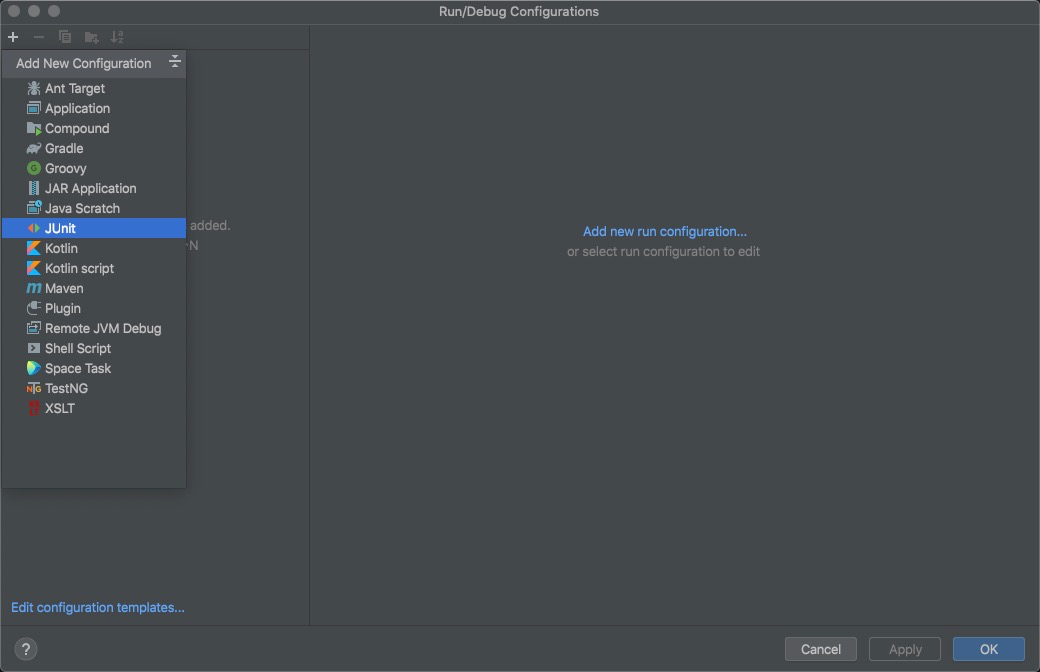 |
| |
| |
| - Step 3. Input some fields as the following picture |
| 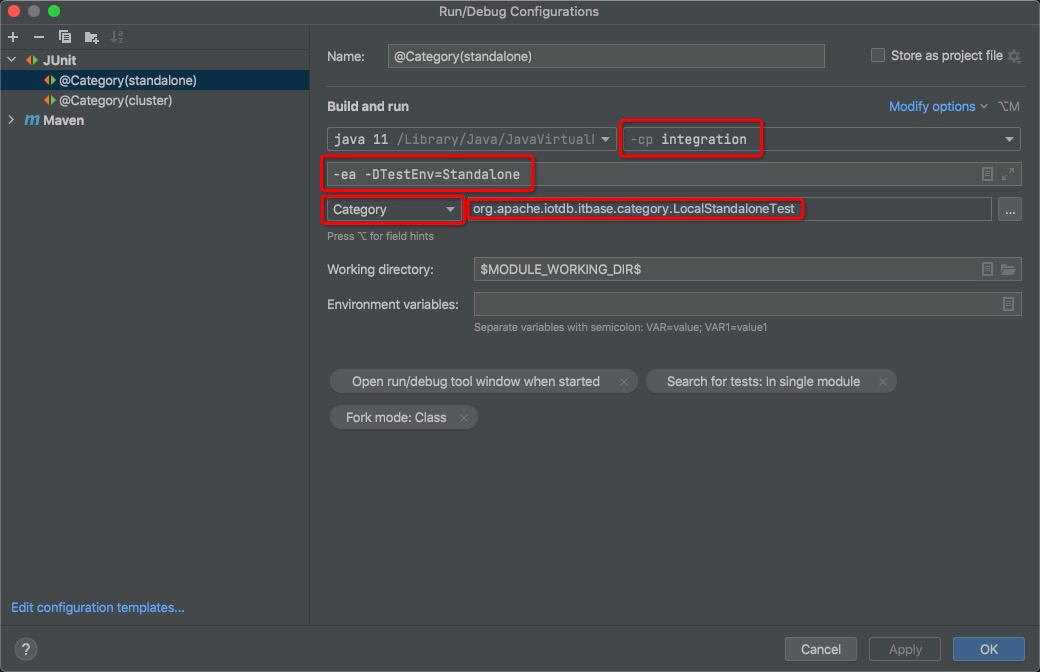 |
| |
| |
| - Step 4. Pay attention to the `Fork mode` in `Modify options`: you need to change `None` to `class` in `Fork mode` |
| 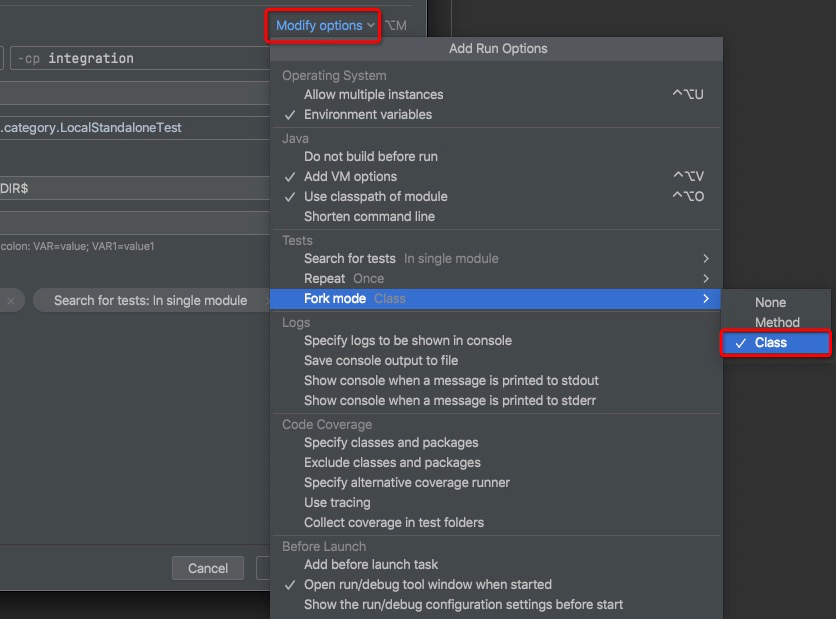 |
| |
| Integration Testing with Cluster Mode |
| ------------------- |
| |
| You can also run the integration test in cluster mode. At present, we have implemented a pseudo cluster with five nodes. |
| (As the test cases and the test environment are decoupled, we can easily implement a three-node cluster or even a docker-based cluster later.) |
| |
| The maven command is: |
| ``` |
| mvn clean verify -Dsession.test.skip=true -Diotdb.test.skip=true -Dcluster.test.skip=true -Dtsfile.test.skip=true -pl integration -am -PCluster |
| ``` |
| |
| ------- |
| |
| Run in IntelliJ in cluster mode is so easy as the Local Standalone Mode above, |
| - Step 0. Optionally, when you run the test for the first time, or when you change the code of the module that the integration test module depends on, you may need to use the following command to generate `integration/target/template-node` for nodes of the pseudo cluster. |
| ``` |
| mvn clean package -pl integration -am -DskipTests -PCluster |
| ``` |
| |
| |
| - Step 1. You can copy configuration and change some fields as the following picture, |
| 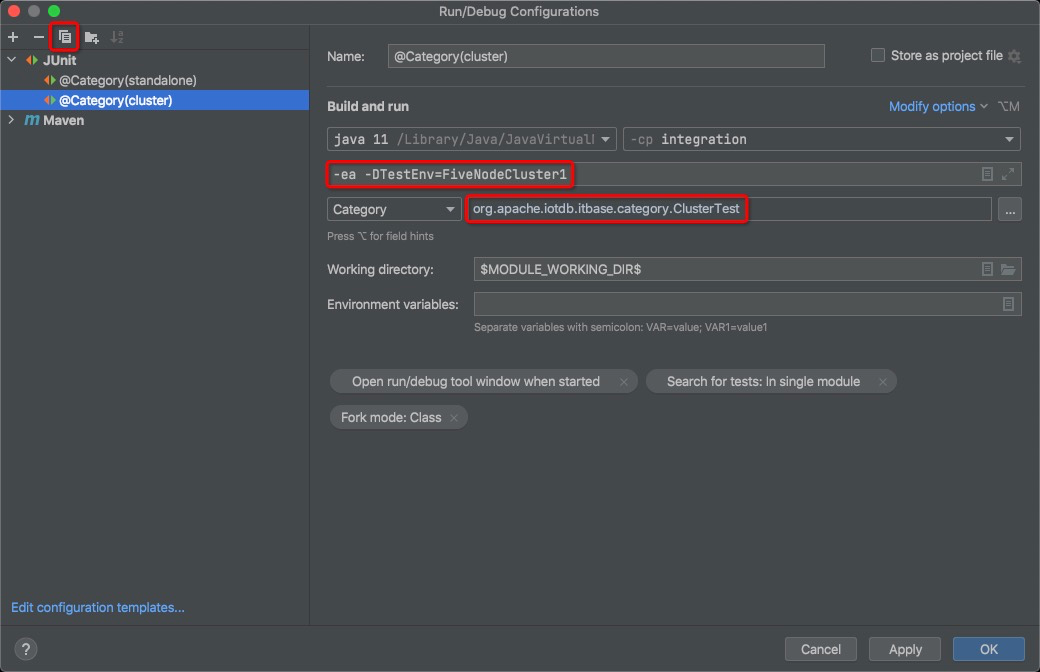 |
| |
| |
| Integration Testing with Remote Mode |
| ------------------- |
| |
| You can also run the integration test in remote mode. The remote server can be a standalone server or a server of a cluster. |
| |
| The maven command is: |
| ``` |
| mvn clean verify -pl integration -am -PRemote -DRemoteIp=127.0.0.1 -DRemotePort=6777 |
| ``` |
| |
| Writing a New Test |
| ------------------- |
| |
| ## What should we cover in integration tests |
| |
| For every end-user functionality provided by IoTDB, we should have an integration test verifying the correctness. |
| |
| ## Rules to be followed while writing a new integration test |
| |
| ### Every Integration Test must follow these rules: |
| |
| 1) The name of the test file must end with a suffix "IT" |
| 2) A test should be independent of other tests |
| 3) Tests are to be written in Junit style |
| 4) Put appropriate annotation `@Category` on the class or the test level |
| |
| ### About the annotation: |
| You can put the annotation `@Category({LocalStandaloneTest.class, ClusterTest.class, RemoteTest.class})` on the class or the test level. |
| And you can use these annotations individually or in combination. |
| |
| `LocalStandaloneTest.class` stands for you want your test run in the local standalone mode. |
| |
| `ClusterTest.class` stands for you want your test run in the cluster mode. |
| |
| `RemoteTest.class` stands for you want your test run in the remote mode. |
