监控告警
在 IoTDB 的运行过程中,我们希望对 IoTDB 的状态进行观测,以便于排查系统问题或者及时发现系统潜在的风险,能够**反映系统运行状态的一系列指标 **就是系统监控指标。
1. 什么场景下会使用到监控?
那么什么时候会用到监控框架呢?下面列举一些常见的场景。
系统变慢了
系统变慢几乎是最常见也最头疼的问题,这时候我们需要尽可能多的信息来帮助我们找到系统变慢的原因,比如:
- JVM信息:是不是有FGC?GC耗时多少?GC后内存有没有恢复?是不是有大量的线程?
- 系统信息:CPU使用率是不是太高了?磁盘IO是不是很频繁?
- 连接数:当前连接是不是太多?
- 接口:当前TPS是多少?各个接口耗时有没有变化?
- 线程池:系统中各种任务是否有积压?
- 缓存命中率
磁盘快满了
这时候我们迫切想知道最近一段时间数据文件的增长情况,看看是不是某种文件有突增。
系统运行是否正常
此时我们可能需要通过错误日志的数量、集群节点的状态等指标来判断系统是否在正常运行。
2. 什么人需要使用监控?
所有关注系统状态的人员都可以使用,包括但不限于研发、测试、运维、DBA等等
3. 什么是监控指标?
3.1. 监控指标名词解释
在 IoTDB 的监控模块,每个监控指标被 Metric Name 和 Tags 唯一标识。
Metric Name:指标类型名称,比如logback_events表示日志事件。Tags:指标分类,形式为Key-Value对,每个指标下面可以有0到多个分类,常见的Key-Value对:name = xxx:被监控对象的名称,是对业务逻辑的说明。比如对于Metric Name = entry_seconds_count类型的监控项,name的含义是指被监控的业务接口。type = xxx:监控指标类型细分,是对监控指标本身的说明。比如对于Metric Name = point类型的监控项,type的含义是指监控具体是什么类型的点数。status = xxx:被监控对象的状态,是对业务逻辑的说明。比如对于Metric Name = Task类型的监控项可以通过该参数,从而区分被监控对象的状态。user = xxx:被监控对象的相关用户,是对业务逻辑的说明。比如统计root用户的写入总点数。- 根据具体情况自定义:比如logback_events_total下有一个level的分类,用来表示特定级别下的日志数量。
Metric Level:指标管理级别,默认启动级别为Core级别,建议启动级别为Important级别,审核严格程度Core > Important > Normal > AllCore:系统的核心指标,供系统内核和运维人员使用,关乎系统的性能、稳定性、安全性,比如实例的状况,系统的负载等。Important:模块的重要指标,供运维和测试人员使用,直接关乎每个模块的运行状态,比如合并文件个数、执行情况等。Normal:模块的一般指标,供开发人员使用,方便在出现问题时定位模块,比如合并中的特定关键操作情况。All:模块的全部指标,供模块开发人员使用,往往在复现问题的时候使用,从而快速解决问题。
3.2. 监控指标对外获取数据格式
- IoTDB 对外提供 JMX、 Prometheus 和 IoTDB 格式的监控指标:
- 对于 JMX ,可以通过
org.apache.iotdb.metrics获取系统监控指标指标。 - 对于 Prometheus ,可以通过对外暴露的端口获取监控指标的值
- 对于 IoTDB 方式对外暴露:可以通过执行 IoTDB 的查询来获取监控指标
- 对于 JMX ,可以通过
4. 监控指标有哪些?
目前,IoTDB 对外提供一些主要模块的监控指标,并且随着新功能的开发以及系统优化或者重构,监控指标也会同步添加和更新。如果想自己在 IoTDB 中添加更多系统监控指标埋点,可以参考IoTDB Metrics Framework使用说明。
4.1. Core 级别监控指标
Core 级别的监控指标在系统运行中默认开启,每一个 Core 级别的监控指标的添加都需要经过谨慎的评估,目前 Core 级别的监控指标如下所述:
4.1.1. 集群运行状态
| Metric | Tags | Type | Description |
|---|---|---|---|
| config_node | name=“total”,status=“Registered/Online/Unknown” | AutoGauge | 已注册/在线/离线 confignode 的节点数量 |
| data_node | name=“total”,status=“Registered/Online/Unknown” | AutoGauge | 已注册/在线/离线 datanode 的节点数量 |
| cluster_node_leader_count | name=“{ip}:{port}” | Gauge | 节点上共识组Leader的数量 |
| cluster_node_status | name=“{ip}:{port}”,type=“ConfigNode/DataNode” | Gauge | 节点的状态,0=Unkonwn 1=online |
| entry | name=“{interface}” | Timer | Client 建立的 Thrift 的耗时情况 |
| mem | name=“IoTConsensus” | AutoGauge | IoT共识协议的内存占用,单位为byte |
4.1.2. 接口层统计
| Metric | Tags | Type | Description |
|---|---|---|---|
| thrift_connections | name=“ConfigNodeRPC” | AutoGauge | ConfigNode 的内部 Thrift 连接数 |
| thrift_connections | name=“InternalRPC” | AutoGauge | DataNode 的内部 Thrift 连接数 |
| thrift_connections | name=“MPPDataExchangeRPC” | AutoGauge | MPP 框架的内部 Thrift 连接数 |
| thrift_connections | name=“ClientRPC” | AutoGauge | Client 建立的 Thrift 连接数 |
| thrift_active_threads | name=“ConfigNodeRPC-Service” | AutoGauge | ConfigNode 的内部活跃 Thrift 连接数 |
| thrift_active_threads | name=“DataNodeInternalRPC-Service” | AutoGauge | DataNode 的内部活跃 Thrift 连接数 |
| thrift_active_threads | name=“MPPDataExchangeRPC-Service” | AutoGauge | MPP 框架的内部活跃 Thrift 连接数 |
| thrift_active_threads | name=“ClientRPC-Service” | AutoGauge | Client 建立的活跃 Thrift 连接数 |
| session_idle_time | name = “sessionId” | Histogram | 不同 Session 的空闲时间分布情况 |
4.1.3. 节点统计
| Metric | Tags | Type | Description |
|---|---|---|---|
| quantity | name=“database” | AutoGauge | 系统数据库数量 |
| quantity | name=“timeSeries” | AutoGauge | 系统时间序列数量 |
| quantity | name=“pointsIn” | Counter | 系统累计写入点数 |
| points | database=“{database}”, type=“flush” | Gauge | 最新一个刷盘的memtale的点数 |
4.1.4. 集群全链路
| Metric | Tags | Type | Description |
|---|---|---|---|
| performance_overview | interface=“{interface}”, type=“{statement_type}” | Timer | 客户端执行的操作的耗时情况 |
| performance_overview_detail | stage=“authority” | Timer | 权限认证总耗时 |
| performance_overview_detail | stage=“parser” | Timer | 解析构造总耗时 |
| performance_overview_detail | stage=“analyzer” | Timer | 语句分析总耗时 |
| performance_overview_detail | stage=“planner” | Timer | 请求规划总耗时 |
| performance_overview_detail | stage=“scheduler” | Timer | 请求执行总耗时 |
| performance_overview_schedule_detail | stage=“local_scheduler” | Timer | 本地请求执行总耗时 |
| performance_overview_schedule_detail | stage=“remote_scheduler” | Timer | 远程请求执行总耗时 |
| performance_overview_local_detail | stage=“schema_validate” | Timer | 元数据验证总耗时 |
| performance_overview_local_detail | stage=“trigger” | Timer | Trigger 触发总耗时 |
| performance_overview_local_detail | stage=“storage” | Timer | 共识层总耗时 |
| performance_overview_storage_detail | stage=“engine” | Timer | DataRegion 抢锁总耗时 |
| performance_overview_engine_detail | stage=“lock” | Timer | DataRegion 抢锁总耗时 |
| performance_overview_engine_detail | stage=“create_memtable_block” | Timer | 创建新的 Memtable 耗时 |
| performance_overview_engine_detail | stage=“memory_block” | Timer | 内存控制阻塞总耗时 |
| performance_overview_engine_detail | stage=“wal” | Timer | 写入 Wal 总耗时 |
| performance_overview_engine_detail | stage=“memtable” | Timer | 写入 Memtable 总耗时 |
| performance_overview_engine_detail | stage=“last_cache” | Timer | 更新 LastCache 总耗时 |
4.1.5. 任务统计
| Metric | Tags | Type | Description |
|---|---|---|---|
| queue | name=“compaction_inner”, status=“running/waiting” | Gauge | 空间内合并任务数 |
| queue | name=“compaction_cross”, status=“running/waiting” | Gauge | 跨空间合并任务数 |
| queue | name=“flush”,status=“running/waiting” | AutoGauge | 刷盘任务数 |
| cost_task | name=“inner_compaction/cross_compaction/flush” | Gauge | 任务耗时情况 |
4.1.6. IoTDB 进程运行状态
| Metric | Tags | Type | Description |
|---|---|---|---|
| process_cpu_load | name=“process” | AutoGauge | IoTDB 进程的 CPU 占用率,单位为% |
| process_cpu_time | name=“process” | AutoGauge | IoTDB 进程占用的 CPU 时间,单位为ns |
| process_max_mem | name=“memory” | AutoGauge | IoTDB 进程最大可用内存 |
| process_total_mem | name=“memory” | AutoGauge | IoTDB 进程当前已申请内存 |
| process_free_mem | name=“memory” | AutoGauge | IoTDB 进程当前剩余可用内存 |
4.1.7. 系统运行状态
| Metric | Tags | Type | Description |
|---|---|---|---|
| sys_cpu_load | name=“system” | AutoGauge | 系统的 CPU 占用率,单位为% |
| sys_cpu_cores | name=“system” | Gauge | 系统的可用处理器数 |
| sys_total_physical_memory_size | name=“memory” | Gauge | 系统的最大物理内存 |
| sys_free_physical_memory_size | name=“memory” | AutoGauge | 系统的剩余可用内存 |
| sys_total_swap_space_size | name=“memory” | AutoGauge | 系统的交换区最大空间 |
| sys_free_swap_space_size | name=“memory” | AutoGauge | 系统的交换区剩余可用空间 |
| sys_committed_vm_size | name=“memory” | AutoGauge | 系统保证可用于正在运行的进程的虚拟内存量 |
| sys_disk_total_space | name=“disk” | AutoGauge | 系统磁盘总大小 |
| sys_disk_free_space | name=“disk” | AutoGauge | 系统磁盘可用大小 |
4.1.8. IoTDB 日志统计
| Metric | Tags | Type | Description |
|---|---|---|---|
| logback_events | level=“trace/debug/info/warn/error” | Counter | 不同类型的日志个数 |
4.1.9. 文件统计信息
| Metric | Tags | Type | Description |
|---|---|---|---|
| file_size | name=“wal” | AutoGauge | 写前日志总大小,单位为byte |
| file_size | name=“seq” | AutoGauge | 顺序TsFile总大小,单位为byte |
| file_size | name=“unseq” | AutoGauge | 乱序TsFile总大小,单位为byte |
| file_size | name=“inner-seq-temp” | AutoGauge | 顺序空间内合并临时文件大小,单位为byte |
| file_size | name=“inner-unseq-temp” | AutoGauge | 乱序空间内合并临时文件大小,单位为byte |
| file_size | name=“cross-temp” | AutoGauge | 跨空间合并临时文件大小,单位为byte |
| file_size | name=“mods” | AutoGauge | Modification 文件的大小 |
| file_count | name=“wal” | AutoGauge | 写前日志文件个数 |
| file_count | name=“seq” | AutoGauge | 顺序TsFile文件个数 |
| file_count | name=“unseq” | AutoGauge | 乱序TsFile文件个数 |
| file_count | name=“inner-seq-temp” | AutoGauge | 顺序空间内合并临时文件个数 |
| file_count | name=“inner-unseq-temp” | AutoGauge | 乱序空间内合并临时文件个数 |
| file_count | name=“cross-temp” | AutoGauge | 跨空间合并临时文件个数 |
| file_count | name=“open_file_handlers” | AutoGauge | IoTDB 进程打开文件数,仅支持Linux和MacOS |
| file_count | name="mods | AutoGauge | Modification 文件的数目 |
4.1.10. JVM 内存统计
| Metric | Tags | Type | Description |
|---|---|---|---|
| jvm_buffer_memory_used_bytes | id=“direct/mapped” | AutoGauge | 已经使用的缓冲区大小 |
| jvm_buffer_total_capacity_bytes | id=“direct/mapped” | AutoGauge | 最大缓冲区大小 |
| jvm_buffer_count_buffers | id=“direct/mapped” | AutoGauge | 当前缓冲区数量 |
| jvm_memory_committed_bytes | {area=“heap/nonheap”,id=“xxx”,} | AutoGauge | 当前申请的内存大小 |
| jvm_memory_max_bytes | {area=“heap/nonheap”,id=“xxx”,} | AutoGauge | 最大内存 |
| jvm_memory_used_bytes | {area=“heap/nonheap”,id=“xxx”,} | AutoGauge | 已使用内存大小 |
4.1.11. JVM 线程统计
| Metric | Tags | Type | Description |
|---|---|---|---|
| jvm_threads_live_threads | AutoGauge | 当前线程数 | |
| jvm_threads_daemon_threads | AutoGauge | 当前 Daemon 线程数 | |
| jvm_threads_peak_threads | AutoGauge | 峰值线程数 | |
| jvm_threads_states_threads | state=“runnable/blocked/waiting/timed-waiting/new/terminated” | AutoGauge | 当前处于各种状态的线程数 |
4.1.12. JVM GC 统计
| Metric | Tags | Type | Description |
|---|---|---|---|
| jvm_gc_pause | action=“end of major GC/end of minor GC”,cause=“xxxx” | Timer | 不同原因的Young GC/Full GC的次数与耗时 |
| jvm_gc_concurrent_phase_time | action=“{action}”,cause=“{cause}” | Timer | 不同原因的Young GC/Full GC的次数与耗时 |
| jvm_gc_max_data_size_bytes | AutoGauge | 老年代内存的历史最大值 | |
| jvm_gc_live_data_size_bytes | AutoGauge | 老年代内存的使用值 | |
| jvm_gc_memory_promoted_bytes | Counter | 老年代内存正向增长累计值 | |
| jvm_gc_memory_allocated_bytes | Counter | GC分配内存正向增长累计值 |
4.2. Important 级别监控指标
目前 Important 级别的监控指标如下所述:
4.2.1. 节点统计
| Metric | Tags | Type | Description |
|---|---|---|---|
| region | name=“total”,type=“SchemaRegion” | AutoGauge | 分区表中 SchemaRegion 总数量 |
| region | name=“total”,type=“DataRegion” | AutoGauge | 分区表中 DataRegion 总数量 |
| region | name=“{ip}:{port}”,type=“SchemaRegion” | Gauge | 分区表中对应节点上 DataRegion 总数量 |
| region | name=“{ip}:{port}”,type=“DataRegion” | Gauge | 分区表中对应节点上 DataRegion 总数量 |
4.2.2. Ratis共识协议统计
| Metric | Tags | Type | Description |
|---|---|---|---|
| ratis_consensus_write | stage=“writeLocally” | Timer | 本地写入阶段的时间 |
| ratis_consensus_write | stage=“writeRemotely” | Timer | 远程写入阶段的时间 |
| ratis_consensus_write | stage=“writeStateMachine” | Timer | 写入状态机阶段的时间 |
| ratis_server | clientWriteRequest | Timer | 处理来自客户端写请求的时间 |
| ratis_server | followerAppendEntryLatency | Timer | 跟随者追加日志条目的总时间 |
| ratis_log_worker | appendEntryLatency | Timer | 领导者追加日志条目的总时间 |
| ratis_log_worker | queueingDelay | Timer | 一个 Raft 日志操作被请求后进入队列的时间,等待队列未满 |
| ratis_log_worker | enqueuedTime | Timer | 一个 Raft 日志操作在队列中的时间 |
| ratis_log_worker | writelogExecutionTime | Timer | 一个 Raft 日志写入操作完成执行的时间 |
| ratis_log_worker | flushTime | Timer | 刷新日志的时间 |
| ratis_log_worker | closedSegmentsSizeInBytes | Gauge | 关闭的 Raft 日志段的总大小 |
| ratis_log_worker | openSegmentSizeInBytes | Gauge | 打开的 Raft 日志段的总大小 |
4.2.3. IoT共识协议统计
| Metric | Tags | Type | Description |
|---|---|---|---|
| iot_consensus | name=“logDispatcher-{IP}:{Port}”, region=“{region}”, type=“currentSyncIndex” | AutoGauge | 副本组同步线程的当前同步进度 |
| iot_consensus | name=“logDispatcher-{IP}:{Port}”, region=“{region}”, type=“cachedRequestInMemoryQueue” | AutoGauge | 副本组同步线程缓存队列请求总大小 |
| iot_consensus | name=“IoTConsensusServerImpl”, region=“{region}”, type=“searchIndex” | AutoGauge | 副本组主流程写入进度 |
| iot_consensus | name=“IoTConsensusServerImpl”, region=“{region}”, type=“safeIndex” | AutoGauge | 副本组同步进度 |
| iot_consensus | name=“IoTConsensusServerImpl”, region=“{region}”, type=“syncLag” | AutoGauge | 副本组写入进度与同步进度差 |
| iot_consensus | name=“IoTConsensusServerImpl”, region=“{region}”, type=“LogEntriesFromWAL” | AutoGauge | 副本组Batch中来自WAL的日志项数量 |
| iot_consensus | name=“IoTConsensusServerImpl”, region=“{region}”, type=“LogEntriesFromQueue” | AutoGauge | 副本组Batch中来自队列的日志项数量 |
| stage | name=“iot_consensus”, region=“{region}”, type=“getStateMachineLock” | Histogram | 主流程获取状态机锁耗时 |
| stage | name=“iot_consensus”, region=“{region}”, type=“checkingBeforeWrite” | Histogram | 主流程写入状态机检查耗时 |
| stage | name=“iot_consensus”, region=“{region}”, type=“writeStateMachine” | Histogram | 主流程写入状态机耗时 |
| stage | name=“iot_consensus”, region=“{region}”, type=“offerRequestToQueue” | Histogram | 主流程尝试添加队列耗时 |
| stage | name=“iot_consensus”, region=“{region}”, type=“consensusWrite” | Histogram | 主流程全写入耗时 |
| stage | name=“iot_consensus”, region=“{region}”, type=“constructBatch” | Histogram | 同步线程构造 Batch 耗时 |
| stage | name=“iot_consensus”, region=“{region}”, type=“syncLogTimePerRequest” | Histogram | 异步回调流程同步日志耗时 |
4.2.4. 缓存统计
| Metric | Tags | Type | Description |
|---|---|---|---|
| cache_hit | name=“chunk” | AutoGauge | ChunkCache的命中率,单位为% |
| cache_hit | name=“schema” | AutoGauge | SchemaCache的命中率,单位为% |
| cache_hit | name=“timeSeriesMeta” | AutoGauge | TimeseriesMetadataCache的命中率,单位为% |
| cache_hit | name=“bloomFilter” | AutoGauge | TimeseriesMetadataCache中的bloomFilter的拦截率,单位为% |
| cache | name=“Database”, type=“hit” | Counter | Database Cache 的命中次数 |
| cache | name=“Database”, type=“all” | Counter | Database Cache 的访问次数 |
| cache | name=“SchemaPartition”, type=“hit” | Counter | SchemaPartition Cache 的命中次数 |
| cache | name=“SchemaPartition”, type=“all” | Counter | SchemaPartition Cache 的访问次数 |
| cache | name=“DataPartition”, type=“hit” | Counter | DataPartition Cache 的命中次数 |
| cache | name=“DataPartition”, type=“all” | Counter | DataPartition Cache 的访问次数 |
4.2.5. 内存统计
| Metric | Tags | Type | Description |
|---|---|---|---|
| mem | name=“database_{name}” | AutoGauge | DataNode内对应DataRegion的内存占用,单位为byte |
| mem | name=“chunkMetaData_{name}” | AutoGauge | 写入TsFile时的ChunkMetaData的内存占用,单位为byte |
| mem | name=“IoTConsensus” | AutoGauge | IoT共识协议的内存占用,单位为byte |
| mem | name=“IoTConsensusQueue” | AutoGauge | IoT共识协议用于队列的内存占用,单位为byte |
| mem | name=“IoTConsensusSync” | AutoGauge | IoT共识协议用于同步的内存占用,单位为byte |
| mem | name=“schema_region_total_usage” | AutoGauge | 所有SchemaRegion的总内存占用,单位为byte |
4.2.6. 合并统计
| Metric | Tags | Type | Description |
|---|---|---|---|
| data_written | name=“compaction”, type=“aligned/not-aligned/total” | Counter | 合并时写入量 |
| data_read | name=“compaction” | Counter | 合并时的读取量 |
| compaction_task_count | name = “inner_compaction”, type=“sequence” | Counter | 顺序空间内合并次数 |
| compaction_task_count | name = “inner_compaction”, type=“unsequence” | Counter | 乱序空间内合并次数 |
| compaction_task_count | name = “cross_compaction”, type=“cross” | Counter | 跨空间合并次数 |
4.2.7. IoTDB 进程统计
| Metric | Tags | Type | Description |
|---|---|---|---|
| process_used_mem | name=“memory” | AutoGauge | IoTDB 进程当前使用内存 |
| process_mem_ratio | name=“memory” | AutoGauge | IoTDB 进程的内存占用比例 |
| process_threads_count | name=“process” | AutoGauge | IoTDB 进程当前线程数 |
| process_status | name=“process” | AutoGauge | IoTDB 进程存活状态,1为存活,0为终止 |
4.2.8. JVM 类加载统计
| Metric | Tags | Type | Description |
|---|---|---|---|
| jvm_classes_unloaded_classes | AutoGauge | 累计卸载的class数量 | |
| jvm_classes_loaded_classes | AutoGauge | 累计加载的class数量 |
4.2.9. JVM 编译时间统计
| Metric | Tags | Type | Description |
|---|---|---|---|
| jvm_compilation_time_ms | {compiler=“HotSpot 64-Bit Tiered Compilers”,} | AutoGauge | 耗费在编译上的时间 |
4.2.10. 查询规划耗时统计
| Metric | Tags | Type | Description |
|---|---|---|---|
| query_plan_cost | stage=“analyzer” | Timer | 查询语句分析耗时 |
| query_plan_cost | stage=“logical_planner” | Timer | 查询逻辑计划规划耗时 |
| query_plan_cost | stage=“distribution_planner” | Timer | 查询分布式执行计划规划耗时 |
| query_plan_cost | stage=“partition_fetcher” | Timer | 分区信息拉取耗时 |
| query_plan_cost | stage=“schema_fetcher” | Timer | 元数据信息拉取耗时 |
4.2.11. 执行计划分发耗时统计
| Metric | Tags | Type | Description |
|---|---|---|---|
| dispatcher | stage=“wait_for_dispatch” | Timer | 分发执行计划耗时 |
| dispatcher | stage=“dispatch_read” | Timer | 查询执行计划发送耗时 |
4.2.12. 查询资源访问统计
| Metric | Tags | Type | Description |
|---|---|---|---|
| query_resource | type=“sequence_tsfile” | Rate | 顺序文件访问频率 |
| query_resource | type=“unsequence_tsfile” | Rate | 乱序文件访问频率 |
| query_resource | type=“flushing_memtable” | Rate | flushing memtable 访问频率 |
| query_resource | type=“working_memtable” | Rate | working memtable 访问频率 |
4.2.13. 数据传输模块统计
| Metric | Tags | Type | Description |
|---|---|---|---|
| data_exchange_cost | operation=“source_handle_get_tsblock”, type=“local/remote” | Timer | source handle 接收 TsBlock 耗时 |
| data_exchange_cost | operation=“source_handle_deserialize_tsblock”, type=“local/remote” | Timer | source handle 反序列化 TsBlock 耗时 |
| data_exchange_cost | operation=“sink_handle_send_tsblock”, type=“local/remote” | Timer | sink handle 发送 TsBlock 耗时 |
| data_exchange_cost | operation=“send_new_data_block_event_task”, type=“server/caller” | Timer | sink handle 发送 TsBlock RPC 耗时 |
| data_exchange_cost | operation=“get_data_block_task”, type=“server/caller” | Timer | source handle 接收 TsBlock RPC 耗时 |
| data_exchange_cost | operation=“on_acknowledge_data_block_event_task”, type=“server/caller” | Timer | source handle 确认接收 TsBlock RPC 耗时 |
| data_exchange_count | name=“send_new_data_block_num”, type=“server/caller” | Histogram | sink handle 发送 TsBlock数量 |
| data_exchange_count | name=“get_data_block_num”, type=“server/caller” | Histogram | source handle 接收 TsBlock 数量 |
| data_exchange_count | name=“on_acknowledge_data_block_num”, type=“server/caller” | Histogram | source handle 确认接收 TsBlock 数量 |
4.2.14. 查询任务调度统计
| Metric | Tags | Type | Description |
|---|---|---|---|
| driver_scheduler | name=“ready_queued_time” | Timer | 就绪队列排队时间 |
| driver_scheduler | name=“block_queued_time” | Timer | 阻塞队列排队时间 |
| driver_scheduler | name=“ready_queue_task_count” | AutoGauge | 就绪队列排队任务数 |
| driver_scheduler | name=“block_queued_task_count” | AutoGauge | 阻塞队列排队任务数 |
4.2.15. 查询执行耗时统计
| Metric | Tags | Type | Description |
|---|---|---|---|
| query_execution | stage=“local_execution_planner” | Timer | 算子树构造耗时 |
| query_execution | stage=“query_resource_init” | Timer | 查询资源初始化耗时 |
| query_execution | stage=“get_query_resource_from_mem” | Timer | 查询资源内存查询与构造耗时 |
| query_execution | stage=“driver_internal_process” | Timer | Driver 执行耗时 |
| query_execution | stage=“wait_for_result” | Timer | 从resultHandle 获取一次查询结果的耗时 |
| operator_execution_cost | name=“{operator_name}” | Timer | 算子执行耗时 |
| operator_execution_count | name=“{operator_name}” | Counter | 算子调用次数(以 next 方法调用次数计算) |
| aggregation | from=“raw_data” | Timer | 从一批原始数据进行一次聚合计算的耗时 |
| aggregation | from=“statistics” | Timer | 使用统计信息更新一次聚合值的耗时 |
| series_scan_cost | stage=“load_timeseries_metadata”, type=“aligned/non_aligned”, from=“mem/disk” | Timer | 加载 TimeseriesMetadata 耗时 |
| series_scan_cost | stage=“read_timeseries_metadata”, type="", from=“cache/file” | Timer | 读取一个文件的 Metadata 耗时 |
| series_scan_cost | stage=“timeseries_metadata_modification”, type=“aligned/non_aligned”, from=“null” | Timer | 过滤删除的 TimeseriesMetadata 耗时 |
| series_scan_cost | stage=“load_chunk_metadata_list”, type=“aligned/non_aligned”, from=“mem/disk” | Timer | 加载 ChunkMetadata 列表耗时 |
| series_scan_cost | stage=“chunk_metadata_modification”, type=“aligned/non_aligned”, from=“mem/disk” | Timer | 过滤删除的 ChunkMetadata 耗时 |
| series_scan_cost | stage=“chunk_metadata_filter”, type=“aligned/non_aligned”, from=“mem/disk” | Timer | 根据查询过滤条件过滤 ChunkMetadata 耗时 |
| series_scan_cost | stage=“construct_chunk_reader”, type=“aligned/non_aligned”, from=“mem/disk” | Timer | 构造 ChunkReader 耗时 |
| series_scan_cost | stage=“read_chunk”, type="", from=“cache/file” | Timer | 读取 Chunk 的耗时 |
| series_scan_cost | stage=“init_chunk_reader”, type=“aligned/non_aligned”, from=“mem/disk” | Timer | 初始化 ChunkReader(构造 PageReader) 耗时 |
| series_scan_cost | stage=“build_tsblock_from_page_reader”, type=“aligned/non_aligned”, from=“mem/disk” | Timer | 从 PageReader 构造 Tsblock 耗时 |
| series_scan_cost | stage=“build_tsblock_from_merge_reader”, type=“aligned/non_aligned”, from=“null” | Timer | 从 MergeReader 构造 Tsblock (解乱序数据)耗时 |
4.2.16 元数据引擎统计
| Metric | Tags | Type | Description |
|---|---|---|---|
| schema_engine | name=“schema_region_total_mem_usage” | AutoGauge | SchemaRegion 全局内存使用量 |
| schema_engine | name=“schema_region_mem_capacity” | AutoGauge | SchemaRegion 全局可用内存 |
| schema_engine | name=“schema_engine_mode” | Gauge | SchemaEngine 模式 |
| schema_engine | name=“schema_region_consensus” | Gauge | 元数据管理引擎共识协议 |
| schema_engine | name=“schema_region_number” | AutoGauge | SchemaRegion 个数 |
| quantity | name=“template_series_cnt” | AutoGauge | 模板序列数 |
| schema_region | name=“schema_region_mem_usage”, region=“SchemaRegion[{regionId}]” | AutoGauge | 每个 SchemaRegion 分别的内存使用量 |
| schema_region | name=“schema_region_series_cnt”, region=“SchemaRegion[{regionId}]” | AutoGauge | 每个 SchemaRegion 分别的时间序列数 |
| schema_region | name=“activated_template_cnt”, region=“SchemaRegion[{regionId}]” | AutoGauge | 每个 SchemaRegion 激活的模板数 |
| schema_region | name=“template_series_cnt”, region=“SchemaRegion[{regionId}]” | AutoGauge | 每个 SchemaRegion 的模板序列数 |
4.2.17 写入指标统计
| Metric | Tags | Type | Description |
|---|---|---|---|
| wal_node_num | name=“wal_nodes_num” | AutoGauge | WALNode数量 |
| wal_cost | stage=“make_checkpoint” type=“<checkpoint_type>” | Timer | 创建各种类型的Checkpoint耗时 |
| wal_cost | type=“serialize_one_wal_info_entry” | Timer | 对每个WALInfoEntry serialize耗时 |
| wal_cost | stage=“sync_wal_buffer” type=“<force_flag>” | Timer | WAL flush SyncBuffer耗时 |
| wal_buffer | name=“used_ratio” | Histogram | WALBuffer利用率 |
| wal_buffer | name=“entries_count” | Histogram | WALBuffer条目数量 |
| wal_cost | stage=“serialize_wal_entry” type=“serialize_wal_entry_total” | Timer | WALBuffer serialize任务耗时 |
| wal_node_info | name=“effective_info_ratio” type=“<wal_node_id>” | Histogram | WALNode有效信息占比 |
| wal_node_info | name=“oldest_mem_table_ram_when_cause_snapshot” type=“<wal_node_id>” | Histogram | WAL触发oldest MemTable snapshot时MemTable大小 |
| wal_node_info | name=“oldest_mem_table_ram_when_cause_flush” type=“<wal_node_id>” | Histogram | WAL触发oldest MemTable flush时MemTable大小 |
| flush_sub_task_cost | type=“sort_task” | Timer | 排序阶段中的每个series排序耗时 |
| flush_sub_task_cost | type=“encoding_task” | Timer | 编码阶段中处理每个encodingTask耗时 |
| flush_sub_task_cost | type=“io_task” | Timer | IO阶段中处理每个ioTask耗时 |
| flush_cost | stage=“write_plan_indices” | Timer | writePlanIndices耗时 |
| flush_cost | stage=“sort” | Timer | 排序阶段总耗时 |
| flush_cost | stage=“encoding” | Timer | 编码阶段总耗时 |
| flush_cost | stage=“io” | Timer | IO阶段总耗时 |
| pending_flush_task | type=“pending_task_num” | AutoGauge | 阻塞的Task数 |
| pending_flush_task | type=“pending_sub_task_num” | AutoGauge | 阻塞的SubTask数 |
| flushing_mem_table_status | name=“mem_table_size” region=“DataRegion[<data_region_id>]” | Histogram | Flush时MemTable大小 |
| flushing_mem_table_status | name=“total_point_num” region=“DataRegion[<data_region_id>]” | Histogram | Flush时MemTable中point数量 |
| flushing_mem_table_status | name=“series_num” region=“DataRegion[<data_region_id>]” | Histogram | Flush时MemTable中series数量 |
| flushing_mem_table_status | name=“avg_series_points_num” region=“DataRegion[<data_region_id>]” | Histogram | Flush时该memTable内平均每个Memchunk中的point数量 |
| flushing_mem_table_status | name=“tsfile_compression_ratio” region=“DataRegion[<data_region_id>]” | Histogram | Flush MemTable时对应的TsFile的压缩率 |
| flushing_mem_table_status | name=“flush_tsfile_size” region=“DataRegion[<data_region_id>]” | Histogram | Flush的MemTable对应的TsFile大小 |
| data_region_mem_cost | name=“data_region_mem_cost” | AutoGauge | DataRegion内存占用 |
4.3. Normal 级别监控指标
4.3.1. 集群
| Metric | Tags | Type | Description |
|---|---|---|---|
| region | name=“{DatabaseName}”,type=“SchemaRegion/DataRegion” | AutoGauge | 特定节点上不同 Database 的 DataRegion/SchemaRegion 个数 |
| slot | name=“{DatabaseName}”,type=“schemaSlotNumber/dataSlotNumber” | AutoGauge | 特定节点上不同 Database 的 DataSlot/SchemaSlot 个数 |
4.4. All 级别监控指标
目前还没有All级别的监控指标,后续会持续添加。
5. 怎样获取这些系统监控?
- 监控模块的相关配置均在
conf/iotdb-{datanode/confignode}.properties中,所有配置项支持通过load configuration命令热加载。
5.1. 使用 JMX 方式
对于使用 JMX 对外暴露的指标,可以通过 Jconsole 来进行查看。在进入 Jconsole 监控页面后,首先会看到 IoTDB 的各类运行情况的概览。在这里,您可以看到堆内存信息、线程信息、类信息以及服务器的 CPU 使用情况。
5.1.1. 获取监控指标数据
连接到 JMX 后,您可以通过 “MBeans” 标签找到名为 “org.apache.iotdb.metrics” 的 “MBean”,可以在侧边栏中查看所有监控指标的具体值。
5.1.2. 获取其他相关数据
连接到 JMX 后,您可以通过 “MBeans” 标签找到名为 “org.apache.iotdb.service” 的 “MBean”,如下图所示,了解服务的基本状态
为了提高查询性能,IOTDB 对 ChunkMetaData 和 TsFileMetaData 进行了缓存。用户可以使用 MXBean ,展开侧边栏org.apache.iotdb.db.service查看缓存命中率:
5.2. 使用 Prometheus 方式
5.2.1. 监控指标的 Prometheus 映射关系
对于 Metric Name 为 name, Tags 为 K1=V1, ..., Kn=Vn 的监控指标有如下映射,其中 value 为具体值
| 监控指标类型 | 映射关系 |
|---|---|
| Counter | name_total{cluster=“clusterName”, nodeType=“nodeType”, nodeId=“nodeId”,k1=“V1” , ..., Kn=“Vn”} value |
| AutoGauge、Gauge | name{cluster=“clusterName”, nodeType=“nodeType”, nodeId=“nodeId”,k1=“V1” , ..., Kn=“Vn”} value |
| Histogram | name_max{cluster=“clusterName”, nodeType=“nodeType”, nodeId=“nodeId”,k1=“V1” , ..., Kn=“Vn”} value name_sum{cluster=“clusterName”, nodeType=“nodeType”, nodeId=“nodeId”,k1=“V1” , ..., Kn=“Vn”} value name_count{cluster=“clusterName”, nodeType=“nodeType”, nodeId=“nodeId”,k1=“V1” , ..., Kn=“Vn”} value name{cluster=“clusterName”, nodeType=“nodeType”, nodeId=“nodeId”,k1=“V1” , ..., Kn=“Vn”, quantile=“0.0”} value name{cluster=“clusterName”, nodeType=“nodeType”, nodeId=“nodeId”,k1=“V1” , ..., Kn=“Vn”, quantile=“0.5”} value name{cluster=“clusterName”, nodeType=“nodeType”, nodeId=“nodeId”,k1=“V1” , ..., Kn=“Vn”, quantile=“0.99”} value name{cluster=“clusterName”, nodeType=“nodeType”, nodeId=“nodeId”,k1=“V1” , ..., Kn=“Vn”, quantile=“0.999”} value |
| Rate | name_total{cluster=“clusterName”, nodeType=“nodeType”, nodeId=“nodeId”,k1=“V1” , ..., Kn=“Vn”} value name_total{cluster=“clusterName”, nodeType=“nodeType”, nodeId=“nodeId”,k1=“V1” , ..., Kn=“Vn”, rate=“m1”} value name_total{cluster=“clusterName”, nodeType=“nodeType”, nodeId=“nodeId”,k1=“V1” , ..., Kn=“Vn”, rate=“m5”} value name_total{cluster=“clusterName”, nodeType=“nodeType”, nodeId=“nodeId”,k1=“V1” , ..., Kn=“Vn”, rate=“m15”} value name_total{cluster=“clusterName”, nodeType=“nodeType”, nodeId=“nodeId”,k1=“V1” , ..., Kn=“Vn”, rate=“mean”} value |
| Timer | name_seconds_max{cluster=“clusterName”, nodeType=“nodeType”, nodeId=“nodeId”,k1=“V1” , ..., Kn=“Vn”} value name_seconds_sum{cluster=“clusterName”, nodeType=“nodeType”, nodeId=“nodeId”,k1=“V1” , ..., Kn=“Vn”} value name_seconds_count{cluster=“clusterName”, nodeType=“nodeType”, nodeId=“nodeId”,k1=“V1” , ..., Kn=“Vn”} value name_seconds{cluster=“clusterName”, nodeType=“nodeType”, nodeId=“nodeId”,k1=“V1” , ..., Kn=“Vn”, quantile=“0.0”} value name_seconds{cluster=“clusterName”, nodeType=“nodeType”, nodeId=“nodeId”,k1=“V1” , ..., Kn=“Vn”, quantile=“0.5”} value value name_seconds{cluster=“clusterName”, nodeType=“nodeType”, nodeId=“nodeId”,k1=“V1” , ..., Kn=“Vn”, quantile=“0.99”} value name_seconds{cluster=“clusterName”, nodeType=“nodeType”, nodeId=“nodeId”,k1=“V1” , ..., Kn=“Vn”, quantile=“0.999”} value |
5.2.2. 修改配置文件
- 以 DataNode 为例,修改 iotdb-datanode.properties 配置文件如下:
dn_metric_reporter_list=PROMETHEUS
dn_metric_level=CORE
dn_metric_prometheus_reporter_port=9091
启动 IoTDB DataNode
打开浏览器或者用
curl访问http://servier_ip:9091/metrics, 就能得到如下 metric 数据:
...
# HELP file_count
# TYPE file_count gauge
file_count{name="wal",} 0.0
file_count{name="unseq",} 0.0
file_count{name="seq",} 2.0
...
5.2.3. Prometheus + Grafana
如上所示,IoTDB 对外暴露出标准的 Prometheus 格式的监控指标数据,可以使用 Prometheus 采集并存储监控指标,使用 Grafana 可视化监控指标。
IoTDB、Prometheus、Grafana三者的关系如下图所示:
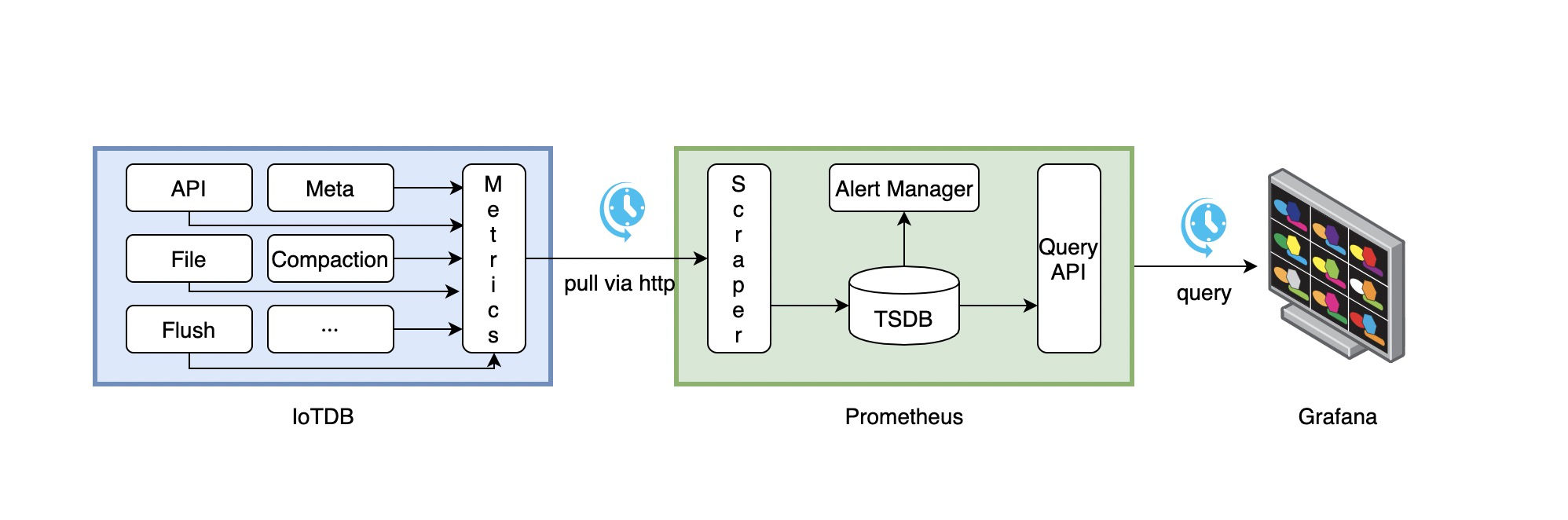
- IoTDB在运行过程中持续收集监控指标数据。
- Prometheus以固定的间隔(可配置)从IoTDB的HTTP接口拉取监控指标数据。
- Prometheus将拉取到的监控指标数据存储到自己的TSDB中。
- Grafana以固定的间隔(可配置)从Prometheus查询监控指标数据并绘图展示。
从交互流程可以看出,我们需要做一些额外的工作来部署和配置Prometheus和Grafana。
比如,你可以对Prometheus进行如下的配置(部分参数可以自行调整)来从IoTDB获取监控数据
job_name: pull-metrics
honor_labels: true
honor_timestamps: true
scrape_interval: 15s
scrape_timeout: 10s
metrics_path: /metrics
scheme: http
follow_redirects: true
static_configs:
  - targets:
      - localhost:9091
更多细节可以参考下面的文档:
Prometheus从HTTP接口拉取metrics数据的配置说明
5.2.4. Apache IoTDB Dashboard
我们提供了Apache IoTDB Dashboard,在Grafana中显示的效果图如下所示:

你可以在企业版中获取到 Dashboard 的 Json文件。
5.3. 使用 IoTDB 方式
5.3.1. 监控指标的 IoTDB 映射关系
对于 Metric Name 为 name, Tags 为 K1=V1, ..., Kn=Vn 的监控指标有如下映射,以默认写到 root.__system.metric.
clusterName.nodeType.nodeId为例
| 监控指标类型 | 映射关系 |
|---|---|
| Counter | root.__system.metric.clusterName.nodeType.nodeId.name.K1=V1...Kn=Vn.value |
| AutoGauge、Gauge | root.__system.metric.clusterName.nodeType.nodeId.name.K1=V1...Kn=Vn.value |
| Histogram | root.__system.metric.clusterName.nodeType.nodeId.name.K1=V1...Kn=Vn.count root.__system.metric. clusterName.nodeType.nodeId.name.K1=V1...Kn=Vn.max root.__system.metric. clusterName.nodeType.nodeId.name.K1=V1...Kn=Vn.sum root.__system.metric. clusterName.nodeType.nodeId.name.K1=V1...Kn=Vn.p0 root.__system.metric. clusterName.nodeType.nodeId.name.K1=V1...Kn=Vn.p50 root.__system.metric. clusterName.nodeType.nodeId.name.K1=V1...Kn=Vn.p75 root.__system.metric. clusterName.nodeType.nodeId.name.K1=V1...Kn=Vn.p99 root.__system.metric. clusterName.nodeType.nodeId.name.K1=V1...Kn=Vn.p999 |
| Rate | root.__system.metric.clusterName.nodeType.nodeId.name.K1=V1...Kn=Vn.count root.__system.metric. clusterName.nodeType.nodeId.name.K1=V1...Kn=Vn.mean root.__system.metric. clusterName.nodeType.nodeId.name.K1=V1...Kn=Vn.m1 root.__system.metric. clusterName.nodeType.nodeId.name.K1=V1...Kn=Vn.m5 root.__system.metric. clusterName.nodeType.nodeId.name.K1=V1...Kn=Vn.m15 |
| Timer | root.__system.metric.clusterName.nodeType.nodeId.name.K1=V1...Kn=Vn.count root.__system.metric. clusterName.nodeType.nodeId.name.K1=V1...Kn=Vn.max root.__system.metric. clusterName.nodeType.nodeId.name.K1=V1...Kn=Vn.mean root.__system.metric. clusterName.nodeType.nodeId.name.K1=V1...Kn=Vn.sum root.__system.metric. clusterName.nodeType.nodeId.name.K1=V1...Kn=Vn.p0 root.__system.metric. clusterName.nodeType.nodeId.name.K1=V1...Kn=Vn.p50 root.__system.metric. clusterName.nodeType.nodeId.name.K1=V1...Kn=Vn.p75 root.__system.metric. clusterName.nodeType.nodeId.name.K1=V1...Kn=Vn.p99 root.__system.metric. clusterName.nodeType.nodeId.name.K1=V1...Kn=Vn.p999 root.__system.metric. clusterName.nodeType.nodeId.name.K1=V1...Kn=Vn.m1 root.__system.metric. clusterName.nodeType.nodeId.name.K1=V1...Kn=Vn.m5 root.__system.metric. clusterName.nodeType.nodeId.name.K1=V1...Kn=Vn.m15 |
5.3.2. 获取监控指标
根据如上的映射关系,可以构成相关的 IoTDB 查询语句获取监控指标