| <!-- |
| |
| Licensed to the Apache Software Foundation (ASF) under one |
| or more contributor license agreements. See the NOTICE file |
| distributed with this work for additional information |
| regarding copyright ownership. The ASF licenses this file |
| to you under the Apache License, Version 2.0 (the |
| "License"); you may not use this file except in compliance |
| with the License. You may obtain a copy of the License at |
| |
| http://www.apache.org/licenses/LICENSE-2.0 |
| |
| Unless required by applicable law or agreed to in writing, |
| software distributed under the License is distributed on an |
| "AS IS" BASIS, WITHOUT WARRANTIES OR CONDITIONS OF ANY |
| KIND, either express or implied. See the License for the |
| specific language governing permissions and limitations |
| under the License. |
| |
| --> |
| |
| # IoTDB 数据同步 |
| |
| **IoTDB 数据同步功能可以将 IoTDB 的数据传输到另一个数据平台,我们将<font color=RED>一个数据同步任务称为 Pipe</font>。** |
| |
| **一个 Pipe 包含三个子任务(插件):** |
| |
| - 抽取(Source) |
| - 处理(Process) |
| - 发送(Sink) |
| |
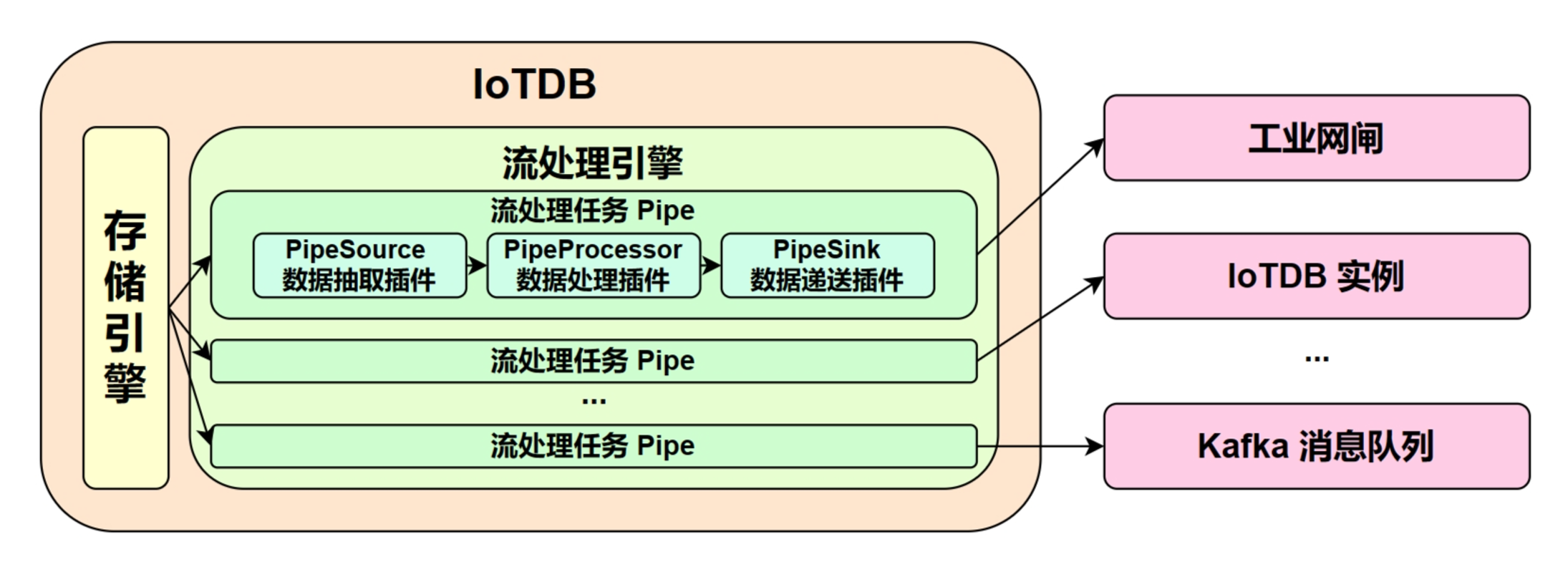
| **Pipe 允许用户自定义三个子任务的处理逻辑,通过类似 UDF 的方式处理数据。** 在一个 Pipe 中,上述的子任务分别由三种插件执行实现,数据会依次经过这三个插件进行处理:Pipe Source 用于抽取数据,Pipe Processor 用于处理数据,Pipe Sink 用于发送数据,最终数据将被发至外部系统。 |
| |
| **Pipe 任务的模型如下:** |
| |
|  |
| |
| 描述一个数据同步任务,本质就是描述 Pipe Source、Pipe Processor 和 Pipe Sink 插件的属性。用户可以通过 SQL 语句声明式地配置三个子任务的具体属性,通过组合不同的属性,实现灵活的数据 ETL 能力。 |
| |
| 利用数据同步功能,可以搭建完整的数据链路来满足端*边云同步、异地灾备、读写负载分库*等需求。 |
| |
| ## 快速开始 |
| |
| **🎯 目标:实现 IoTDB A -> IoTDB B 的全量数据同步** |
| |
| - 启动两个 IoTDB,A(datanode -> 127.0.0.1:6667) B(datanode -> 127.0.0.1:6668) |
| - 创建 A -> B 的 Pipe,在 A 上执行 |
| |
| ```sql |
| create pipe a2b |
| with sink ( |
| 'sink'='iotdb-thrift-sink', |
| 'sink.ip'='127.0.0.1', |
| 'sink.port'='6668' |
| ) |
| ``` |
| - 启动 A -> B 的 Pipe,在 A 上执行 |
| |
| ```sql |
| start pipe a2b |
| ``` |
| - 向 A 写入数据 |
| |
| ```sql |
| INSERT INTO root.db.d(time, m) values (1, 1) |
| ``` |
| - 在 B 检查由 A 同步过来的数据 |
| |
| ```sql |
| SELECT ** FROM root |
| ``` |
| |
| > ❗️**注:目前的 IoTDB -> IoTDB 的数据同步实现并不支持 DDL 同步** |
| > |
| > 即:不支持 ttl,trigger,别名,模板,视图,创建/删除序列,创建/删除数据库等操作 |
| > |
| > **IoTDB -> IoTDB 的数据同步要求目标端 IoTDB:** |
| > |
| > * 开启自动创建元数据:需要人工配置数据类型的编码和压缩与发送端保持一致 |
| > * 不开启自动创建元数据:手工创建与源端一致的元数据 |
| |
| ## 同步任务管理 |
| |
| ### 创建同步任务 |
| |
| 可以使用 `CREATE PIPE` 语句来创建一条数据同步任务,示例 SQL 语句如下所示: |
| |
| ```sql |
| CREATE PIPE <PipeId> -- PipeId 是能够唯一标定同步任务任务的名字 |
| WITH SOURCE ( |
| -- 默认的 IoTDB 数据抽取插件 |
| 'source' = 'iotdb-source', |
| -- 路径前缀,只有能够匹配该路径前缀的数据才会被抽取,用作后续的处理和发送 |
| 'source.pattern' = 'root.timecho', |
| -- 描述被抽取的历史数据的时间范围,表示最早时间 |
| 'source.history.start-time' = '2011.12.03T10:15:30+01:00', |
| -- 描述被抽取的历史数据的时间范围,表示最晚时间 |
| 'source.history.end-time' = '2022.12.03T10:15:30+01:00', |
| ) |
| WITH PROCESSOR ( |
| -- 默认的数据处理插件,即不做任何处理 |
| 'processor' = 'do-nothing-processor', |
| ) |
| WITH SINK ( |
| -- IoTDB 数据发送插件,目标端为 IoTDB |
| 'sink' = 'iotdb-thrift-sink', |
| -- 目标端 IoTDB 其中一个 DataNode 节点的数据服务 ip |
| 'sink.ip' = '127.0.0.1', |
| -- 目标端 IoTDB 其中一个 DataNode 节点的数据服务 port |
| 'sink.port' = '6667', |
| ) |
| ``` |
| |
| **创建同步任务时需要配置 PipeId 以及三个插件部分的参数:** |
| |
| |
| | 配置项 | 说明 | 是否必填 | 默认实现 | 默认实现说明 | 是否允许自定义实现 | |
| |-----------|-------------------------------|---------------------------|----------------------|-----------------------------|--------------------------| |
| | PipeId | 全局唯一标定一个同步任务的名称 | <font color=red>必填</font> | - | - | - | |
| | source | Pipe Source 插件,负责在数据库底层抽取同步数据 | 选填 | iotdb-source | 将数据库的全量历史数据和后续到达的实时数据接入同步任务 | 否 | |
| | processor | Pipe Processor 插件,负责处理数据 | 选填 | do-nothing-processor | 对传入的数据不做任何处理 | <font color=red>是</font> | |
| | sink | Pipe Sink 插件,负责发送数据 | <font color=red>必填</font> | - | - | <font color=red>是</font> | |
| |
| 示例中,使用了 iotdb-source、do-nothing-processor 和 iotdb-thrift-sink 插件构建数据同步任务。IoTDB 还内置了其他的数据同步插件,**请查看“系统预置数据同步插件”一节**。 |
| |
| **一个最简的 CREATE PIPE 语句示例如下:** |
| |
| ```sql |
| CREATE PIPE <PipeId> -- PipeId 是能够唯一标定任务任务的名字 |
| WITH SINK ( |
| -- IoTDB 数据发送插件,目标端为 IoTDB |
| 'sink' = 'iotdb-thrift-sink', |
| -- 目标端 IoTDB 其中一个 DataNode 节点的数据服务 ip |
| 'sink.ip' = '127.0.0.1', |
| -- 目标端 IoTDB 其中一个 DataNode 节点的数据服务 port |
| 'sink.port' = '6667', |
| ) |
| ``` |
| |
| 其表达的语义是:将本数据库实例中的全量历史数据和后续到达的实时数据,同步到目标为 127.0.0.1:6667 的 IoTDB 实例上。 |
| |
| **注意:** |
| |
| - SOURCE 和 PROCESSOR 为选填配置,若不填写配置参数,系统则会采用相应的默认实现 |
| - SINK 为必填配置,需要在 CREATE PIPE 语句中声明式配置 |
| - SINK 具备自复用能力。对于不同的任务,如果他们的 SINK 具备完全相同的 KV 属性(所有属性的 key 对应的 value 都相同),**那么系统最终只会创建一个 SINK 实例**,以实现对连接资源的复用。 |
| |
| - 例如,有下面 pipe1, pipe2 两个任务的声明: |
| |
| ```sql |
| CREATE PIPE pipe1 |
| WITH SINK ( |
| 'sink' = 'iotdb-thrift-sink', |
| 'sink.ip' = 'localhost', |
| 'sink.port' = '9999', |
| ) |
| |
| CREATE PIPE pipe2 |
| WITH SINK ( |
| 'sink' = 'iotdb-thrift-sink', |
| 'sink.port' = '9999', |
| 'sink.ip' = 'localhost', |
| ) |
| ``` |
| |
| - 因为它们对 SINK 的声明完全相同(**即使某些属性声明时的顺序不同**),所以框架会自动对它们声明的 SINK 进行复用,最终 pipe1, pipe2 的 SINK 将会是同一个实例。 |
| - 请不要构建出包含数据循环同步的应用场景(会导致无限循环): |
| |
| - IoTDB A -> IoTDB B -> IoTDB A |
| - IoTDB A -> IoTDB A |
| |
| ### 启动任务 |
| |
| CREATE PIPE 语句成功执行后,任务相关实例会被创建,但整个任务的运行状态会被置为 STOPPED(V1.3.0),即任务不会立刻处理数据。在 V1.3.1 及以后的版本,任务的状态在 CREATE 后将会被置为 RUNNING。 |
| |
| 当任务状态为 STOPPED 时,可以使用 START PIPE 语句使任务开始处理数据: |
| |
| ```sql |
| START PIPE <PipeId> |
| ``` |
| |
| ### 停止任务 |
| |
| 使用 STOP PIPE 语句使任务停止处理数据: |
| |
| ```sql |
| STOP PIPE <PipeId> |
| ``` |
| |
| ### 删除任务 |
| |
| 使用 DROP PIPE 语句使任务停止处理数据(当任务状态为 RUNNING 时),然后删除整个任务同步任务: |
| |
| ```sql |
| DROP PIPE <PipeId> |
| ``` |
| |
| 用户在删除任务前,不需要执行 STOP 操作。 |
| |
| ### 展示任务 |
| |
| 使用 SHOW PIPES 语句查看所有任务: |
| |
| ```sql |
| SHOW PIPES |
| ``` |
| |
| 查询结果如下: |
| |
| ```sql |
| +-----------+-----------------------+-------+----------+-------------+--------+----------------+ |
| | ID| CreationTime | State|PipeSource|PipeProcessor|PipeSink|ExceptionMessage| |
| +-----------+-----------------------+-------+----------+-------------+--------+----------------+ |
| |iotdb-kafka|2022-03-30T20:58:30.689|RUNNING| ...| ...| ...| None| |
| +-----------+-----------------------+-------+----------+-------------+--------+----------------+ |
| |iotdb-iotdb|2022-03-31T12:55:28.129|STOPPED| ...| ...| ...| TException: ...| |
| +-----------+-----------------------+-------+----------+-------------+--------+----------------+ |
| ``` |
| |
| 可以使用 `<PipeId>` 指定想看的某个同步任务状态: |
| |
| ```sql |
| SHOW PIPE <PipeId> |
| ``` |
| |
| 您也可以通过 where 子句,判断某个 \<PipeId\> 使用的 Pipe Sink 被复用的情况。 |
| |
| ```sql |
| SHOW PIPES |
| WHERE SINK USED BY <PipeId> |
| ``` |
| |
| ### 任务运行状态迁移 |
| |
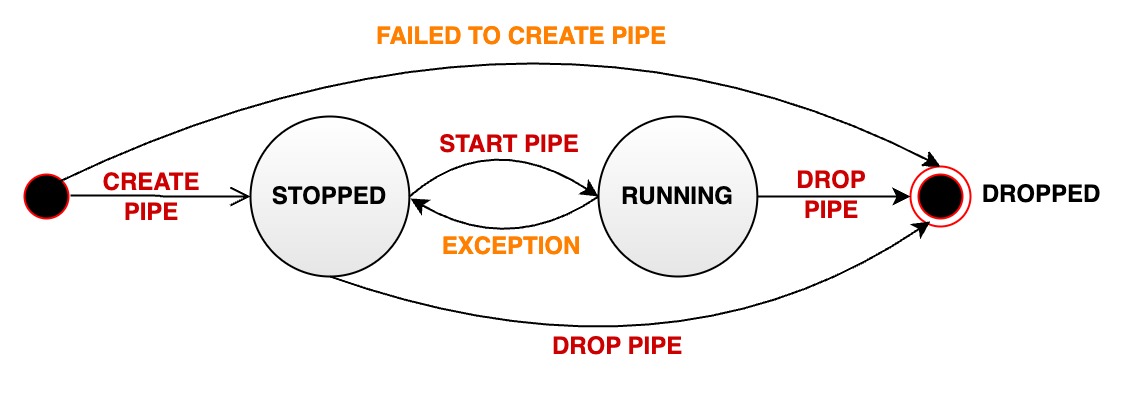
| 一个数据同步 pipe 在其生命周期中会经过多种状态: |
| |
| - **STOPPED:** pipe 处于停止运行状态。当管道处于该状态时,有如下几种可能: |
| - 当一个 pipe 被成功创建之后,其初始状态为暂停状态(V1.3.0) |
| - 用户手动将一个处于正常运行状态的 pipe 暂停,其状态会被动从 RUNNING 变为 STOPPED |
| - 当一个 pipe 运行过程中出现无法恢复的错误时,其状态会自动从 RUNNING 变为 STOPPED |
| - **RUNNING:** pipe 正在正常工作 |
| - 当一个 pipe 被成功创建之后,其初始状态为工作状态(V1.3.1) |
| - **DROPPED:** pipe 任务被永久删除 |
| |
| 下图表明了所有状态以及状态的迁移: |
| |
|  |
| |
| ## 系统预置数据同步插件 |
| 📌 说明:在 1.3.1 及以上的版本中,除 source、processor、sink 本身外,各项参数不再需要额外增加 source、processor、sink 前缀。例如: |
| ```Sql |
| create pipe A2B |
| with sink ( |
| 'sink'='iotdb-thrift-sink', |
| 'sink.ip'='127.0.0.1', |
| 'sink.port'='6668' |
| ) |
| ``` |
| 可以写作 |
| ```Sql |
| create pipe A2B |
| with sink ( |
| 'sink'='iotdb-thrift-sink', |
| 'ip'='127.0.0.1', |
| 'port'='6668' |
| ) |
| ``` |
| ### 查看预置插件 |
| |
| 用户可以按需查看系统中的插件。查看插件的语句如图所示。 |
| |
| ```sql |
| SHOW PIPEPLUGINS |
| ``` |
| |
| ### 预置 Source 插件 |
| |
| #### iotdb-source |
| |
| 作用:抽取 IoTDB 内部的历史或实时数据进入 pipe。 |
| |
| |
| | key | value | value 取值范围 | required or optional with default | |
| |---------------------------|--------------------------------------------------------------------------------------------------------|----------------------------------------|-----------------------------------| |
| | source | iotdb-source | String: iotdb-source | required | |
| | source.pattern | 用于筛选时间序列的路径前缀 | String: 任意的时间序列前缀 | optional: root | |
| | source.history.start-time | 同步历史数据的开始 event time,包含 start-time | Long: [Long.MIN_VALUE, Long.MAX_VALUE] | optional: Long.MIN_VALUE | |
| | source.history.end-time | 同步历史数据的结束 event time,包含 end-time | Long: [Long.MIN_VALUE, Long.MAX_VALUE] | optional: Long.MAX_VALUE | |
| | start-time(V1.3.1+) | 同步所有数据的开始 event time,包含 start-time, 配置时 source.historical.start-time 及 source.historical.end-time 将被忽略 | Long: [Long.MIN_VALUE, Long.MAX_VALUE] | optional: Long.MIN_VALUE | |
| | end-time(V1.3.1+) | 同步所有数据的结束 event time,包含 end-time, 配置时 source.historical.start-time 及 source.historical.end-time 将被忽略 | Long: [Long.MIN_VALUE, Long.MAX_VALUE] | optional: Long.MAX_VALUE | |
| |
| > 🚫 **source.pattern 参数说明** |
| > |
| > * Pattern 需用反引号修饰不合法字符或者是不合法路径节点,例如如果希望筛选 root.\`a@b\` 或者 root.\`123\`,应设置 pattern 为 root.\`a@b\` 或者 root.\`123\`(具体参考 [单双引号和反引号的使用时机](https://iotdb.apache.org/zh/Download/#_1-0-版本不兼容的语法详细说明)) |
| > * 在底层实现中,当检测到 pattern 为 root(默认值)或某个 Database 时,同步效率较高,其他任意格式都将降低性能 |
| > * 路径前缀不需要能够构成完整的路径。例如,当创建一个包含参数为 'source.pattern'='root.aligned.1' 的 pipe 时: |
| > |
| > * root.aligned.1TS |
| > * root.aligned.1TS.\`1\` |
| > * root.aligned.100TS |
| > |
| > 的数据会被同步; |
| > |
| > * root.aligned.\`1\` |
| > * root.aligned.\`123\` |
| > |
| > 的数据不会被同步。 |
| |
| > ❗️** start-time,end-time 参数说明** |
| > |
| > * start-time,end-time 应为 ISO 格式,例如 2011-12-03T10:15:30 或 2011-12-03T10:15:30+01:00。V1.3.1 及以后的版本能够支持纯时间戳格式,如 1706704494000。 |
| |
| > ✅ **一条数据从生产到落库 IoTDB,包含两个关键的时间概念** |
| > |
| > * **event time:** 数据实际生产时的时间(或者数据生产系统给数据赋予的生成时间,是数据点中的时间项),也称为事件时间。 |
| > * **arrival time:** 数据到达 IoTDB 系统内的时间。 |
| > |
| > 我们常说的乱序数据,指的是数据到达时,其 **event time** 远落后于当前系统时间(或者已经落库的最大 **event time**)的数据。另一方面,不论是乱序数据还是顺序数据,只要它们是新到达系统的,那它们的 **arrival time** 都是会随着数据到达 IoTDB 的顺序递增的。 |
| |
| > 💎 **iotdb-source 的工作可以拆分成两个阶段** |
| > |
| > 1. 历史数据抽取:所有 **arrival time** < 创建 pipe 时**当前系统时间**的数据称为历史数据 |
| > 2. 实时数据抽取:所有 **arrival time** >= 创建 pipe 时**当前系统时间**的数据称为实时数据 |
| > |
| > 历史数据传输阶段和实时数据传输阶段,**两阶段串行执行,只有当历史数据传输阶段完成后,才执行实时数据传输阶段。** |
| |
| ### 预置 processor 插件 |
| |
| #### do-nothing-processor |
| |
| 作用:不对 source 传入的事件做任何的处理。 |
| |
| |
| | key | value | value 取值范围 | required or optional with default | |
| |-----------|----------------------|------------------------------|-----------------------------------| |
| | processor | do-nothing-processor | String: do-nothing-processor | required | |
| |
| ### 预置 sink 插件 |
| |
| #### iotdb-thrift-sync-sink |
| |
| 作用:主要用于 IoTDB(v1.2.0+)与 IoTDB(v1.2.0+)之间的数据传输。 |
| 使用 Thrift RPC 框架传输数据,单线程 blocking IO 模型。 |
| 保证接收端 apply 数据的顺序与发送端接受写入请求的顺序一致。 |
| |
| 限制:源端 IoTDB 与 目标端 IoTDB 版本都需要在 v1.2.0+。 |
| |
| |
| | key | value | value 取值范围 | required or optional with default | |
| |----------------|----------------------------------------|---------------------------------------------------------------------------|--------------------------------------| |
| | sink | iotdb-thrift-sync-sink | String: iotdb-thrift-sync-sink | required | |
| | sink.ip | 目标端 IoTDB 其中一个 DataNode 节点的数据服务 ip | String | optional: 与 sink.node-urls 任选其一填写 | |
| | sink.port | 目标端 IoTDB 其中一个 DataNode 节点的数据服务 port | Integer | optional: 与 sink.node-urls 任选其一填写 | |
| | sink.node-urls | 目标端 IoTDB 任意多个 DataNode 节点的数据服务端口的 url | String。例:'127.0.0.1:6667,127.0.0.1:6668,127.0.0.1:6669', '127.0.0.1:6667' | optional: 与 sink.ip:sink.port 任选其一填写 | |
| |
| > 📌 请确保接收端已经创建了发送端的所有时间序列,或是开启了自动创建元数据,否则将会导致 pipe 运行失败。 |
| |
| #### iotdb-thrift-async-sink(别名:iotdb-thrift-sink) |
| |
| 作用:主要用于 IoTDB(v1.2.0+)与 IoTDB(v1.2.0+)之间的数据传输。 |
| 使用 Thrift RPC 框架传输数据,多线程 async non-blocking IO 模型,传输性能高,尤其适用于目标端为分布式时的场景。 |
| 不保证接收端 apply 数据的顺序与发送端接受写入请求的顺序一致,但是保证数据发送的完整性(at-least-once)。 |
| |
| 限制:源端 IoTDB 与 目标端 IoTDB 版本都需要在 v1.2.0+。 |
| |
| |
| | key | value | value 取值范围 | required or optional with default | |
| |----------------|---------------------------------------------|---------------------------------------------------------------------------|-----------------------------------| |
| | sink | iotdb-thrift-async-sink 或 iotdb-thrift-sink | String: iotdb-thrift-async-sink 或 iotdb-thrift-sink | required | |
| | sink.ip | 目标端 IoTDB 其中一个 DataNode 节点的数据服务 ip | String | optional: 与 node-urls 任选其一填写 | |
| | sink.port | 目标端 IoTDB 其中一个 DataNode 节点的数据服务 port | Integer | optional: 与 node-urls 任选其一填写 | |
| | sink.node-urls | 目标端 IoTDB 任意多个 DataNode 节点的数据服务端口的 url | String。例:'127.0.0.1:6667,127.0.0.1:6668,127.0.0.1:6669', '127.0.0.1:6667' | optional: 与 ip:port 任选其一填写 | |
| |
| > 📌 请确保接收端已经创建了发送端的所有时间序列,或是开启了自动创建元数据,否则将会导致 pipe 运行失败。 |
| |
| #### iotdb-legacy-pipe-sink |
| |
| 作用:主要用于 IoTDB(v1.2.0+)向 v1.2.0 前的 IoTDB 传输数据,使用 v1.2.0 版本前的数据同步(Sync)协议。 |
| 使用 Thrift RPC 框架传输数据。单线程 sync blocking IO 模型,传输性能较弱。 |
| |
| 限制:源端 IoTDB 版本需要在 v1.2.0+,目标端 IoTDB 版本可以是 v1.2.0+、v1.1.x(更低版本的 IoTDB 理论上也支持,但是未经测试)。 |
| |
| 注意:理论上 v1.2.0+ IoTDB 可作为 v1.2.0 版本前的任意版本的数据同步(Sync)接收端。 |
| |
| |
| | key | value | value 取值范围 | required or optional with default | |
| |---------------|----------------------------------------------|--------------------------------|-----------------------------------| |
| | sink | iotdb-legacy-pipe-sink | String: iotdb-legacy-pipe-sink | required | |
| | sink.ip | 目标端 IoTDB 其中一个 DataNode 节点的数据服务 ip | String | required | |
| | sink.port | 目标端 IoTDB 其中一个 DataNode 节点的数据服务 port | Integer | required | |
| | sink.user | 目标端 IoTDB 的用户名,注意该用户需要支持数据写入、TsFile Load 的权限 | String | optional: root | |
| | sink.password | 目标端 IoTDB 的密码,注意该用户需要支持数据写入、TsFile Load 的权限 | String | optional: root | |
| | sink.version | 目标端 IoTDB 的版本,用于伪装自身实际版本,绕过目标端的版本一致性检查 | String | optional: 1.1 | |
| |
| > 📌 请确保接收端已经创建了发送端的所有时间序列,或是开启了自动创建元数据,否则将会导致 pipe 运行失败。 |
| |
| #### do-nothing-sink |
| |
| 作用:不对 processor 传入的事件做任何的处理。 |
| |
| |
| | key | value | value 取值范围 | required or optional with default | |
| |------|-----------------|-------------------------|-----------------------------------| |
| | sink | do-nothing-sink | String: do-nothing-sink | required | |
| |
| ## 权限管理 |
| |
| | 权限名称 | 描述 | |
| |----------|------------| |
| | USE_PIPE | 注册任务。路径无关。 | |
| | USE_PIPE | 开启任务。路径无关。 | |
| | USE_PIPE | 停止任务。路径无关。 | |
| | USE_PIPE | 卸载任务。路径无关。 | |
| | USE_PIPE | 查询任务。路径无关。 | |
| |
| ## 配置参数 |
| |
| 在 iotdb-common.properties 中: |
| |
| V1.3.0+: |
| ```Properties |
| #################### |
| ### Pipe Configuration |
| #################### |
| |
| # Uncomment the following field to configure the pipe lib directory. |
| # For Windows platform |
| # If its prefix is a drive specifier followed by "\\", or if its prefix is "\\\\", then the path is |
| # absolute. Otherwise, it is relative. |
| # pipe_lib_dir=ext\\pipe |
| # For Linux platform |
| # If its prefix is "/", then the path is absolute. Otherwise, it is relative. |
| # pipe_lib_dir=ext/pipe |
| |
| # The maximum number of threads that can be used to execute the pipe subtasks in PipeSubtaskExecutor. |
| # The actual value will be min(pipe_subtask_executor_max_thread_num, max(1, CPU core number / 2)). |
| # pipe_subtask_executor_max_thread_num=5 |
| |
| # The connection timeout (in milliseconds) for the thrift client. |
| # pipe_connector_timeout_ms=900000 |
| |
| # The maximum number of selectors that can be used in the async connector. |
| # pipe_async_connector_selector_number=1 |
| |
| # The core number of clients that can be used in the async connector. |
| # pipe_async_connector_core_client_number=8 |
| |
| # The maximum number of clients that can be used in the async connector. |
| # pipe_async_connector_max_client_number=16 |
| ``` |
| |
| V1.3.1+: |
| ```Properties |
| #################### |
| ### Pipe Configuration |
| #################### |
| |
| # Uncomment the following field to configure the pipe lib directory. |
| # For Windows platform |
| # If its prefix is a drive specifier followed by "\\", or if its prefix is "\\\\", then the path is |
| # absolute. Otherwise, it is relative. |
| # pipe_lib_dir=ext\\pipe |
| # For Linux platform |
| # If its prefix is "/", then the path is absolute. Otherwise, it is relative. |
| # pipe_lib_dir=ext/pipe |
| |
| # The maximum number of threads that can be used to execute the pipe subtasks in PipeSubtaskExecutor. |
| # The actual value will be min(pipe_subtask_executor_max_thread_num, max(1, CPU core number / 2)). |
| # pipe_subtask_executor_max_thread_num=5 |
| |
| # The connection timeout (in milliseconds) for the thrift client. |
| # pipe_sink_timeout_ms=900000 |
| |
| # The maximum number of selectors that can be used in the sink. |
| # Recommend to set this value to less than or equal to pipe_sink_max_client_number. |
| # pipe_sink_selector_number=4 |
| |
| # The maximum number of clients that can be used in the sink. |
| # pipe_sink_max_client_number=16 |
| ``` |
| |
| ## 功能特性 |
| |
| ### 最少一次语义保证 **at-least-once** |
| |
| 数据同步功能向外部系统传输数据时,提供 at-least-once 的传输语义。在大部分场景下,同步功能可提供 exactly-once 保证,即所有数据被恰好同步一次。 |
| |
| 但是在以下场景中,可能存在部分数据被同步多次 **(断点续传)** 的情况: |
| |
| - 临时的网络故障:某次数据传输请求失败后,系统会进行重试发送,直至到达最大尝试次数 |
| - Pipe 插件逻辑实现异常:插件运行中抛出错误,系统会进行重试发送,直至到达最大尝试次数 |
| - 数据节点宕机、重启等导致的数据分区切主:分区变更完成后,受影响的数据会被重新传输 |
| - 集群不可用:集群可用后,受影响的数据会重新传输 |
| |
| ### 源端:数据写入与 Pipe 处理、发送数据异步解耦 |
| |
| 数据同步功能中,数据传输采用的是异步复制模式。 |
| |
| 数据同步与写入操作完全脱钩,不存在对写入关键路径的影响。该机制允许框架在保证持续数据同步的前提下,保持时序数据库的写入速度。 |
| |
| ### 源端:高可用集群部署时,Pipe 服务高可用 |
| |
| 当发送端 IoTDB 为高可用集群部署模式时,数据同步服务也将是高可用的。 数据同步框架将监控每个数据节点的数据同步进度,并定期做轻量级的分布式一致性快照以保存同步状态。 |
| |
| - 当发送端集群某数据节点宕机时,数据同步框架可以利用一致性快照以及保存在副本上的数据快速恢复同步,以此实现数据同步服务的高可用。 |
| - 当发送端集群整体宕机并重启时,数据同步框架也能使用快照恢复同步服务。 |
