| <!-- |
| |
| Licensed to the Apache Software Foundation (ASF) under one |
| or more contributor license agreements. See the NOTICE file |
| distributed with this work for additional information |
| regarding copyright ownership. The ASF licenses this file |
| to you under the Apache License, Version 2.0 (the |
| "License"); you may not use this file except in compliance |
| with the License. You may obtain a copy of the License at |
| |
| http://www.apache.org/licenses/LICENSE-2.0 |
| |
| Unless required by applicable law or agreed to in writing, |
| software distributed under the License is distributed on an |
| "AS IS" BASIS, WITHOUT WARRANTIES OR CONDITIONS OF ANY |
| KIND, either express or implied. See the License for the |
| specific language governing permissions and limitations |
| under the License. |
| |
| --> |
| |
| # 数据同步 |
| 数据同步是工业物联网的典型需求,通过数据同步机制,可实现IoTDB之间的数据共享,搭建完整的数据链路来满足内网外网数据互通、端边云同步、数据迁移、数据备份等需求。 |
| |
| ## 功能介绍 |
| |
| ### 同步任务概述 |
| |
| 一个数据同步任务包含2个阶段: |
| |
| - 抽取(Extract)阶段:该部分用于从源 IoTDB 抽取数据,在SQL语句中的 Extractor 部分定义 |
| - 发送(Connect)阶段:该部分用于向目标 IoTDB 发送数据,在SQL语句中的 Connector 部分定义 |
| |
| |
| |
| 通过 SQL 语句声明式地配置2个部分的具体内容,可实现灵活的数据同步能力。 |
| |
| ### 同步任务 - 创建 |
| |
| 使用 `CREATE PIPE` 语句来创建一条数据同步任务,下列属性中`PipeId`和`connector`为必填项,`extractor`和`processor`为选填项,输入SQL时注意 `EXTRACTOR `与 `CONNECTOR` 插件顺序不能替换。 |
| |
| SQL 示例如下: |
| |
| ```SQL |
| CREATE PIPE <PipeId> -- PipeId 是能够唯一标定任务任务的名字 |
| -- 数据抽取插件,必填插件 |
| WITH EXTRACTOR ( |
| [<parameter> = <value>,], |
| -- 数据连接插件,必填插件 |
| WITH CONNECTOR ( |
| [<parameter> = <value>,], |
| ) |
| ``` |
| > 📌 注:使用数据同步功能,请保证接收端开启自动创建元数据 |
| |
| |
| |
| ### 同步任务 - 管理 |
| |
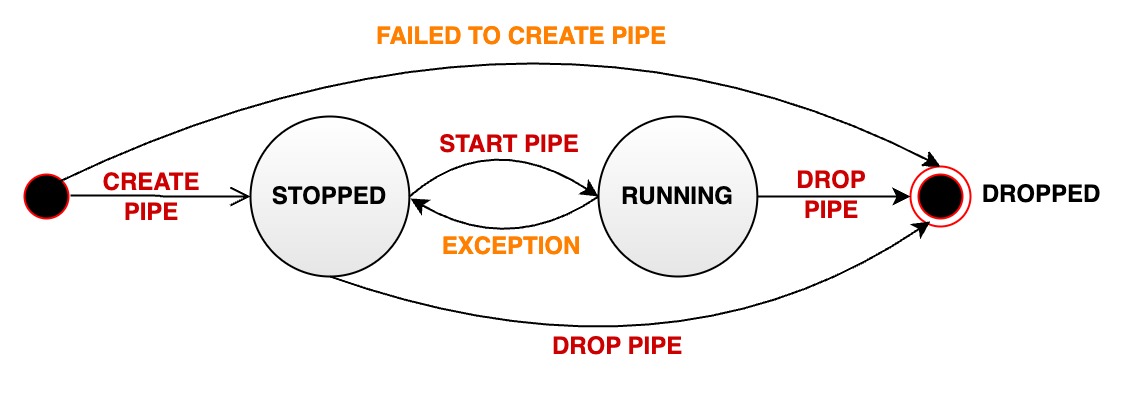
| 数据同步任务有三种状态:RUNNING、STOPPED和DROPPED。任务状态转换如下图所示: |
| |
|  |
| |
| 一个数据同步任务在生命周期中会经过多种状态: |
| |
| - RUNNING: 运行状态。 |
| - STOPPED: 停止状态。 |
| - 说明1:任务的初始状态为停止状态,需要使用SQL语句启动任务 |
| - 说明2:用户也可以使用SQL语句手动将一个处于运行状态的任务停止,此时状态会从 RUNNING 变为 STOPPED |
| - 说明3:当一个任务出现无法恢复的错误时,其状态会自动从 RUNNING 变为 STOPPED |
| - DROPPED:删除状态。 |
| |
| 我们提供以下SQL语句对同步任务进行状态管理。 |
| |
| #### 启动任务 |
| |
| 创建之后,任务不会立即被处理,需要启动任务。使用`START PIPE`语句来启动任务,从而开始处理数据: |
| |
| ```Go |
| START PIPE<PipeId> |
| ``` |
| |
| #### 停止任务 |
| |
| 停止处理数据: |
| |
| ```Go |
| STOP PIPE <PipeId> |
| ``` |
| |
| #### 删除任务 |
| |
| 删除指定任务: |
| |
| ```Go |
| DROP PIPE <PipeId> |
| ``` |
| 删除任务不需要先停止同步任务。 |
| #### 查看任务 |
| |
| 查看全部任务: |
| |
| ```Go |
| SHOW PIPES |
| ``` |
| |
| 查看指定任务: |
| |
| ```Go |
| SHOW PIPE <PipeId> |
| ``` |
| |
| ### 插件 |
| |
| 为了使得整体架构更加灵活以匹配不同的同步场景需求,在上述同步任务框架中IoTDB支持进行插件组装。系统为您预置了一些常用插件可直接使用,同时您也可以自定义 connector 插件,并加载至IoTDB系统进行使用。 |
| |
| | 模块 | 插件 | 预置插件 | 自定义插件 | |
| | --- | --- | --- | --- | |
| | 抽取(Extract) | Extractor 插件 | iotdb-extractor | 不支持 | |
| | 发送(Connect) | Connector 插件 | iotdb-thrift-connector、iotdb-air-gap-connector| 支持 | |
| |
| #### 预置插件 |
| |
| 预置插件如下: |
| |
| | 插件名称 | 类型 | 介绍 | 适用版本 | |
| | ---------------------------- | ---- | ------------------------------------------------------------ | --------- | |
| | iotdb-extractor | extractor 插件 | 默认的extractor插件,用于抽取 IoTDB 历史或实时数据 | 1.2.x | |
| | iotdb-thrift-connector | connector 插件 | 用于 IoTDB(v1.2.0及以上)与 IoTDB(v1.2.0及以上)之间的数据传输。使用 Thrift RPC 框架传输数据,多线程 async non-blocking IO 模型,传输性能高,尤其适用于目标端为分布式时的场景 | 1.2.x | |
| | iotdb-air-gap-connector | connector 插件 | 用于 IoTDB(v1.2.2+)向 IoTDB(v1.2.2+)跨单向数据网闸的数据同步。支持的网闸型号包括南瑞 Syskeeper 2000 等 | 1.2.1以上 | |
| |
| 每个插件的详细参数可参考本文[参数说明](#connector-参数)章节。 |
| |
| #### 查看插件 |
| |
| 查看系统中的插件(含自定义与内置插件)可以用以下语句: |
| |
| ```Go |
| SHOW PIPEPLUGINS |
| ``` |
| |
| 返回结果如下(其中部分插件为系统内部插件,将在1.3.0版本中删除): |
| |
| ```Go |
| IoTDB> SHOW PIPEPLUGINS |
| +----------------------------+----------+--------------------------------------------------------------------------------+----------------------------------------------------+ |
| | PluginName|PluginType| ClassName| PluginJar| |
| +----------------------------+----------+--------------------------------------------------------------------------------+----------------------------------------------------+ |
| | DO-NOTHING-CONNECTOR| Builtin| org.apache.iotdb.commons.pipe.plugin.builtin.connector.DoNothingConnector| | |
| | DO-NOTHING-PROCESSOR| Builtin| org.apache.iotdb.commons.pipe.plugin.builtin.processor.DoNothingProcessor| | |
| | IOTDB-AIR-GAP-CONNECTOR| Builtin| org.apache.iotdb.commons.pipe.plugin.builtin.connector.IoTDBAirGapConnector| | |
| | IOTDB-EXTRACTOR| Builtin| org.apache.iotdb.commons.pipe.plugin.builtin.extractor.IoTDBExtractor| | |
| | IOTDB-LEGACY-PIPE-CONNECTOR| Builtin| org.apache.iotdb.commons.pipe.plugin.builtin.connector.IoTDBLegacyPipeConnector| | |
| |IOTDB-THRIFT-ASYNC-CONNECTOR| Builtin|org.apache.iotdb.commons.pipe.plugin.builtin.connector.IoTDBThriftAsyncConnector| | |
| | IOTDB-THRIFT-CONNECTOR| Builtin| org.apache.iotdb.commons.pipe.plugin.builtin.connector.IoTDBThriftConnector| | |
| | IOTDB-THRIFT-SYNC-CONNECTOR| Builtin| org.apache.iotdb.commons.pipe.plugin.builtin.connector.IoTDBThriftSyncConnector| | |
| +----------------------------+----------+--------------------------------------------------------------------------------+----------------------------------------------------+ |
| ``` |
| |
| ## 使用示例 |
| |
| ### 全量数据同步 |
| |
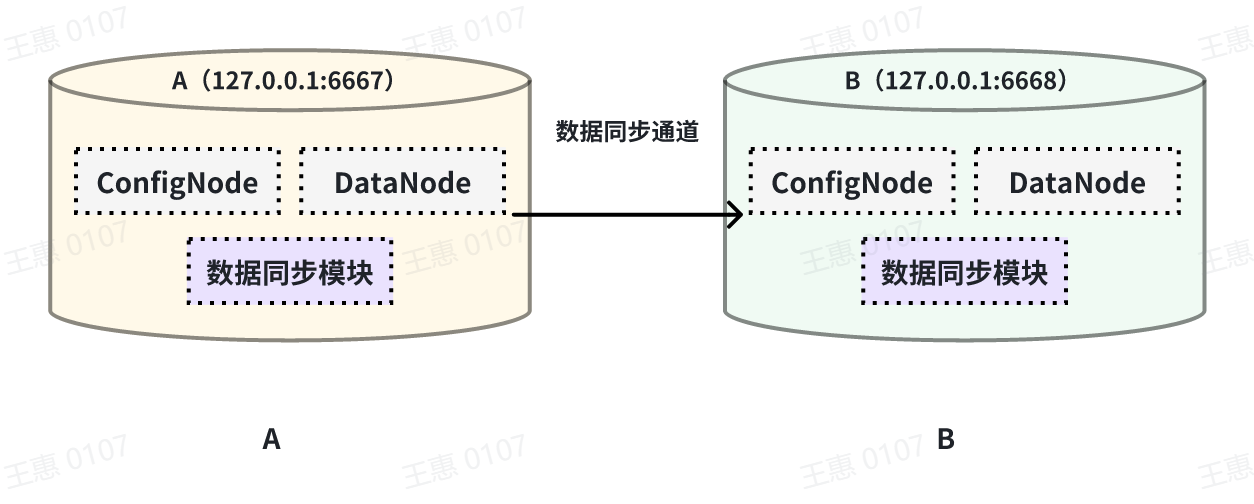
| 本例子用来演示将一个 IoTDB 的所有数据同步至另一个IoTDB,数据链路如下图所示: |
| |
|  |
| |
| 在这个例子中,我们可以创建一个名为 A2B 的同步任务,用来同步 A IoTDB 到 B IoTDB 间的全量数据,这里需要用到用到 connector 的 iotdb-thrift-connector 插件(内置插件),需指定接收端地址,这个例子中指定了'connector.ip'和'connector.port',也可指定'connector.node-urls',如下面的示例语句: |
| |
| ```Go |
| create pipe A2B |
| with connector ( |
| 'connector'='iotdb-thrift-connector', |
| 'connector.ip'='127.0.0.1', |
| 'connector.port'='6668' |
| ) |
| ``` |
| |
| |
| ### 历史数据同步 |
| |
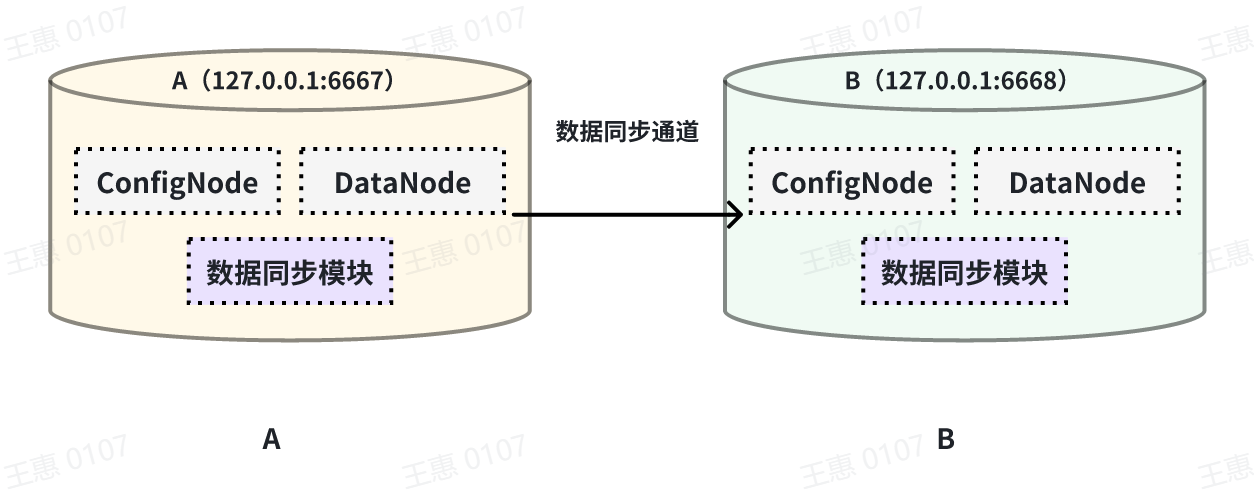
| 本例子用来演示同步某个历史时间范围(2023年8月23日8点到2023年10月23日8点)的数据至另一个IoTDB,数据链路如下图所示: |
| |
|  |
| |
| 在这个例子中,我们可以创建一个名为 A2B 的同步任务。首先我们需要在 extractor 中定义传输数据的范围,由于传输的是历史数据(历史数据是指同步任务创建之前存在的数据),所以需要将extractor.realtime.enable参数配置为false;同时需要配置数据的起止时间start-time和end-time以及传输的模式mode,此处推荐mode设置为 hybrid 模式(hybrid模式为混合传输,在无数据积压时采用实时传输方式,有数据积压时采用批量传输方式,并根据系统内部情况自动切换)。 |
| |
| 详细语句如下: |
| |
| ```SQL |
| create pipe A2B |
| WITH EXTRACTOR ( |
| 'extractor'= 'iotdb-extractor', |
| 'extractor.realtime.enable' = 'false', |
| 'extractor.realtime.mode'='hybrid', |
| 'extractor.history.start-time' = '2023.08.23T08:00:00+00:00', |
| 'extractor.history.end-time' = '2023.10.23T08:00:00+00:00') |
| with connector ( |
| 'connector'='iotdb-thrift-async-connector', |
| 'connector.node-urls'='xxxx:6668', |
| 'connector.batch.enable'='false') |
| ``` |
| |
| |
| ### 双向数据传输 |
| |
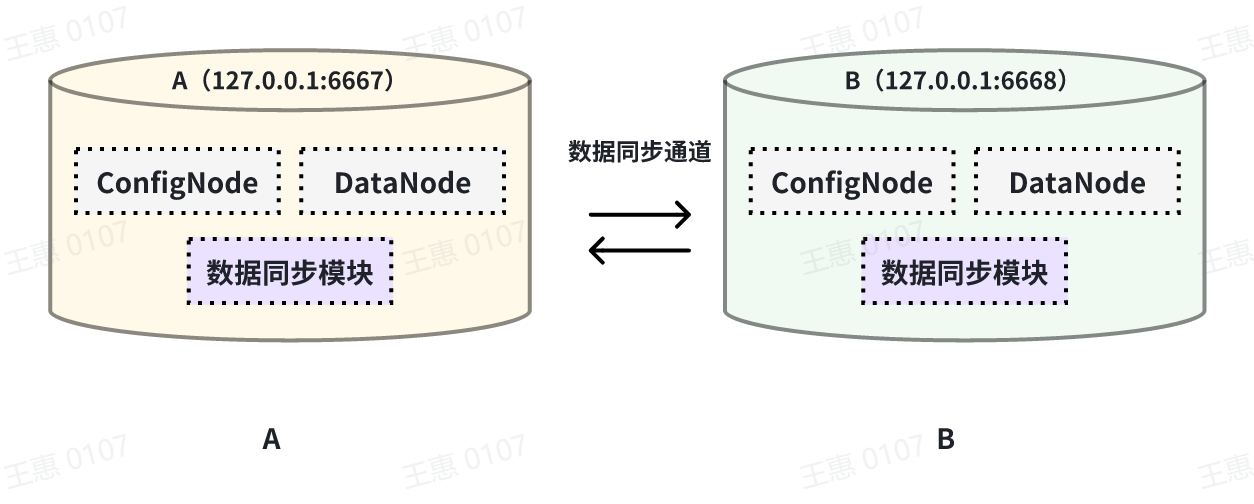
| 本例子用来演示两个 IoTDB 之间互为双活的场景,数据链路如下图所示: |
| |
|  |
| |
| 在这个例子中,为了避免数据无限循环,需要将A和B上的参数`extractor.forwarding-pipe-requests` 均设置为 `false`,表示不转发从另一pipe传输而来的数据。同时将`'extractor.history.enable'` 设置为 `false`,表示不传输历史数据,即不同步创建该任务前的数据。 |
| |
| 详细语句如下: |
| |
| 在 A IoTDB 上执行下列语句: |
| |
| ```Go |
| create pipe AB |
| with extractor ( |
| 'extractor.history.enable' = 'false', |
| 'extractor.forwarding-pipe-requests' = 'false', |
| with connector ( |
| 'connector'='iotdb-thrift-connector', |
| 'connector.ip'='127.0.0.1', |
| 'connector.port'='6668' |
| ) |
| ``` |
| |
| 在 B IoTDB 上执行下列语句: |
| |
| ```Go |
| create pipe BA |
| with extractor ( |
| 'extractor.history.enable' = 'false', |
| 'extractor.forwarding-pipe-requests' = 'false', |
| with connector ( |
| 'connector'='iotdb-thrift-connector', |
| 'connector.ip'='127.0.0.1', |
| 'connector.port'='6667' |
| ) |
| ``` |
| |
| |
| ### 级联数据传输 |
| |
| |
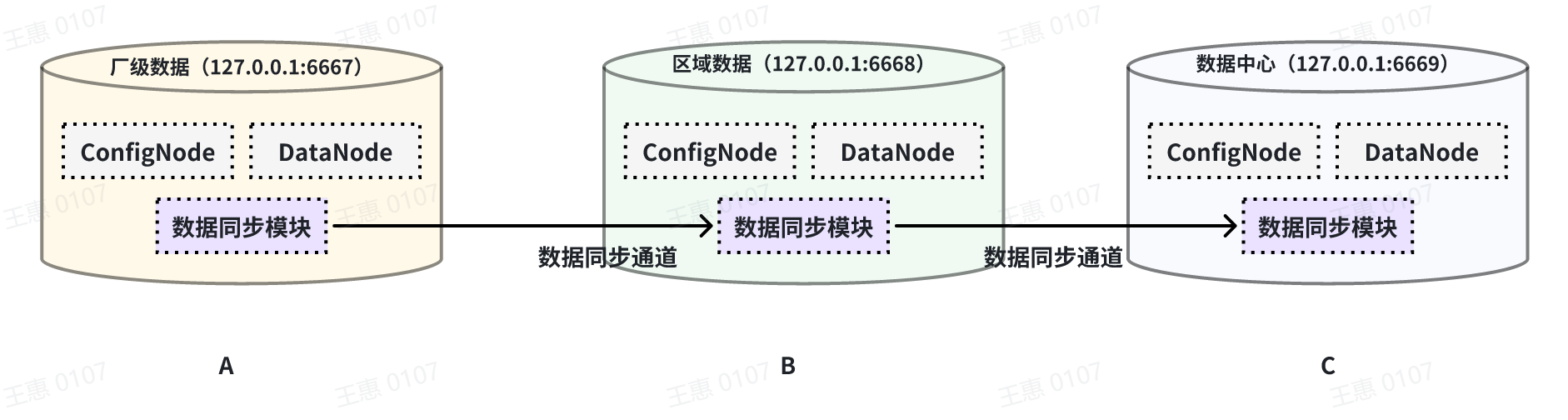
| 本例子用来演示多个 IoTDB 之间级联传输数据的场景,数据由A集群同步至B集群,再同步至C集群,数据链路如下图所示: |
| |
|  |
| |
| 在这个例子中,为了将A集群的数据同步至C,在BC之间的pipe需要将 `extractor.forwarding-pipe-requests` 配置为`true`,详细语句如下: |
| |
| 在A IoTDB上执行下列语句,将A中数据同步至B: |
| |
| ```Go |
| create pipe AB |
| with connector ( |
| 'connector'='iotdb-thrift-connector', |
| 'connector.ip'='127.0.0.1', |
| 'connector.port'='6668' |
| ) |
| ``` |
| |
| 在B IoTDB上执行下列语句,将B中数据同步至C: |
| |
| ```Go |
| create pipe BC |
| with extractor ( |
| 'extractor.forwarding-pipe-requests' = 'true', |
| with connector ( |
| 'connector'='iotdb-thrift-connector', |
| 'connector.ip'='127.0.0.1', |
| 'connector.port'='6669' |
| ) |
| ``` |
| |
| ### 跨网闸数据传输 |
| |
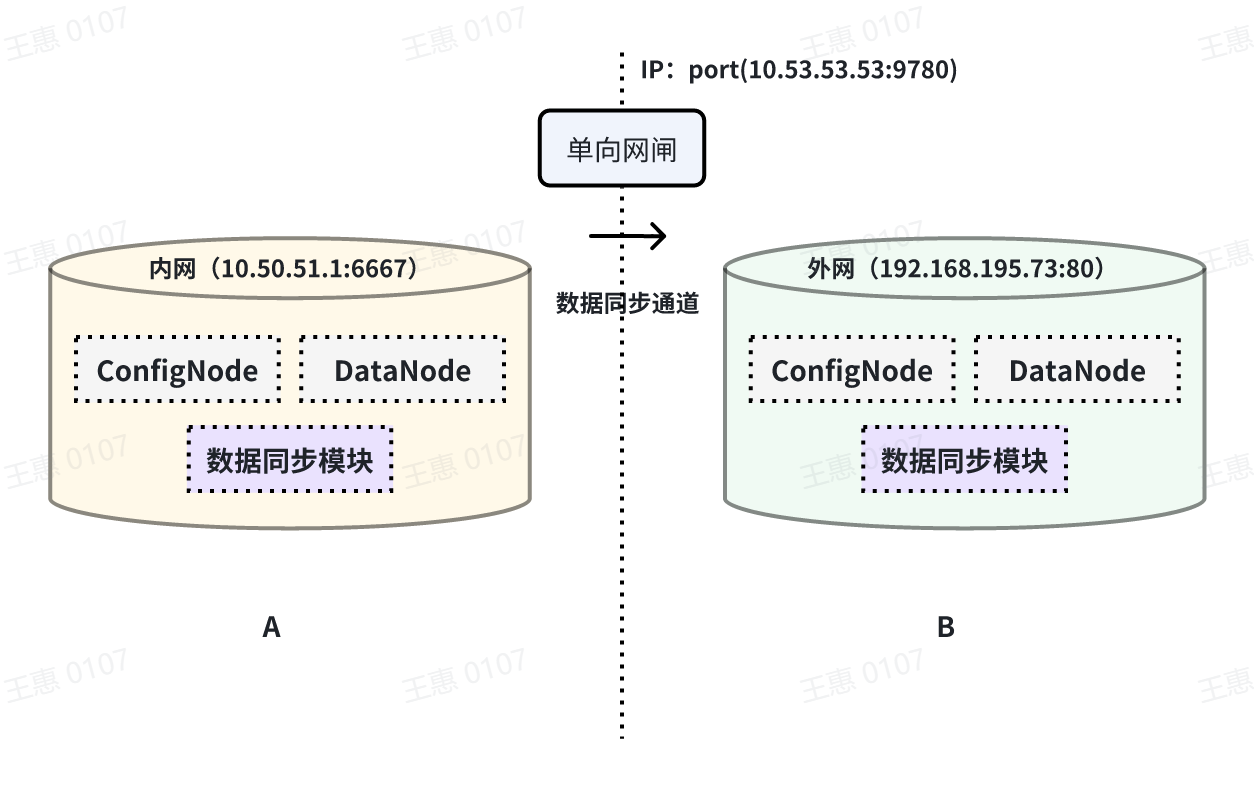
| 本例子用来演示将一个 IoTDB 的数据,经过单向网闸,同步至另一个IoTDB的场景,数据链路如下图所示: |
| |
|  |
| |
| 在这个例子中,需要使用 connector 任务中的iotdb-air-gap-connector 插件(目前支持部分型号网闸,具体型号请联系天谋科技工作人员确认),配置网闸后,在 A IoTDB 上执行下列语句,其中ip和port填写网闸信息,详细语句如下: |
| |
| ```Go |
| create pipe A2B |
| with connector ( |
| 'connector'='iotdb-air-gap-connector', |
| 'connector.ip'='10.53.53.53', |
| 'connector.port'='9780' |
| ) |
| ``` |
| |
| ## 参考:注意事项 |
| |
| 可通过修改 IoTDB 配置文件(iotdb-common.properties)以调整数据同步的参数,如同步数据存储目录等。完整配置如下: |
| |
| ```Go |
| #################### |
| ### Pipe Configuration |
| #################### |
| |
| # Uncomment the following field to configure the pipe lib directory. |
| # For Windows platform |
| # If its prefix is a drive specifier followed by "\\", or if its prefix is "\\\\", then the path is |
| # absolute. Otherwise, it is relative. |
| # pipe_lib_dir=ext\\pipe |
| # For Linux platform |
| # If its prefix is "/", then the path is absolute. Otherwise, it is relative. |
| # pipe_lib_dir=ext/pipe |
| |
| # The maximum number of threads that can be used to execute the pipe subtasks in PipeSubtaskExecutor. |
| # The actual value will be min(pipe_subtask_executor_max_thread_num, max(1, CPU core number / 2)). |
| # pipe_subtask_executor_max_thread_num=5 |
| |
| # The connection timeout (in milliseconds) for the thrift client. |
| # pipe_connector_timeout_ms=900000 |
| |
| # The maximum number of selectors that can be used in the async connector. |
| # pipe_async_connector_selector_number=1 |
| |
| # The core number of clients that can be used in the async connector. |
| # pipe_async_connector_core_client_number=8 |
| |
| # The maximum number of clients that can be used in the async connector. |
| # pipe_async_connector_max_client_number=16 |
| |
| # Whether to enable receiving pipe data through air gap. |
| # The receiver can only return 0 or 1 in tcp mode to indicate whether the data is received successfully. |
| # pipe_air_gap_receiver_enabled=false |
| |
| # The port for the server to receive pipe data through air gap. |
| # pipe_air_gap_receiver_port=9780 |
| ``` |
| |
| ## 参考:参数说明 |
| |
| ### extractor 参数 |
| |
| | key | value | value 取值范围 | 是否必填 |默认取值| |
| | ---------------------------------- | ------------------------------------------------ | -------------------------------------- | -------- |------| |
| | extractor | iotdb-extractor | String: iotdb-extractor | 必填 | - | |
| | extractor.pattern | 用于筛选时间序列的路径前缀 | String: 任意的时间序列前缀 | 选填 | root | |
| | extractor.history.enable | 是否同步历史数据 | Boolean: true, false | 选填 | true | |
| | extractor.history.start-time | 同步历史数据的开始 event time,包含 start-time | Long: [Long.MIN_VALUE, Long.MAX_VALUE] | 选填 | Long.MIN_VALUE | |
| | extractor.history.end-time | 同步历史数据的结束 event time,包含 end-time | Long: [Long.MIN_VALUE, Long.MAX_VALUE] | 选填 | Long.MAX_VALUE | |
| | extractor.realtime.enable | 是否同步实时数据 | Boolean: true, false | 选填 | true | |
| | extractor.realtime.mode | 实时数据的抽取模式 | String: hybrid, log, file | 选填 | hybrid | |
| | extractor.forwarding-pipe-requests | 是否转发由其他 Pipe (通常是数据同步)写入的数据 | Boolean: true, false | 选填 | true | |
| |
| > 💎 **说明:历史数据与实时数据的差异** |
| > |
| > * **历史数据**:所有 arrival time < 创建 pipe 时当前系统时间的数据称为历史数据 |
| > * **实时数据**:所有 arrival time >= 创建 pipe 时当前系统时间的数据称为实时数据 |
| > * **全量数据**: 全量数据 = 历史数据 + 实时数据 |
| |
| |
| > 💎 **说明:数据抽取模式hybrid, log和file的差异** |
| > |
| > - **hybrid(推荐)**:该模式下,任务将优先对数据进行实时处理、发送,当数据产生积压时自动切换至批量发送模式,其特点是平衡了数据同步的时效性和吞吐量 |
| > - **log**:该模式下,任务将对数据进行实时处理、发送,其特点是高时效、低吞吐 |
| > - **file**:该模式下,任务将对数据进行批量(按底层数据文件)处理、发送,其特点是低时效、高吞吐 |
| |
| |
| ### connector 参数 |
| |
| #### iotdb-thrift-connector |
| |
| | key | value | value 取值范围 | 是否必填 | 默认取值 | |
| | --------------------------------- | ------------------------------------------------------------ | ------------------------------------------------------------ | -------- | ------------------------------------------- | |
| | connector | iotdb-thrift-connector 或 iotdb-thrift-sync-connector | String: iotdb-thrift-connector 或 iotdb-thrift-sync-connector | 必填 | | |
| | connector.ip | 目标端 IoTDB 其中一个 DataNode 节点的数据服务 ip(请注意同步任务不支持向自身服务进行转发) | String | 选填 | 与 connector.node-urls 任选其一填写 | |
| | connector.port | 目标端 IoTDB 其中一个 DataNode 节点的数据服务 port(请注意同步任务不支持向自身服务进行转发) | Integer | 选填 | 与 connector.node-urls 任选其一填写 | |
| | connector.node-urls | 目标端 IoTDB 任意多个 DataNode 节点的数据服务端口的 url(请注意同步任务不支持向自身服务进行转发) | String。例:'127.0.0.1:6667,127.0.0.1:6668,127.0.0.1:6669', '127.0.0.1:6667' | 选填 | 与 connector.ip:connector.port 任选其一填写 | |
| | connector.batch.enable | 是否开启日志攒批发送模式,用于提高传输吞吐,降低 IOPS | Boolean: true, false | 选填 | true | |
| | connector.batch.max-delay-seconds | 在开启日志攒批发送模式时生效,表示一批数据在发送前的最长等待时间(单位:s) | Integer | 选填 | 1 | |
| | connector.batch.size-bytes | 在开启日志攒批发送模式时生效,表示一批数据最大的攒批大小(单位:byte) | Long | 选填 |
| |
| |
| |
| #### iotdb-air-gap-connector |
| |
| | key | value | value 取值范围 | 是否必填 | 默认取值 | |
| | -------------------------------------- | ------------------------------------------------------------ | ------------------------------------------------------------ | -------- | ------------------------------------------- | |
| | connector | iotdb-air-gap-connector | String: iotdb-air-gap-connector | 必填 | | |
| | connector.ip | 目标端 IoTDB 其中一个 DataNode 节点的数据服务 ip | String | 选填 | 与 connector.node-urls 任选其一填写 | |
| | connector.port | 目标端 IoTDB 其中一个 DataNode 节点的数据服务 port | Integer | 选填 | 与 connector.node-urls 任选其一填写 | |
| | connector.node-urls | 目标端 IoTDB 任意多个 DataNode 节点的数据服务端口的 url | String。例:'127.0.0.1:6667,127.0.0.1:6668,127.0.0.1:6669', '127.0.0.1:6667' | 选填 | 与 connector.ip:connector.port 任选其一填写 | |
| | connector.air-gap.handshake-timeout-ms | 发送端与接收端在首次尝试建立连接时握手请求的超时时长,单位:毫秒 | Integer | 选填 | 5000 | |
