| <!-- |
| |
| Licensed to the Apache Software Foundation (ASF) under one |
| or more contributor license agreements. See the NOTICE file |
| distributed with this work for additional information |
| regarding copyright ownership. The ASF licenses this file |
| to you under the Apache License, Version 2.0 (the |
| "License"); you may not use this file except in compliance |
| with the License. You may obtain a copy of the License at |
| |
| http://www.apache.org/licenses/LICENSE-2.0 |
| |
| Unless required by applicable law or agreed to in writing, |
| software distributed under the License is distributed on an |
| "AS IS" BASIS, WITHOUT WARRANTIES OR CONDITIONS OF ANY |
| KIND, either express or implied. See the License for the |
| specific language governing permissions and limitations |
| under the License. |
| |
| --> |
| |
| # IoTDB 数据订阅 |
| |
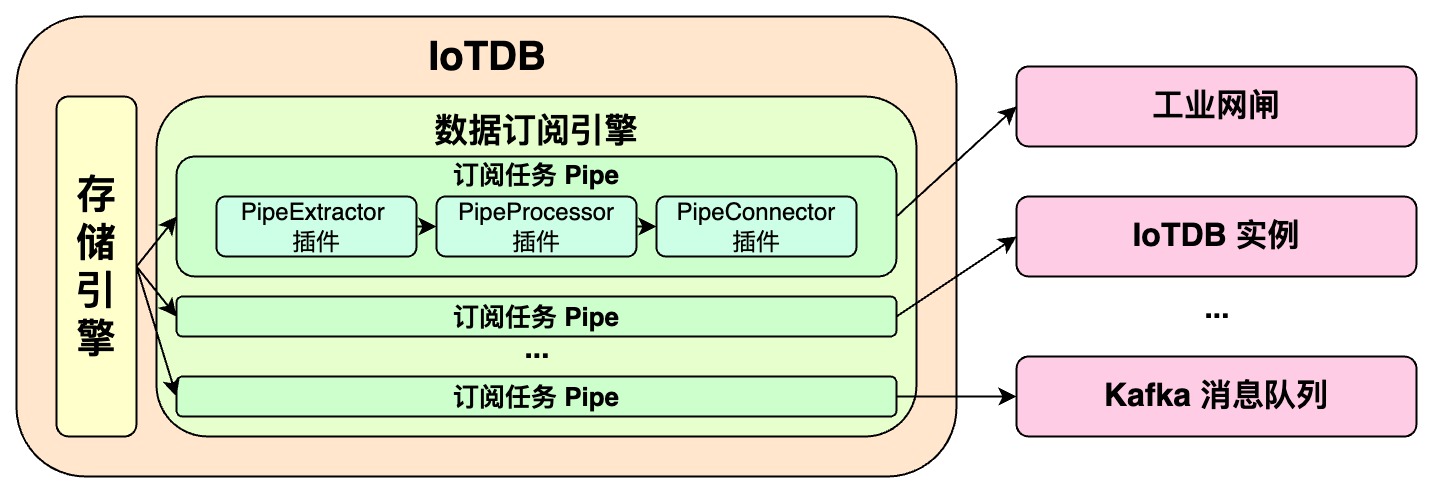
| **IoTDB 数据订阅功能可以将 IoTDB 的数据传输到另一个数据平台,我们将<font color=RED>一个数据订阅任务称为 Pipe</font>。** |
| |
| **一个 Pipe 包含三个子任务(插件):** |
| |
| - 抽取(Extract) |
| - 处理(Process) |
| - 发送(Connect) |
| |
| **Pipe 允许用户自定义三个子任务的处理逻辑,通过类似 UDF 的方式处理数据。**在一个 Pipe 中,上述的子任务分别由三种插件执行实现,数据会依次经过这三个插件进行处理:Pipe Extractor 用于抽取数据,Pipe Processor 用于处理数据,Pipe Connector 用于发送数据,最终数据将被发至外部系统。 |
| |
| **Pipe 任务的模型如下:** |
| |
|  |
| |
| |
| |
| 描述一个数据订阅任务,本质就是描述 Pipe Extractor、Pipe Processor 和 Pipe Connector 插件的属性。用户可以通过 SQL 语句声明式地配置三个子任务的具体属性,通过组合不同的属性,实现灵活的数据 ETL 能力。 |
| |
| 利用数据订阅功能,可以搭建完整的数据链路来满足端*边云同步、异地灾备、读写负载分库*等需求。 |
| |
| # 快速开始 |
| |
| **🎯 目标:实现 IoTDB A -> IoTDB B 的全量数据订阅** |
| |
| - 启动两个 IoTDB,A(datanode -> 127.0.0.1:6667) B(datanode -> 127.0.0.1:6668) |
| |
| - 创建 A -> B 的 Pipe,在 A 上执行 |
| |
| ```sql |
| create pipe a2b |
| with connector ( |
| 'connector'='iotdb-thrift-connector', |
| 'connector.ip'='127.0.0.1', |
| 'connector.port'='6668' |
| ) |
| ``` |
| |
| - 启动 A -> B 的 Pipe,在 A 上执行 |
| |
| ```sql |
| start pipe a2b |
| ``` |
| |
| - 向 A 写入数据 |
| |
| ```sql |
| INSERT INTO root.db.d(time, m) values (1, 1) |
| ``` |
| |
| - 在 B 检查由 A 同步过来的数据 |
| |
| ```sql |
| SELECT ** FROM root |
| ``` |
| |
| > ❗️**注:目前的 IoTDB -> IoTDB 的数据订阅实现并不支持 DDL 同步** |
| > |
| > 即:不支持 ttl,trigger,别名,模板,视图,创建/删除序列,创建/删除数据库等操作**IoTDB -> IoTDB 的数据订阅要求目标端 IoTDB:** |
| > |
| > * 开启自动创建元数据:需要人工配置数据类型的编码和压缩与发送端保持一致 |
| > * 不开启自动创建元数据:手工创建与源端一致的元数据 |
| |
| # Pipe 同步任务管理 |
| |
| ## 创建流水线 |
| |
| 可以使用 `CREATE PIPE` 语句来创建一条数据订阅任务,SQL 语句如下所示: |
| |
| ```sql |
| CREATE PIPE <PipeId> -- PipeId 是能够唯一标定流水线任务的名字 |
| WITH EXTRACTOR ( |
| -- 默认的 IoTDB 数据抽取插件 |
| 'extractor' = 'iotdb-extractor', |
| -- 路径前缀,只有能够匹配该路径前缀的数据才会被抽取,用作后续的处理和发送 |
| 'extractor.pattern' = 'root.timecho', |
| -- 是否抽取历史数据 |
| 'extractor.history.enable' = 'true', |
| -- 描述被抽取的历史数据的时间范围,表示最早时间 |
| 'extractor.history.start-time' = '2011.12.03T10:15:30+01:00', |
| -- 描述被抽取的历史数据的时间范围,表示最晚时间 |
| 'extractor.history.end-time' = '2022.12.03T10:15:30+01:00', |
| -- 是否抽取实时数据 |
| 'extractor.realtime.enable' = 'true', |
| -- 描述实时数据的抽取方式 |
| 'extractor.realtime.mode' = 'hybrid', |
| ) |
| WITH PROCESSOR ( |
| -- 默认的数据处理插件,即不做任何处理 |
| 'processor' = 'do-nothing-processor', |
| ) |
| WITH CONNECTOR ( |
| -- IoTDB 数据发送插件,目标端为 IoTDB |
| 'connector' = 'iotdb-thrift-connector', |
| -- 目标端 IoTDB 其中一个 DataNode 节点的数据服务 ip |
| 'connector.ip' = '127.0.0.1', |
| -- 目标端 IoTDB 其中一个 DataNode 节点的数据服务 port |
| 'connector.port' = '6667', |
| ) |
| ``` |
| |
| **创建流水线时需要配置 PipeId 以及三个插件部分的参数:** |
| |
| | 配置项 | 说明 | 是否必填 | 默认实现 | 默认实现说明 | 是否允许自定义实现 | |
| | --------- | ------------------------------------------------- | --------------------------- | -------------------- | -------------------------------------------------------- | ------------------------- | |
| | PipeId | 全局唯一标定一个同步流水线的名称 | <font color=red>必填</font> | - | - | - | |
| | extractor | Pipe Extractor 插件,负责在数据库底层抽取同步数据 | 选填 | iotdb-extractor | 将数据库的全量历史数据和后续到达的实时数据接入同步流水线 | 否 | |
| | processor | Pipe Processor 插件,负责处理数据 | 选填 | do-nothing-processor | 对传入的数据不做任何处理 | <font color=red>是</font> | |
| | connector | Pipe Connector 插件,负责发送数据 | <font color=red>必填</font> | - | - | <font color=red>是</font> | |
| |
| 示例中,使用了 iotdb-extractor、do-nothing-processor 和 iotdb-thrift-connector 插件构建数据订阅任务。IoTDB 还内置了其他的数据订阅插件,**请查看“系统预置数据订阅插件”一节**。 |
| |
| **一个最简的 CREATE PIPE 语句示例如下:** |
| |
| ```sql |
| CREATE PIPE <PipeId> -- PipeId 是能够唯一标定流水线任务的名字 |
| WITH CONNECTOR ( |
| -- IoTDB 数据发送插件,目标端为 IoTDB |
| 'connector' = 'iotdb-thrift-connector', |
| -- 目标端 IoTDB 其中一个 DataNode 节点的数据服务 ip |
| 'connector.ip' = '127.0.0.1', |
| -- 目标端 IoTDB 其中一个 DataNode 节点的数据服务 port |
| 'connector.port' = '6667', |
| ) |
| ``` |
| |
| 其表达的语义是:将本数据库实例中的全量历史数据和后续到达的实时数据,同步到目标为 127.0.0.1:6667 的 IoTDB 实例上。 |
| |
| **注意:** |
| |
| - EXTRACTOR 和 PROCESSOR 为选填配置,若不填写配置参数,系统则会采用相应的默认实现 |
| |
| - CONNECTOR 为必填配置,需要在 CREATE PIPE 语句中声明式配置 |
| |
| - CONNECTOR 具备自复用能力。对于不同的流水线,如果他们的 CONNECTOR 具备完全相同 KV 属性的(所有属性的 key 对应的 value 都相同),**那么系统最终只会创建一个 CONNECTOR 实例**,以实现对连接资源的复用。 |
| |
| - 例如,有下面 pipe1, pipe2 两个流水线的声明: |
| |
| ```sql |
| CREATE PIPE pipe1 |
| WITH CONNECTOR ( |
| 'connector' = 'iotdb-thrift-connector', |
| 'connector.thrift.host' = 'localhost', |
| 'connector.thrift.port' = '9999', |
| ) |
| |
| CREATE PIPE pipe2 |
| WITH CONNECTOR ( |
| 'connector' = 'iotdb-thrift-connector', |
| 'connector.thrift.port' = '9999', |
| 'connector.thrift.host' = 'localhost', |
| 'connector.id' = '1', |
| ) |
| ``` |
| |
| - 因为它们对 CONNECTOR 的声明完全相同(**即使某些属性声明时的顺序不同**),所以框架会自动对它们声明的 CONNECTOR 进行复用,最终 pipe1, pipe2 的CONNECTOR 将会是同一个实例。 |
| |
| - 请不要构建出包含数据循环同步的应用场景(会导致无限循环): |
| |
| - IoTDB A -> IoTDB B -> IoTDB A |
| - IoTDB A -> IoTDB A |
| |
| ## 启动流水线 |
| |
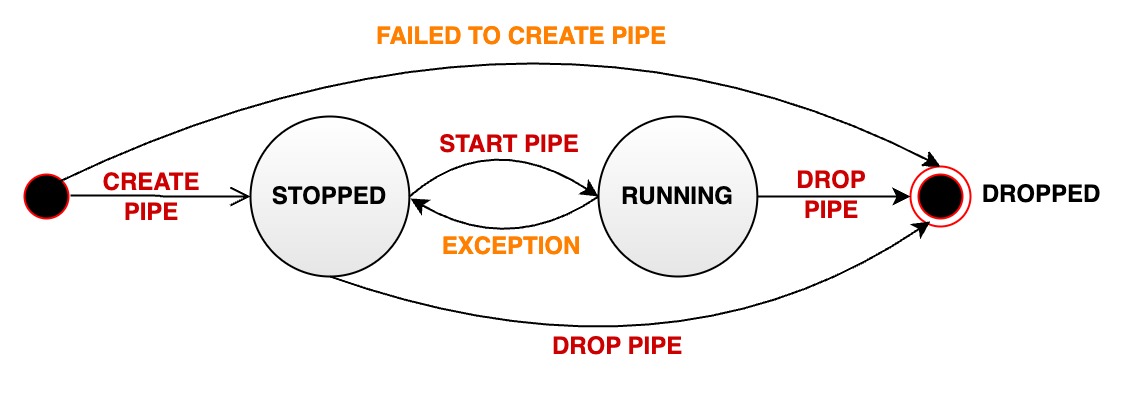
| CREATE PIPE 语句成功执行后,流水线相关实例会被创建,但整个流水线的运行状态会被置为 STOPPED,即流水线不会立刻处理数据。 |
| |
| 可以使用 START PIPE 语句使流水线开始处理数据: |
| |
| ```sql |
| START PIPE <PipeId> |
| ``` |
| |
| ## 停止流水线 |
| |
| 使用 STOP PIPE 语句使流水线停止处理数据: |
| |
| ```sql |
| STOP PIPE <PipeId> |
| ``` |
| |
| ## 删除流水线 |
| |
| 使用 DROP PIPE 语句使流水线停止处理数据(当流水线状态为 RUNNING 时),然后删除整个流水线同步任务: |
| |
| ```sql |
| DROP PIPE <PipeId> |
| ``` |
| |
| 用户在删除流水线前,不需要执行 STOP 操作。 |
| |
| ## 展示流水线 |
| |
| 使用 SHOW PIPES 语句查看所有流水线: |
| |
| ```sql |
| SHOW PIPES |
| ``` |
| |
| 查询结果如下: |
| |
| ```sql |
| +-----------+-----------------------+-------+-------------+-------------+-------------+----------------+ |
| | ID| CreationTime | State|PipeExtractor|PipeProcessor|PipeConnector|ExceptionMessage| |
| +-----------+-----------------------+-------+-------------+-------------+-------------+----------------+ |
| |iotdb-kafka|2022-03-30T20:58:30.689|RUNNING| ...| ...| ...| None| |
| +-----------+-----------------------+-------+-------------+-------------+-------------+----------------+ |
| |iotdb-iotdb|2022-03-31T12:55:28.129|STOPPED| ...| ...| ...| TException: ...| |
| +-----------+-----------------------+-------+-------------+-------------+-------------+----------------+ |
| ``` |
| |
| 可以使用 `<PipeId>` 指定想看的某个同步任务状态: |
| |
| ```sql |
| SHOW PIPE <PipeId> |
| ``` |
| |
| 您也可以通过 where 子句,判断某个 \<PipeId\> 使用的 Pipe Connector 被复用的情况。 |
| |
| ```sql |
| SHOW PIPES |
| WHERE CONNECTOR USED BY <PipeId> |
| ``` |
| |
| ## 流水线运行状态迁移 |
| |
| 一个数据订阅 pipe 在其被管理的生命周期中会经过多种状态: |
| |
| - **STOPPED:**pipe 处于停止运行状态。当管道处于该状态时,有如下几种可能: |
| - 当一个 pipe 被成功创建之后,其初始状态为暂停状态 |
| - 用户手动将一个处于正常运行状态的 pipe 暂停,其状态会被动从 RUNNING 变为 STOPPED |
| - 当一个 pipe 运行过程中出现无法恢复的错误时,其状态会自动从 RUNNING 变为 STOPPED |
| - **RUNNING:**pipe 正在正常工作 |
| - **DROPPED:**pipe 任务被永久删除 |
| |
| 下图表明了所有状态以及状态的迁移: |
| |
|  |
| |
| # **系统预置数据订阅插件** |
| |
| ## 预置 extractor |
| |
| ### iotdb-extractor |
| |
| 作用:抽取 IoTDB 内部的历史或实时数据进入流水线。 |
| |
| | key | value | value 取值范围 | required or optional with default | |
| | ---------------------------- | ---------------------------------------------- | -------------------------------------- | --------------------------------- | |
| | extractor | iotdb-extractor | String: iotdb-extractor | required | |
| | extractor.pattern | 用于筛选时间序列的路径前缀 | String: 任意的时间序列前缀 | optional: root | |
| | extractor.history.enable | 是否同步历史数据 | Boolean: true, false | optional: true | |
| | extractor.history.start-time | 同步历史数据的开始 event time,包含 start-time | Long: [Long.MIN_VALUE, Long.MAX_VALUE] | optional: Long.MIN_VALUE | |
| | extractor.history.end-time | 同步历史数据的结束 event time,包含 end-time | Long: [Long.MIN_VALUE, Long.MAX_VALUE] | optional: Long.MAX_VALUE | |
| | extractor.realtime.enable | 是否同步实时数据 | Boolean: true, false | optional: true | |
| | extractor.realtime.mode | 实时数据的抽取模式 | String: hybrid, log, file | optional: hybrid | |
| |
| > 🚫 **extractor.pattern 参数说明** |
| > |
| > * Pattern 需用反引号修饰不合法字符或者是不合法路径节点,例如如果希望筛选 root.\`a@b\` 或者 root.\`123\`,应设置 pattern 为 root.\`a@b\` 或者 root.\`123\`(具体参考 [单双引号和反引号的使用时机](https://iotdb.apache.org/zh/Download/#_1-0-版本不兼容的语法详细说明)) |
| > |
| > * 在底层实现中,当检测到 pattern 为 root(默认值)时,同步效率较高,其他任意格式都将降低性能 |
| > |
| > * 路径前缀不需要能够构成完整的路径。例如,当创建一个包含参数为 'extractor.pattern'='root.aligned.1' 的 pipe 时: |
| > |
| > * root.aligned.1TS |
| > * root.aligned.1TS.\`1\` |
| > * root.aligned.100TS |
| > |
| > 的数据会被同步; |
| > |
| > * root.aligned.\`1\` |
| > * root.aligned.\`123\` |
| > |
| > 的数据不会被同步。 |
| > |
| > * root.\_\_system 的数据不会被 pipe 抽取,即不会被同步到目标端。用户虽然可以在 extractor.pattern 中包含任意前缀,包括带有(或覆盖) root.\__system 的前缀,但是 root.__system 下的数据总是会被 pipe 忽略的 |
| |
| |
| |
| > ❗️**extractor.history 的 start-time,end-time 参数说明** |
| > |
| > * start-time,end-time 应为 ISO 格式,例如 2011-12-03T10:15:30 或 2011-12-03T10:15:30+01:00 |
| |
| |
| |
| > ✅ **一条数据从生产到落库 IoTDB,包含两个关键的时间概念** |
| > |
| > * **event time:**数据实际生产时的时间(或者数据生产系统给数据赋予的生成时间,是数据点中的时间项),也称为事件时间。 |
| > * **arrival time:**数据到达 IoTDB 系统内的时间。 |
| > |
| > 我们常说的乱序数据,指的是数据到达时,其 **event time** 远落后于当前系统时间(或者已经落库的最大 **event time**)的数据。另一方面,不论是乱序数据还是顺序数据,只要它们是新到达系统的,那它们的 **arrival time** 都是会随着数据到达 IoTDB 的顺序递增的。 |
| |
| |
| |
| > 💎 **iotdb-extractor 的工作可以拆分成两个阶段** |
| > |
| > 1. 历史数据抽取:所有 **arrival time** < 创建 pipe 时**当前系统时间**的数据称为历史数据 |
| > 2. 实时数据抽取:所有 **arrival time** >= 创建 pipe 时**当前系统时间**的数据称为实时数据 |
| > |
| > 历史数据传输阶段和实时数据传输阶段,**两阶段串行执行,只有当历史数据传输阶段完成后,才执行实时数据传输阶段。** |
| > |
| > 用户可以指定 iotdb-extractor 进行: |
| > |
| > * 历史数据抽取(`'extractor.history.enable' = 'true'`, `'extractor.realtime.enable' = 'false'` ) |
| > * 实时数据抽取(`'extractor.history.enable' = 'false'`, `'extractor.realtime.enable' = 'true'` ) |
| > * 全量数据抽取(`'extractor.history.enable' = 'true'`, `'extractor.realtime.enable' = 'true'` ) |
| > * 禁止同时设置 extractor.history.enable 和 extractor.relatime.enable 为 false |
| |
| |
| |
| > 📌 **extractor.realtime.mode:数据抽取的模式** |
| > |
| > * log:该模式下,流水线仅使用操作日志进行数据处理、发送 |
| > * file:该模式下,流水线仅使用数据文件进行数据处理、发送 |
| > * hybrid:该模式,考虑了按操作日志逐条目发送数据时延迟低但吞吐低的特点,以及按数据文件批量发送时发送吞吐高但延迟高的特点,能够在不同的写入负载下自动切换适合的数据抽取方式,首先采取基于操作日志的数据抽取方式以保证低发送延迟,当产生数据积压时自动切换成基于数据文件的数据抽取方式以保证高发送吞吐,积压消除时自动切换回基于操作日志的数据抽取方式,避免了采用单一数据抽取算法难以平衡数据发送延迟或吞吐的问题。 |
| |
| ## 预置 processor |
| |
| ### do-nothing-processor |
| |
| 作用:不对 extractor 传入的事件做任何的处理。 |
| |
| | key | value | value 取值范围 | required or optional with default | |
| | --------- | -------------------- | ---------------------------- | --------------------------------- | |
| | processor | do-nothing-processor | String: do-nothing-processor | required | |
| |
| ## 预置 connector |
| |
| ### iotdb-thrift-connector-v1(别名:iotdb-thrift-connector) |
| |
| 作用:主要用于 IoTDB(v1.2.0+)与 IoTDB(v1.2.0+)之间的数据传输。使用 Thrift RPC 框架传输数据,单线程 blocking IO 模型。保证接收端 apply 数据的顺序与发送端接受写入请求的顺序一致。 |
| |
| 限制:源端 IoTDB 与 目标端 IoTDB 版本都需要在 v1.2.0+。 |
| |
| | key | value | value 取值范围 | required or optional with default | |
| | -------------- | --------------------------------------------------- | ----------------------------------------------------------- | --------------------------------- | |
| | connector | iotdb-thrift-connector 或 iotdb-thrift-connector-v1 | String: iotdb-thrift-connector 或 iotdb-thrift-connector-v1 | required | |
| | connector.ip | 目标端 IoTDB 其中一个 DataNode 节点的数据服务 ip | String | required | |
| | connector.port | 目标端 IoTDB 其中一个 DataNode 节点的数据服务 port | Integer | required | |
| |
| > 📌 请确保接收端已经创建了发送端的所有时间序列,或是开启了自动创建元数据,否则将会导致 pipe 运行失败。 |
| |
| ### iotdb-thrift-connector-v2 |
| |
| 作用:主要用于 IoTDB(v1.2.0+)与 IoTDB(v1.2.0+)之间的数据传输。使用 Thrift RPC 框架传输数据,多线程 async non-blocking IO 模型,传输性能高,尤其适用于目标端为分布式时的场景。不保证接收端 apply 数据的顺序与发送端接受写入请求的顺序一致,但是保证数据发送的完整性(at-least-once)。 |
| |
| 限制:源端 IoTDB 与 目标端 IoTDB 版本都需要在 v1.2.0+。 |
| |
| | key | value | value 取值范围 | required or optional with default | |
| | ------------------- | ------------------------------------------------------- | ------------------------------------------------------------ | --------------------------------- | |
| | connector | iotdb-thrift-connector-v2 | String: iotdb-thrift-connector-v2 | required | |
| | connector.node-urls | 目标端 IoTDB 任意多个 DataNode 节点的数据服务端口的 url | String。例:'127.0.0.1:6667,127.0.0.1:6668,127.0.0.1:6669''127.0.0.1:6667' | required | |
| |
| > 📌 请确保接收端已经创建了发送端的所有时间序列,或是开启了自动创建元数据,否则将会导致 pipe 运行失败。 |
| |
| ### iotdb-sync-connector |
| |
| 作用:主要用于 IoTDB(v1.2.0+)向更低版本的 IoTDB 传输数据,使用 v1.2.0 版本前的数据同步(Sync)协议。使用 Thrift RPC 框架传输数据。单线程 sync blocking IO 模型,传输性能较弱。 |
| |
| 限制:源端 IoTDB 版本需要在 v1.2.0+,目标端 IoTDB 版本可以是 v1.2.0+、v1.1.x(更低版本的 IoTDB 理论上也支持,但是未经测试)。 |
| |
| 注意:理论上 v1.2.0+ IoTDB 可作为 v1.2.0 版本前的任意版本的数据同步(Sync)接收端。 |
| |
| | key | value | value 取值范围 | required or optional with default | |
| | ------------------ | ------------------------------------------------------------ | ---------------------------- | --------------------------------- | |
| | connector | iotdb-sync-connector | String: iotdb-sync-connector | required | |
| | connector.ip | 目标端 IoTDB 其中一个 DataNode 节点的数据服务 ip | String | required | |
| | connector.port | 目标端 IoTDB 其中一个 DataNode 节点的数据服务 port | Integer | required | |
| | connector.user | 目标端 IoTDB 的用户名,注意该用户需要支持数据写入、TsFile Load 的权限 | String | optional: root | |
| | connector.password | 目标端 IoTDB 的密码,注意该用户需要支持数据写入、TsFile Load 的权限 | String | optional: root | |
| | connector.version | 目标端 IoTDB 的版本,用于伪装自身实际版本,绕过目标端的版本一致性检查 | String | optional: 1.1 | |
| |
| > 📌 请确保接收端已经创建了发送端的所有时间序列,或是开启了自动创建元数据,否则将会导致 pipe 运行失败。 |
| |
| ### do-nothing-connector |
| |
| 作用:不对 processor 传入的事件做任何的处理。 |
| |
| | key | value | value 取值范围 | required or optional with default | |
| | --------- | -------------------- | ---------------------------- | --------------------------------- | |
| | connector | do-nothing-connector | String: do-nothing-connector | required | |
| |
| # 自定义数据订阅插件开发 |
| |
| ## 编程开发依赖 |
| |
| 推荐采用 maven 构建项目,在`pom.xml`中添加以下依赖。请注意选择和 IoTDB 服务器版本相同的依赖版本。 |
| |
| ```xml |
| <dependency> |
| <groupId>org.apache.iotdb</groupId> |
| <artifactId>pipe-api</artifactId> |
| <version>1.2.0</version> |
| <scope>provided</scope> |
| </dependency> |
| ``` |
| |
| ## 事件驱动编程模型 |
| |
| 数据订阅插件的用户编程接口设计,参考了事件驱动编程模型的通用设计理念。事件(Event)是用户编程接口中的数据抽象,而编程接口与具体的执行方式解耦,只需要专注于描述事件(数据)到达系统后,系统期望的处理方式即可。 |
| |
| 在数据订阅插件的用户编程接口中,事件是数据库数据写入操作的抽象。事件由单机同步引擎捕获,按照同步三个阶段的流程,依次传递至 PipeExtractor 插件,PipeProcessor 插件和 PipeConnector 插件,并依次在三个插件中触发用户逻辑的执行。 |
| |
| 为了兼顾端侧低负载场景下的同步低延迟和端侧高负载场景下的同步高吞吐,同步引擎会动态地在操作日志和数据文件中选择处理对象,因此,同步的用户编程接口要求用户提供下列两类事件的处理逻辑:操作日志写入事件 TabletInsertionEvent 和数据文件写入事件 TsFileInsertionEvent。 |
| |
| ### **操作日志写入事件(TabletInsertionEvent)** |
| |
| 操作日志写入事件(TabletInsertionEvent)是对用户写入请求的高层数据抽象,它通过提供统一的操作接口,为用户提供了操纵写入请求底层数据的能力。 |
| |
| 对于不同的数据库部署方式,操作日志写入事件对应的底层存储结构是不一样的。对于单机部署的场景,操作日志写入事件是对写前日志(WAL)条目的封装;对于分布式部署的场景,操作日志写入事件是对单个节点共识协议操作日志条目的封装。 |
| |
| 对于数据库不同写入请求接口生成的写入操作,操作日志写入事件对应的请求结构体的数据结构也是不一样的。IoTDB 提供了 InsertRecord、InsertRecords、InsertTablet、InsertTablets 等众多的写入接口,每一种写入请求都使用了完全不同的序列化方式,生成的二进制条目也不尽相同。 |
| |
| 操作日志写入事件的存在,为用户提供了一种统一的数据操作视图,它屏蔽了底层数据结构的实现差异,极大地降低了用户的编程门槛,提升了功能的易用性。 |
| |
| ```java |
| /** TabletInsertionEvent is used to define the event of data insertion. */ |
| public interface TabletInsertionEvent extends Event { |
| |
| /** |
| * The consumer processes the data row by row and collects the results by RowCollector. |
| * |
| * @return Iterable<TabletInsertionEvent> a list of new TabletInsertionEvent contains the results |
| * collected by the RowCollector |
| */ |
| Iterable<TabletInsertionEvent> processRowByRow(BiConsumer<Row, RowCollector> consumer); |
| |
| /** |
| * The consumer processes the Tablet directly and collects the results by RowCollector. |
| * |
| * @return Iterable<TabletInsertionEvent> a list of new TabletInsertionEvent contains the results |
| * collected by the RowCollector |
| */ |
| Iterable<TabletInsertionEvent> processTablet(BiConsumer<Tablet, RowCollector> consumer); |
| } |
| ``` |
| |
| ### **数据文件写入事件(TsFileInsertionEvent)** |
| |
| 数据文件写入事件(TsFileInsertionEvent) 是对数据库文件落盘操作的高层抽象,它是若干操作日志写入事件(TabletInsertionEvent)的数据集合。 |
| |
| IoTDB 的存储引擎是 LSM 结构的。数据写入时会先将写入操作落盘到日志结构的文件里,同时将写入数据保存在内存里。当内存达到控制上限,则会触发刷盘行为,即将内存中的数据转换为数据库文件,同时删除之前预写的操作日志。当内存中的数据转换为数据库文件中的数据时,会经过编码压缩和通用压缩两次压缩处理,因此数据库文件的数据相比内存中的原始数据占用的空间更少。 |
| |
| 在极端的网络情况下,直接传输数据文件相比传输数据写入的操作要更加经济,它会占用更低的网络带宽,能实现更快的传输速度。当然,天下没有免费的午餐,对文件中的数据进行计算处理,相比直接对内存中的数据进行计算处理时,需要额外付出文件 I/O 的代价。但是,正是磁盘数据文件和内存写入操作两种结构各有优劣的存在,给了系统做动态权衡调整的机会,也正是基于这样的观察,插件的事件模型中才引入了数据文件写入事件。 |
| |
| 综上,数据文件写入事件出现在同步插件的事件流中,存在下面两种情况: |
| |
| (1)历史数据抽取:一个同步任务开始前,所有已经落盘的写入数据都会以 TsFile 的形式存在。一个同步任务开始后,采集历史数据时,历史数据将以 TsFileInsertionEvent 作为抽象; |
| |
| 1. (2)实时数据抽取:一个同步任务进行时,当数据流中实时处理操作日志写入事件的速度慢于写入请求速度一定进度之后,未来得及处理的操作日志写入事件会被被持久化至磁盘,以 TsFile 的形式存在,这一些数据被同步引擎采集到后,会以 TsFileInsertionEvent 作为抽象。 |
| |
| ```java |
| /** |
| * TsFileInsertionEvent is used to define the event of writing TsFile. Event data stores in disks, |
| * which is compressed and encoded, and requires IO cost for computational processing. |
| */ |
| public interface TsFileInsertionEvent extends Event { |
| |
| /** |
| * The method is used to convert the TsFileInsertionEvent into several TabletInsertionEvents. |
| * |
| * @return the list of TsFileInsertionEvent |
| */ |
| Iterable<TabletInsertionEvent> toTabletInsertionEvents(); |
| } |
| ``` |
| |
| ## 自定义数据订阅插件编程接口定义 |
| |
| 基于自定义数据订阅插件编程接口,用户可以轻松编写数据抽取插件、 数据处理插件和数据发送插件,从而使得同步功能灵活适配各种工业场景。 |
| |
| ### 数据抽取插件接口 |
| |
| 数据抽取是同步数据从数据抽取到数据发送三阶段的第一阶段。数据抽取插件(PipeExtractor)是同步引擎和存储引擎的桥梁,它通过监听存储引擎的行为,捕获各种数据写入事件。 |
| |
| ```java |
| /** |
| * PipeExtractor |
| * |
| * <p>PipeExtractor is responsible for capturing events from sources. |
| * |
| * <p>Various data sources can be supported by implementing different PipeExtractor classes. |
| * |
| * <p>The lifecycle of a PipeExtractor is as follows: |
| * |
| * <ul> |
| * <li>When a collaboration task is created, the KV pairs of `WITH EXTRACTOR` clause in SQL are |
| * parsed and the validation method {@link PipeExtractor#validate(PipeParameterValidator)} |
| * will be called to validate the parameters. |
| * <li>Before the collaboration task starts, the method {@link |
| * PipeExtractor#customize(PipeParameters, PipeExtractorRuntimeConfiguration)} will be called |
| * to config the runtime behavior of the PipeExtractor. |
| * <li>Then the method {@link PipeExtractor#start()} will be called to start the PipeExtractor. |
| * <li>While the collaboration task is in progress, the method {@link PipeExtractor#supply()} will |
| * be called to capture events from sources and then the events will be passed to the |
| * PipeProcessor. |
| * <li>The method {@link PipeExtractor#close()} will be called when the collaboration task is |
| * cancelled (the `DROP PIPE` command is executed). |
| * </ul> |
| */ |
| public interface PipeExtractor extends PipePlugin { |
| |
| /** |
| * This method is mainly used to validate {@link PipeParameters} and it is executed before {@link |
| * PipeExtractor#customize(PipeParameters, PipeExtractorRuntimeConfiguration)} is called. |
| * |
| * @param validator the validator used to validate {@link PipeParameters} |
| * @throws Exception if any parameter is not valid |
| */ |
| void validate(PipeParameterValidator validator) throws Exception; |
| |
| /** |
| * This method is mainly used to customize PipeExtractor. In this method, the user can do the |
| * following things: |
| * |
| * <ul> |
| * <li>Use PipeParameters to parse key-value pair attributes entered by the user. |
| * <li>Set the running configurations in PipeExtractorRuntimeConfiguration. |
| * </ul> |
| * |
| * <p>This method is called after the method {@link |
| * PipeExtractor#validate(PipeParameterValidator)} is called. |
| * |
| * @param parameters used to parse the input parameters entered by the user |
| * @param configuration used to set the required properties of the running PipeExtractor |
| * @throws Exception the user can throw errors if necessary |
| */ |
| void customize(PipeParameters parameters, PipeExtractorRuntimeConfiguration configuration) |
| throws Exception; |
| |
| /** |
| * Start the extractor. After this method is called, events should be ready to be supplied by |
| * {@link PipeExtractor#supply()}. This method is called after {@link |
| * PipeExtractor#customize(PipeParameters, PipeExtractorRuntimeConfiguration)} is called. |
| * |
| * @throws Exception the user can throw errors if necessary |
| */ |
| void start() throws Exception; |
| |
| /** |
| * Supply single event from the extractor and the caller will send the event to the processor. |
| * This method is called after {@link PipeExtractor#start()} is called. |
| * |
| * @return the event to be supplied. the event may be null if the extractor has no more events at |
| * the moment, but the extractor is still running for more events. |
| * @throws Exception the user can throw errors if necessary |
| */ |
| Event supply() throws Exception; |
| } |
| ``` |
| |
| ### 数据处理插件接口 |
| |
| 数据处理是同步数据从数据抽取到数据发送三阶段的第二阶段。数据处理插件(PipeProcessor)主要用于过滤和转换由数据抽取插件(PipeExtractor)捕获的各种事件。 |
| |
| ```java |
| /** |
| * PipeProcessor |
| * |
| * <p>PipeProcessor is used to filter and transform the Event formed by the PipeExtractor. |
| * |
| * <p>The lifecycle of a PipeProcessor is as follows: |
| * |
| * <ul> |
| * <li>When a collaboration task is created, the KV pairs of `WITH PROCESSOR` clause in SQL are |
| * parsed and the validation method {@link PipeProcessor#validate(PipeParameterValidator)} |
| * will be called to validate the parameters. |
| * <li>Before the collaboration task starts, the method {@link |
| * PipeProcessor#customize(PipeParameters, PipeProcessorRuntimeConfiguration)} will be called |
| * to config the runtime behavior of the PipeProcessor. |
| * <li>While the collaboration task is in progress: |
| * <ul> |
| * <li>PipeExtractor captures the events and wraps them into three types of Event instances. |
| * <li>PipeProcessor processes the event and then passes them to the PipeConnector. The |
| * following 3 methods will be called: {@link |
| * PipeProcessor#process(TabletInsertionEvent, EventCollector)}, {@link |
| * PipeProcessor#process(TsFileInsertionEvent, EventCollector)} and {@link |
| * PipeProcessor#process(Event, EventCollector)}. |
| * <li>PipeConnector serializes the events into binaries and send them to sinks. |
| * </ul> |
| * <li>When the collaboration task is cancelled (the `DROP PIPE` command is executed), the {@link |
| * PipeProcessor#close() } method will be called. |
| * </ul> |
| */ |
| public interface PipeProcessor extends PipePlugin { |
| |
| /** |
| * This method is mainly used to validate {@link PipeParameters} and it is executed before {@link |
| * PipeProcessor#customize(PipeParameters, PipeProcessorRuntimeConfiguration)} is called. |
| * |
| * @param validator the validator used to validate {@link PipeParameters} |
| * @throws Exception if any parameter is not valid |
| */ |
| void validate(PipeParameterValidator validator) throws Exception; |
| |
| /** |
| * This method is mainly used to customize PipeProcessor. In this method, the user can do the |
| * following things: |
| * |
| * <ul> |
| * <li>Use PipeParameters to parse key-value pair attributes entered by the user. |
| * <li>Set the running configurations in PipeProcessorRuntimeConfiguration. |
| * </ul> |
| * |
| * <p>This method is called after the method {@link |
| * PipeProcessor#validate(PipeParameterValidator)} is called and before the beginning of the |
| * events processing. |
| * |
| * @param parameters used to parse the input parameters entered by the user |
| * @param configuration used to set the required properties of the running PipeProcessor |
| * @throws Exception the user can throw errors if necessary |
| */ |
| void customize(PipeParameters parameters, PipeProcessorRuntimeConfiguration configuration) |
| throws Exception; |
| |
| /** |
| * This method is called to process the TabletInsertionEvent. |
| * |
| * @param tabletInsertionEvent TabletInsertionEvent to be processed |
| * @param eventCollector used to collect result events after processing |
| * @throws Exception the user can throw errors if necessary |
| */ |
| void process(TabletInsertionEvent tabletInsertionEvent, EventCollector eventCollector) |
| throws Exception; |
| |
| /** |
| * This method is called to process the TsFileInsertionEvent. |
| * |
| * @param tsFileInsertionEvent TsFileInsertionEvent to be processed |
| * @param eventCollector used to collect result events after processing |
| * @throws Exception the user can throw errors if necessary |
| */ |
| void process(TsFileInsertionEvent tsFileInsertionEvent, EventCollector eventCollector) |
| throws Exception; |
| |
| /** |
| * This method is called to process the Event. |
| * |
| * @param event Event to be processed |
| * @param eventCollector used to collect result events after processing |
| * @throws Exception the user can throw errors if necessary |
| */ |
| void process(Event event, EventCollector eventCollector) throws Exception; |
| } |
| ``` |
| |
| ### 数据发送插件接口 |
| |
| 数据发送是同步数据从数据抽取到数据发送三阶段的第三阶段。数据发送插件(PipeConnector)主要用于发送经由数据处理插件(PipeProcessor)处理过后的各种事件,它作为数据订阅框架的网络实现层,接口上应允许接入多种实时通信协议和多种连接器。 |
| |
| ```java |
| /** |
| * PipeConnector |
| * |
| * <p>PipeConnector is responsible for sending events to sinks. |
| * |
| * <p>Various network protocols can be supported by implementing different PipeConnector classes. |
| * |
| * <p>The lifecycle of a PipeConnector is as follows: |
| * |
| * <ul> |
| * <li>When a collaboration task is created, the KV pairs of `WITH CONNECTOR` clause in SQL are |
| * parsed and the validation method {@link PipeConnector#validate(PipeParameterValidator)} |
| * will be called to validate the parameters. |
| * <li>Before the collaboration task starts, the method {@link |
| * PipeConnector#customize(PipeParameters, PipeConnectorRuntimeConfiguration)} will be called |
| * to config the runtime behavior of the PipeConnector and the method {@link |
| * PipeConnector#handshake()} will be called to create a connection with sink. |
| * <li>While the collaboration task is in progress: |
| * <ul> |
| * <li>PipeExtractor captures the events and wraps them into three types of Event instances. |
| * <li>PipeProcessor processes the event and then passes them to the PipeConnector. |
| * <li>PipeConnector serializes the events into binaries and send them to sinks. The |
| * following 3 methods will be called: {@link |
| * PipeConnector#transfer(TabletInsertionEvent)}, {@link |
| * PipeConnector#transfer(TsFileInsertionEvent)} and {@link |
| * PipeConnector#transfer(Event)}. |
| * </ul> |
| * <li>When the collaboration task is cancelled (the `DROP PIPE` command is executed), the {@link |
| * PipeConnector#close() } method will be called. |
| * </ul> |
| * |
| * <p>In addition, the method {@link PipeConnector#heartbeat()} will be called periodically to check |
| * whether the connection with sink is still alive. The method {@link PipeConnector#handshake()} |
| * will be called to create a new connection with the sink when the method {@link |
| * PipeConnector#heartbeat()} throws exceptions. |
| */ |
| public interface PipeConnector extends PipePlugin { |
| |
| /** |
| * This method is mainly used to validate {@link PipeParameters} and it is executed before {@link |
| * PipeConnector#customize(PipeParameters, PipeConnectorRuntimeConfiguration)} is called. |
| * |
| * @param validator the validator used to validate {@link PipeParameters} |
| * @throws Exception if any parameter is not valid |
| */ |
| void validate(PipeParameterValidator validator) throws Exception; |
| |
| /** |
| * This method is mainly used to customize PipeConnector. In this method, the user can do the |
| * following things: |
| * |
| * <ul> |
| * <li>Use PipeParameters to parse key-value pair attributes entered by the user. |
| * <li>Set the running configurations in PipeConnectorRuntimeConfiguration. |
| * </ul> |
| * |
| * <p>This method is called after the method {@link |
| * PipeConnector#validate(PipeParameterValidator)} is called and before the method {@link |
| * PipeConnector#handshake()} is called. |
| * |
| * @param parameters used to parse the input parameters entered by the user |
| * @param configuration used to set the required properties of the running PipeConnector |
| * @throws Exception the user can throw errors if necessary |
| */ |
| void customize(PipeParameters parameters, PipeConnectorRuntimeConfiguration configuration) |
| throws Exception; |
| |
| /** |
| * This method is used to create a connection with sink. This method will be called after the |
| * method {@link PipeConnector#customize(PipeParameters, PipeConnectorRuntimeConfiguration)} is |
| * called or will be called when the method {@link PipeConnector#heartbeat()} throws exceptions. |
| * |
| * @throws Exception if the connection is failed to be created |
| */ |
| void handshake() throws Exception; |
| |
| /** |
| * This method will be called periodically to check whether the connection with sink is still |
| * alive. |
| * |
| * @throws Exception if the connection dies |
| */ |
| void heartbeat() throws Exception; |
| |
| /** |
| * This method is used to transfer the TabletInsertionEvent. |
| * |
| * @param tabletInsertionEvent TabletInsertionEvent to be transferred |
| * @throws PipeConnectionException if the connection is broken |
| * @throws Exception the user can throw errors if necessary |
| */ |
| void transfer(TabletInsertionEvent tabletInsertionEvent) throws Exception; |
| |
| /** |
| * This method is used to transfer the TsFileInsertionEvent. |
| * |
| * @param tsFileInsertionEvent TsFileInsertionEvent to be transferred |
| * @throws PipeConnectionException if the connection is broken |
| * @throws Exception the user can throw errors if necessary |
| */ |
| void transfer(TsFileInsertionEvent tsFileInsertionEvent) throws Exception; |
| |
| /** |
| * This method is used to transfer the Event. |
| * |
| * @param event Event to be transferred |
| * @throws PipeConnectionException if the connection is broken |
| * @throws Exception the user can throw errors if necessary |
| */ |
| void transfer(Event event) throws Exception; |
| } |
| ``` |
| |
| # 自定义数据订阅插件管理 |
| |
| 为了保证用户自定义插件在实际生产中的灵活性和易用性,系统还需要提供对插件进行动态统一管理的能力。本章节介绍的数据订阅插件管理语句提供了对插件进行动态统一管理的入口。 |
| |
| ## 加载插件语句 |
| |
| 在 IoTDB 中,若要在系统中动态载入一个用户自定义插件,则首先需要基于 PipeExtractor、 PipeProcessor 或者 PipeConnector 实现一个具体的插件类,然后需要将插件类编译打包成 jar 可执行文件,最后使用加载插件的管理语句将插件载入 IoTDB。 |
| |
| 加载插件的管理语句的语法如图所示。 |
| |
| ```sql |
| CREATE PIPEPLUGIN <别名> |
| AS <全类名> |
| USING <JAR 包的 URI> |
| ``` |
| |
| 例如,用户实现了一个全类名为 edu.tsinghua.iotdb.pipe.ExampleProcessor 的数据处理插件,打包后的 jar 资源包存放到了 https://example.com:8080/iotdb/pipe-plugin.jar 上,用户希望在同步引擎中使用这个插件,将插件标记为 example。那么,这个数据处理插件的创建语句如图所示。 |
| |
| ```sql |
| CREATE PIPEPLUGIN example |
| AS 'edu.tsinghua.iotdb.pipe.ExampleProcessor' |
| USING URI '<https://example.com:8080/iotdb/pipe-plugin.jar>' |
| ``` |
| |
| ## 删除插件语句 |
| |
| 当用户不再想使用一个插件,需要将插件从系统中卸载时,可以使用如图所示的删除插件语句。 |
| |
| ```sql |
| DROP PIPEPLUGIN <别名> |
| ``` |
| |
| ## 查看插件语句 |
| |
| 用户也可以按需查看系统中的插件。查看插件的语句如图所示。 |
| |
| ```sql |
| SHOW PIPEPLUGINS |
| ``` |
| |
| # 权限管理 |
| |
| ## Pipe 任务 |
| |
| | 权限名称 | 描述 | |
| |----------|-------------| |
| | USE_PIPE | 注册流水线。路径无关。 | |
| | USE_PIPE | 开启流水线。路径无关。 | |
| | USE_PIPE | 停止流水线。路径无关。 | |
| | USE_PIPE | 卸载流水线。路径无关。 | |
| | USE_PIPE | 查询流水线。路径无关。 | |
| |
| ## Pipe 插件 |
| |
| | 权限名称 | 描述 | |
| |----------|---------------| |
| | USE_PIPE | 注册流水线插件。路径无关。 | |
| | USE_PIPE | 开启流水线插件。路径无关。 | |
| | USE_PIPE | 查询流水线插件。路径无关。 | |
| |
| # 功能特性 |
| |
| ## 最少一次语义保证 **at-least-once** |
| |
| 数据订阅功能向外部系统传输数据时,提供 at-least-once 的传输语义。在大部分场景下,同步功能可提供 exactly-once 保证,即所有数据被恰好同步一次。 |
| |
| 但是在以下场景中,可能存在部分数据被同步多次**(断点续传)**的情况: |
| |
| - 临时的网络故障:某次数据传输请求失败后,系统会进行重试发送,直至到达最大尝试次数 |
| - Pipe 插件逻辑实现异常:插件运行中抛出错误,系统会进行重试发送,直至到达最大尝试次数 |
| - 数据节点宕机、重启等导致的数据分区切主:分区变更完成后,受影响的数据会被重新传输 |
| - 集群不可用:集群可用后,受影响的数据会重新传输 |
| |
| ## 源端:数据写入与 Pipe 处理、发送数据异步解耦 |
| |
| 数据订阅功能中,数据传输采用的是异步复制模式。 |
| |
| 数据订阅与写入操作完全脱钩,不存在对写入关键路径的影响。该机制允许框架在保证持续数据订阅的前提下,保持时序数据库的写入速度。 |
| |
| ## 源端:可自适应数据写入负载的数据传输策略 |
| |
| 支持根据写入负载,动态调整数据传输方式,同步默认使用 TsFile 文件与操作流动态混合传输(`'extractor.realtime.mode'='hybrid'`)。 |
| |
| 在数据写入负载高时,优先选择 TsFile 传输的方式。TsFile 压缩比高,节省网络带宽。 |
| |
| 在数据写入负载低时,优先选择操作流同步传输的方式。操作流传输实时性高。 |
| |
| ## 源端:高可用集群部署时,Pipe 服务高可用 |
| |
| 当发送端 IoTDB 为高可用集群部署模式时,数据订阅服务也将是高可用的。 数据订阅框架将监控每个数据节点的数据订阅进度,并定期做轻量级的分布式一致性快照以保存同步状态。 |
| |
| - 当发送端集群某数据节点宕机时,数据订阅框架可以利用一致性快照以及保存在副本上的数据快速恢复同步,以此实现数据订阅服务的高可用。 |
| - 当发送端集群整体宕机并重启时,数据订阅框架也能使用快照恢复同步服务。 |
| |
| # 配置参数 |
| |
| 在 iotdb-common.properties 中: |
| |
| ```Properties |
| #################### |
| ### Pipe Configuration |
| #################### |
| |
| # Uncomment the following field to configure the pipe lib directory. |
| # For Window platform |
| # If its prefix is a drive specifier followed by "\\", or if its prefix is "\\\\", then the path is |
| # absolute. Otherwise, it is relative. |
| # pipe_lib_dir=ext\\pipe |
| # For Linux platform |
| # If its prefix is "/", then the path is absolute. Otherwise, it is relative. |
| pipe_lib_dir=ext/pipe |
| |
| # The name of the directory that stores the tsfiles temporarily hold or generated by the pipe module. |
| # The directory is located in the data directory of IoTDB. |
| pipe_hardlink_tsfile_dir_name=pipe |
| |
| # The maximum number of threads that can be used to execute the pipe subtasks in PipeSubtaskExecutor. |
| pipe_subtask_executor_max_thread_num=5 |
| |
| # The number of events that need to be consumed before a checkpoint is triggered. |
| pipe_subtask_executor_basic_check_point_interval_by_consumed_event_count=10000 |
| |
| # The time duration (in milliseconds) between checkpoints. |
| pipe_subtask_executor_basic_check_point_interval_by_time_duration=10000 |
| |
| # The maximum blocking time (in milliseconds) for the pending queue. |
| pipe_subtask_executor_pending_queue_max_blocking_time_ms=1000 |
| |
| # The default size of ring buffer in the realtime extractor's disruptor queue. |
| pipe_extractor_assigner_disruptor_ring_buffer_size=65536 |
| |
| # The maximum number of entries the deviceToExtractorsCache can hold. |
| pipe_extractor_matcher_cache_size=1024 |
| |
| # The capacity for the number of tablet events that can be stored in the pending queue of the hybrid realtime extractor. |
| pipe_extractor_pending_queue_capacity=128 |
| |
| # The limit for the number of tablet events that can be held in the pending queue of the hybrid realtime extractor. |
| # Noted that: this should be less than or equals to realtimeExtractorPendingQueueCapacity |
| pipe_extractor_pending_queue_tablet_limit=64 |
| |
| # The buffer size used for reading file during file transfer. |
| pipe_connector_read_file_buffer_size=8388608 |
| |
| # The delay period (in milliseconds) between each retry when a connection failure occurs. |
| pipe_connector_retry_interval_ms=1000 |
| |
| # The size of the pending queue for the PipeConnector to store the events. |
| pipe_connector_pending_queue_size=1024 |
| |
| # The number of heartbeat loop cycles before collecting pipe meta once |
| pipe_heartbeat_loop_cycles_for_collecting_pipe_meta=100 |
| |
| # The initial delay before starting the PipeMetaSyncer service. |
| pipe_meta_syncer_initial_sync_delay_minutes=3 |
| |
| # The sync regular interval (in minutes) for the PipeMetaSyncer service. |
| pipe_meta_syncer_sync_interval_minutes=3 |
| ``` |
