| # Weex Toolkit |
| |
|  |
|  |
| [](https://github.com/weexteam/weex-toolkit/issues) |
| [](https://www.npmjs.com/package/weex-toolkit) |
| [](https://ci.appveyor.com/project/erha19/weex-toolkit/branch/dev) |
| |
| > Weex Toolkit is the Standard Tooling for Weex Development. |
| |
| ## Introduction |
| |
| This is the branch that develops weex-toolkit2.0. |
| |
| Now you can install the alpha version by: |
| |
| ```base |
| $ npm i weex-toolkit@alpha -g |
| ``` |
| |
| To know more help info, you can run : |
| |
| ```base |
| $ weex --help |
| ``` |
| |
| ## Goals |
| |
| We hope to get the following goals: |
| |
| - Flawless installation and upgrade experience. |
| - Better unit & functional testing support. |
| - Reasonable Node-side command line solution that can be used by all Node-side programs. |
| - Some feartures and optimization for the submodules, such as `weex-debugger`, `weexpack` and so on. |
| |
| More detail you can see the [milestone](https://github.com/weexteam/weex-toolkit/milestone). |
| |
| ## Basic architecture diagram |
| |
| 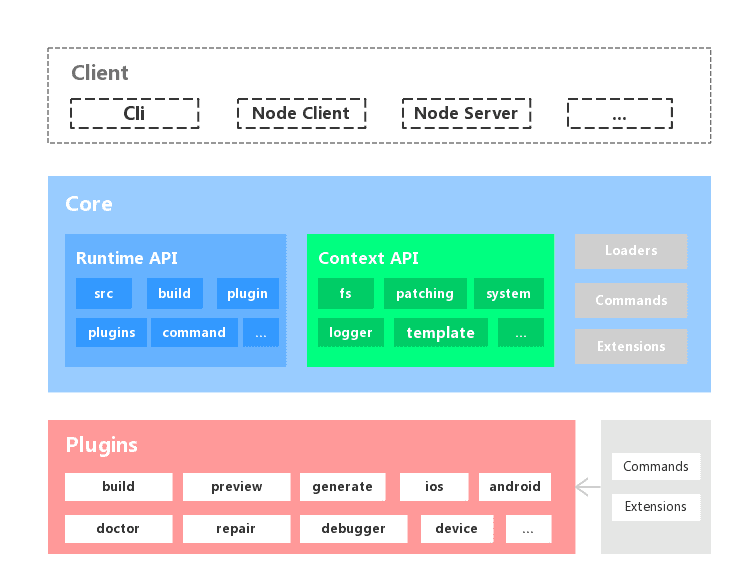 |
| |
| ## Lifecycle |
| |
| 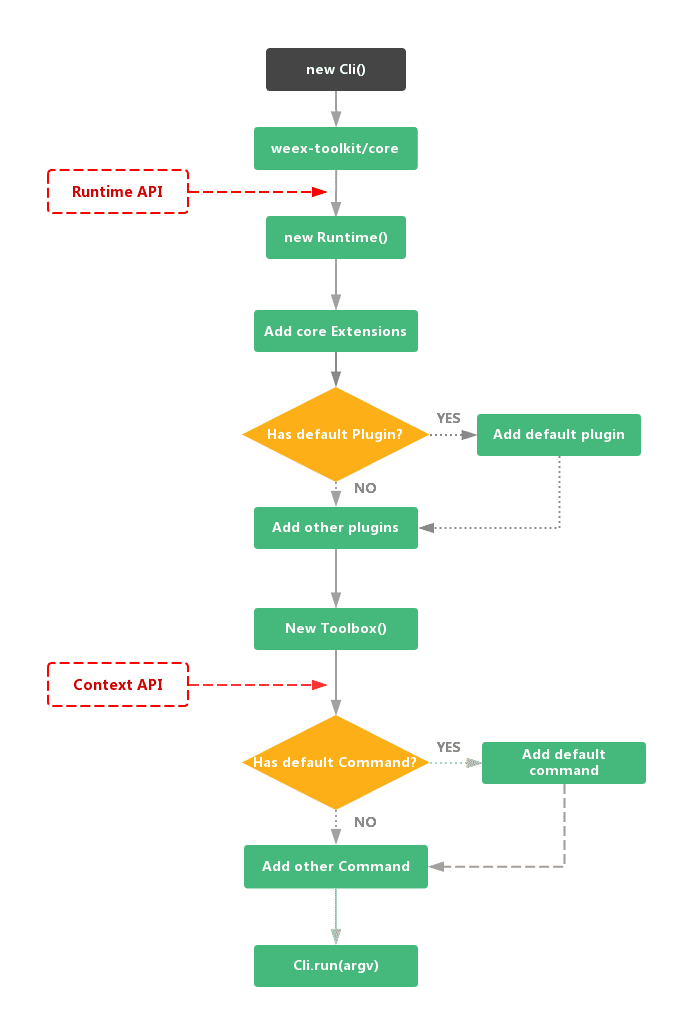 |
| |
| ## License |
| |
| [MIT](https://github.com/weexteam/weex-toolkit/blob/dev/LICENSE) |
