| <!--- |
| /* |
| * Licensed to the Apache Software Foundation (ASF) under one |
| * or more contributor license agreements. See the NOTICE file |
| * distributed with this work for additional information |
| * regarding copyright ownership. The ASF licenses this file |
| * to you under the Apache License, Version 2.0 (the |
| * "License"); you may not use this file except in compliance |
| * with the License. You may obtain a copy of the License at |
| * |
| * http://www.apache.org/licenses/LICENSE-2.0 |
| * |
| * Unless required by applicable law or agreed to in writing, |
| * software distributed under the License is distributed on an |
| * "AS IS" BASIS, WITHOUT WARRANTIES OR CONDITIONS OF ANY |
| * KIND, either express or implied. See the License for the |
| * specific language governing permissions and limitations |
| * under the License. |
| */ |
| ---> |
| # Suggest to implement GraphQL as standard web interface for S2Graph. |
| |
| - To support GraphQL through [Akka HTTP](https://github.com/akka/akka-http) and [Sangria](https://github.com/sangria-graphql). Akka HTTP and Sangria each are an HTTP Server and GraphQL Scala implementation. |
| - It is also used [GraphiQL](https://github.com/graphql/graphiql) as a tool for GraphQL queries. |
| |
| ## Working example |
| |
|  |
| |
| 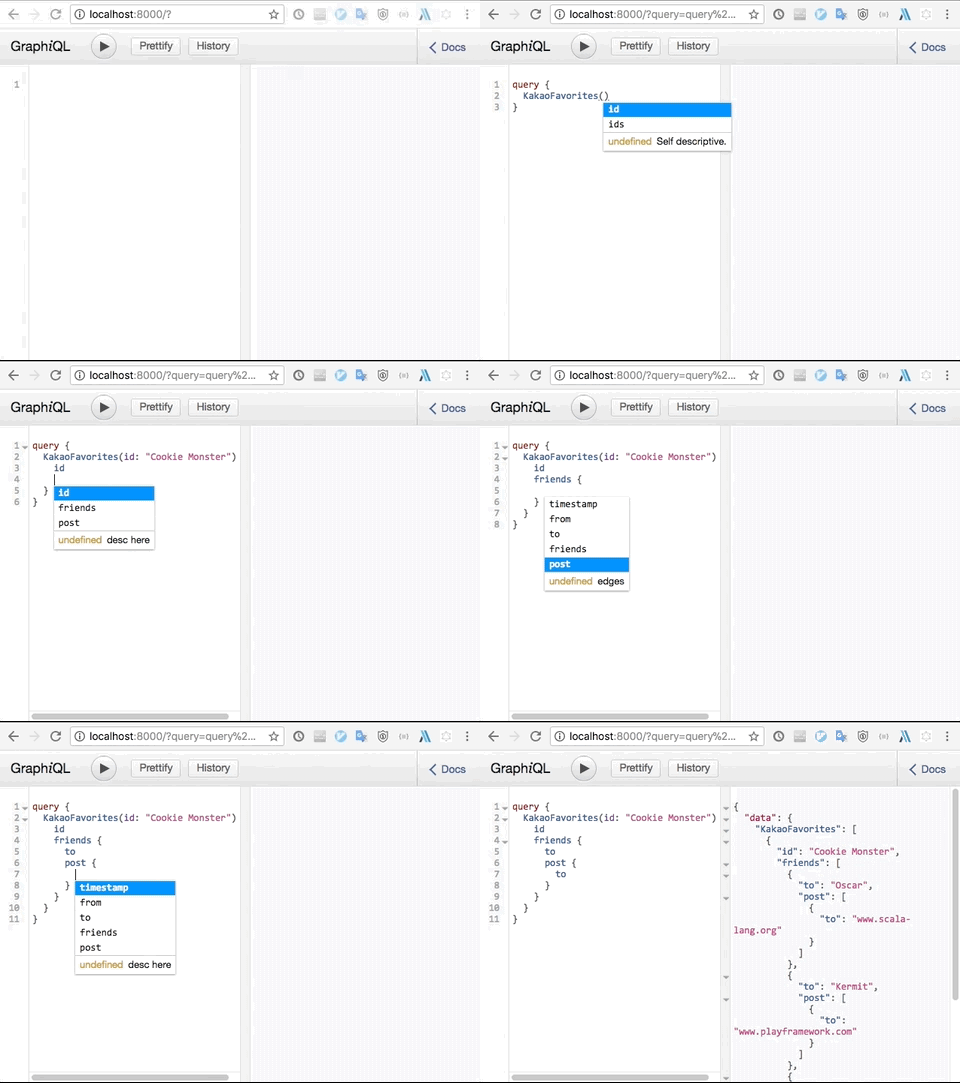 |
| |
| |
| ## Overview |
| |
| The reason why started supporting GraphQL is the `Label` used by S2Graph has a strong type system, so it will work well with the `schema` provided by GraphQL. |
| |
| So far, whenever GraphQL schema has been changed, it has been reflected in S2Graph Model (Service, Label... ). |
| |
| ## Setup |
| Assume that hbase is running on localhost. |
| If the hbase environment is not set up, you should type the following commands. |
| |
| ```bash |
| sbt package |
| target/apache-s2graph-0.2.1-SNAPSHOT-incubating-bin/bin/hbase-standalone.sh start |
| ``` |
| |
| If hbase is running well, run the following command after cloning the project locally. |
| |
| `GraphiQL` is not directly related to the `GraphQL` implementation, but is recommended for convenient queries. |
| Because of the license problem, you should download the file through the following command. |
| |
| ```bash |
| cd s2graphql/src/main/resources/assets |
| wget https://raw.githubusercontent.com/daewon/sangria-akka-http-example/master/src/main/resources/assets/graphiql.html |
| |
| ``` |
| |
| You can see that the `graphiql.html` file is added to the `s2graphql/src/main/resources/assets` folder as shown below. |
| |
| ``` |
| $ls |
| graphiql.html |
| ``` |
| |
| Then let's run http server. |
| |
| ```bash |
| sbt -DschemaCacheTTL=-1 -Dhttp.port=8000 'project s2graphql' '~re-start' |
| ``` |
| |
| When the server is running, connect to `http://localhost:8000`. If it works normally, you can see the following screen. |
| |
|  |
| |
| ## API List |
| - createService |
| - createLabel |
| - addEdges |
| - addEdge |
| - query (You can recursively browse the linked labels from the service and any other labels that are linked from that label) |
| |
| ## Your First Grpah (GraphQL version) |
| |
| [S2Graph tutorial](https://github.com/apache/incubator-s2graph#your-first-graph) |
| The following content rewrote `Your first graph` to the GraphQL version. |
| |
| ### Start by connecting to `http://localhost:8000`. |
| |
| The environment for this examples is Mac OS and Chrome. |
| You can get help with schema-based `Autocompletion` using the `ctrl + space` key. |
| |
| If you add a `label` or `service`, etc. you will need to `refresh` (`cmd + r`) your browser because the schema will change dynamically. |
| |
| #### 1. First, we need a name for the new service. |
| |
| The following POST query will create a service named "KakaoFavorites". |
| |
| Request |
| ```graphql |
| mutation { |
| Management { |
| createService( |
| name: "KakaoFavorites" |
| compressionAlgorithm: gz |
| ) { |
| object { |
| name |
| } |
| } |
| } |
| } |
| ``` |
| |
| Response |
| ```json |
| { |
| "data": { |
| "Management": { |
| "createService": { |
| "object": { |
| "name": "KakaoFavorites" |
| } |
| } |
| } |
| } |
| } |
| ``` |
| |
| |
| #### 1.1 And create a `service column`` which is meta information for storing vertex. |
| |
| The following POST query will create a service column with the age attribute named "user" |
| |
| Request |
| ```graphql |
| mutation { |
| Management { |
| createServiceColumn( |
| serviceName: KakaoFavorites |
| columnName: "user" |
| columnType: string |
| props: { |
| name: "age" |
| dataType: int |
| defaultValue: "0" |
| storeInGlobalIndex: true |
| } |
| ) { |
| isSuccess |
| object { |
| name |
| props { |
| name |
| dataType |
| } |
| } |
| } |
| } |
| } |
| ``` |
| |
| Response |
| ```json |
| { |
| "data": { |
| "Management": { |
| "createServiceColumn": { |
| "isSuccess": true, |
| "object": { |
| "name": "user", |
| "props": [ |
| { |
| "name": "age", |
| "dataType": "int" |
| } |
| ] |
| } |
| } |
| } |
| } |
| } |
| ``` |
| |
| |
| To make sure the service and service column is created correctly, check out the following. |
| |
| > Since the schema has changed, GraphiQL must recognize the changed schema. To do this, refresh the browser several times. |
| |
| Request |
| ```graphql |
| query { |
| Management { |
| Services(name:KakaoFavorites) { |
| name |
| serviceColumns { |
| name |
| columnType |
| props { |
| name |
| dataType |
| } |
| } |
| } |
| } |
| } |
| ``` |
| |
| Response |
| ```json |
| { |
| "data": { |
| "Management": { |
| "Service": { |
| "name": "KakaoFavorites", |
| "serviceColumns": [ |
| { |
| "name": "user", |
| "columnType": "string", |
| "props": [ |
| { |
| "name": "age", |
| "dataType": "int" |
| } |
| ] |
| } |
| ] |
| } |
| } |
| } |
| } |
| ``` |
| |
| #### 2. Next, we will need some friends. |
| |
| In S2Graph, relationships are organized as labels. Create a label called friends using the following createLabel API call: |
| |
| Request |
| |
| ```graphql |
| mutation { |
| Management { |
| createLabel( |
| name: "friends" |
| sourceService: { |
| KakaoFavorites: { |
| columnName: user |
| } |
| } |
| targetService: { |
| KakaoFavorites: { |
| columnName: user |
| } |
| } |
| consistencyLevel: strong |
| ) { |
| isSuccess |
| message |
| object { |
| name |
| serviceName |
| tgtColumnName |
| } |
| } |
| } |
| } |
| ``` |
| |
| Response |
| ```json |
| { |
| "data": { |
| "Management": { |
| "createLabel": { |
| "isSuccess": true, |
| "message": "Mutation successful", |
| "object": { |
| "name": "friends", |
| "serviceName": "KakaoFavorites", |
| "tgtColumnName": "user" |
| } |
| } |
| } |
| } |
| } |
| ``` |
| |
| Check if the label has been created correctly |
| > Since the schema has changed, GraphiQL must recognize the changed schema. To do this, refresh the browser several times. |
| |
| Request |
| ```graphql |
| query { |
| Management { |
| Labels(name: friends) { |
| name |
| srcColumnName |
| tgtColumnName |
| } |
| } |
| } |
| ``` |
| |
| Response |
| ```json |
| { |
| "data": { |
| "Management": { |
| "Label": { |
| "name": "friends", |
| "srcColumnName": "user", |
| "tgtColumnName": "user" |
| } |
| } |
| } |
| } |
| ``` |
| |
| Now that the label friends is ready, we can store the friendship data. |
| Entries of a label are called edges, and you can add edges with edges/insert API: |
| |
| > Since the schema has changed, GraphiQL must recognize the changed schema. To do this, refresh the browser several times. |
| |
| Request |
| ```graphql |
| mutation { |
| addEdge( |
| friends: [ |
| {from: "Elmo", to: "Big Bird"}, |
| {from: "Elmo", to: "Ernie"}, |
| {from: "Elmo", to: "Bert"}, |
| {from: "Cookie Monster", to: "Grover"}, |
| {from: "Cookie Monster", to: "Kermit"}, |
| {from: "Cookie Monster", to: "Oscar"}, |
| ] |
| ) { |
| isSuccess |
| } |
| } |
| ``` |
| |
| Response |
| ```json |
| { |
| "data": { |
| "addEdge": [ |
| { |
| "isSuccess": true |
| }, |
| { |
| "isSuccess": true |
| }, |
| { |
| "isSuccess": true |
| }, |
| { |
| "isSuccess": true |
| }, |
| { |
| "isSuccess": true |
| }, |
| { |
| "isSuccess": true |
| } |
| ] |
| } |
| } |
| ``` |
| |
| Query friends of Elmo with getEdges API: |
| |
| Request |
| |
| ```graphql |
| query { |
| KakaoFavorites { |
| user(id: "Elmo") { |
| friends { |
| user { |
| id |
| } |
| } |
| } |
| } |
| } |
| ``` |
| |
| Response |
| |
| ```json |
| { |
| "data": { |
| "KakaoFavorites": [ |
| { |
| "friends": [ |
| { |
| "to": "Bert" |
| }, |
| { |
| "to": "Ernie" |
| }, |
| { |
| "to": "Big Bird" |
| } |
| ] |
| } |
| ] |
| } |
| } |
| ``` |
| |
| Now query friends of Cookie Monster: |
| |
| Request |
| |
| ```graphql |
| query { |
| KakaoFavorites { |
| user(id: "Elmo") { |
| friends { |
| user { |
| id |
| } |
| } |
| } |
| } |
| } |
| ``` |
| |
| Response |
| |
| ```json |
| { |
| "data": { |
| "KakaoFavorites": { |
| "user": [ |
| { |
| "friends": [ |
| { |
| "to": { |
| "id": "Ernie" |
| } |
| }, |
| { |
| "to": { |
| "id": "Big Bird" |
| } |
| }, |
| { |
| "to": { |
| "id": "Bert" |
| } |
| } |
| ] |
| } |
| ] |
| } |
| } |
| } |
| ``` |
| |
| Before next examples, you should add url to serviceColumn. |
| |
| Request |
| |
| ```graphql |
| mutation { |
| Management { |
| createServiceColumn( |
| serviceName: KakaoFavorites |
| columnName: "url" |
| columnType: string |
| ) { |
| isSuccess |
| object { |
| name |
| } |
| } |
| } |
| } |
| ``` |
| |
| Response |
| |
| ```json |
| { |
| "data": { |
| "Management": { |
| "createServiceColumn": { |
| "isSuccess": true, |
| "object": { |
| "name": "url" |
| } |
| } |
| } |
| } |
| } |
| ``` |
| |
| |
| #### 3. Users of Kakao Favorites will be able to post URLs of their favorite websites. |
| |
| Request |
| |
| ```graphql |
| mutation { |
| Management { |
| createLabel( |
| name: "post" |
| sourceService: { |
| KakaoFavorites: { |
| columnName: user |
| } |
| } |
| targetService: { |
| KakaoFavorites: { |
| columnName: url |
| } |
| } |
| consistencyLevel: strong |
| ) { |
| isSuccess |
| message |
| object { |
| name |
| } |
| } |
| } |
| } |
| ``` |
| |
| Response |
| |
| ```json |
| { |
| "data": { |
| "Management": { |
| "createLabel": { |
| "isSuccess": true, |
| "message": "Mutation successful", |
| "object": { |
| "name": "post" |
| } |
| } |
| } |
| } |
| } |
| ``` |
| |
| Now, insert some posts of the users: |
| |
| > Since the schema has changed, GraphiQL must recognize the changed schema. To do this, refresh the browser several times. |
| |
| |
| Request |
| |
| ```graphql |
| mutation { |
| addEdge( |
| post: [ |
| { from: "Big Bird", to: "www.kakaocorp.com/en/main" }, |
| { from: "Big Bird", to: "github.com/kakao/s2graph" }, |
| { from: "Ernie", to: "groups.google.com/forum/#!forum/s2graph" }, |
| { from: "Grover", to: "hbase.apache.org/forum/#!forum/s2graph" }, |
| { from: "Kermit", to: "www.playframework.com"}, |
| { from: "Oscar", to: "www.scala-lang.org"} |
| ] |
| ) { |
| isSuccess |
| } |
| } |
| ``` |
| |
| Response |
| ```json |
| { |
| "data": { |
| "addEdge": [ |
| { |
| "isSuccess": true |
| }, |
| { |
| "isSuccess": true |
| }, |
| { |
| "isSuccess": true |
| }, |
| { |
| "isSuccess": true |
| }, |
| { |
| "isSuccess": true |
| }, |
| { |
| "isSuccess": true |
| } |
| ] |
| } |
| } |
| ``` |
| |
| #### 4. So far, we have designed a label schema for the labels friends and post, and stored some edges to them.+ |
| |
| This should be enough for creating the timeline feature! The following two-step query will return the URLs for Elmo's timeline, which are the posts of Elmo's friends: |
| |
| Request |
| |
| ```graphql |
| query { |
| KakaoFavorites { |
| user(id: "Elmo") { |
| id |
| friends { |
| user { |
| id |
| post { |
| url { |
| id |
| } |
| } |
| } |
| } |
| } |
| } |
| } |
| ``` |
| |
| Response |
| ```json |
| { |
| "data": { |
| "KakaoFavorites": { |
| "user": [ |
| { |
| "id": "Elmo", |
| "friends": [ |
| { |
| "user": { |
| "id": "Ernie", |
| "post": [ |
| { |
| "url": { |
| "id": "groups.google.com/forum/#!forum/s2graph" |
| } |
| } |
| ] |
| } |
| }, |
| { |
| "user": { |
| "id": "Bert", |
| "post": [] |
| } |
| }, |
| { |
| "user": { |
| "id": "Big Bird", |
| "post": [ |
| { |
| "url": { |
| "id": "github.com/kakao/s2graph" |
| } |
| }, |
| { |
| "url": { |
| "id": "www.kakaocorp.com/en/main" |
| } |
| } |
| ] |
| } |
| } |
| ] |
| } |
| ] |
| } |
| } |
| } |
| ``` |
| |
| Also try Cookie Monster's timeline: |
| |
| Request |
| ```graphql |
| query { |
| KakaoFavorites { |
| user(id: "Cookie Monster") { |
| friends { |
| user { |
| id |
| post { |
| url { |
| id |
| } |
| } |
| } |
| } |
| } |
| } |
| } |
| ``` |
| |
| Response |
| ```json |
| { |
| "data": { |
| "KakaoFavorites": { |
| "user": [ |
| { |
| "friends": [ |
| { |
| "user": { |
| "id": "Oscar", |
| "post": [ |
| { |
| "url": { |
| "id": "www.scala-lang.org" |
| } |
| } |
| ] |
| } |
| }, |
| { |
| "user": { |
| "id": "Kermit", |
| "post": [ |
| { |
| "url": { |
| "id": "www.playframework.com" |
| } |
| } |
| ] |
| } |
| }, |
| { |
| "user": { |
| "id": "Grover", |
| "post": [ |
| { |
| "url": { |
| "id": "hbase.apache.org/forum/#!forum/s2graph" |
| } |
| } |
| ] |
| } |
| } |
| ] |
| } |
| ] |
| } |
| } |
| } |
| ``` |
| |
| |
|  |
| |
| The example above is by no means a full blown social network timeline, but it gives you an idea of how to represent, store and query graph data with S2Graph. |
| |
