| # Ignite cluster & node lifecycle |
| This document describes user-level and component-level cluster lifecycles and their mutual interaction. |
| |
| ## Node lifecycle |
| A node maintains its local state in the local persistent key-value storage named vault. The data stored in the vault is |
| semantically divided in the following categories: |
| * User-level local configuration properties (such as memory limits, network timeouts, etc). User-level configuration |
| properties can be written both at runtime (not all properties will be applied at runtime, however, - some of them will |
| require a full node restart) and when a node is shut down (in order to be able to change properties that prevent node |
| startup for some reason) |
| * System-level private properties (such as computed local statistics, node-local commin paths, etc). System-level |
| private properties are computed locally based on the information available at node locally (not based on metastorage |
| watched values) |
| * System-level distributed metastorage projected properties (such as paths to partition files, etc). System-level |
| projected properties are associated with one or more metastorage properties and are computed based on the local node |
| state and the metastorage properties values. System-level projected properties values are semantically bound to a |
| particular revision of the dependee properties and must be recalculated when dependees are changed (see |
| [reliable watch processing](#reliable-watch-processing)). |
| |
| The vault is created during the first node startup and optionally populated with the paremeters from the configuration |
| file passed in to the ``ignite node start`` [command](TODO link to CLI readme). Only user-level properties can be |
| written via the provided file. |
| |
| System-level properties are written to the storage during the first vault initialization by the node start process. |
| Projected properties are not initialized during the initial node startup because at this point the local node is not |
| aware of the distributed metastorage. The node remains in a 'zombie' state until after it learns that there is an |
| initialized metastorage (either via the ``ignite cluster init`` [command](TODO link to CLI readme) during the initial |
| cluster initialization) or from the group membershup service via gossip (implying that group membership protocol is |
| working at this point). |
| |
| ### Node components startup |
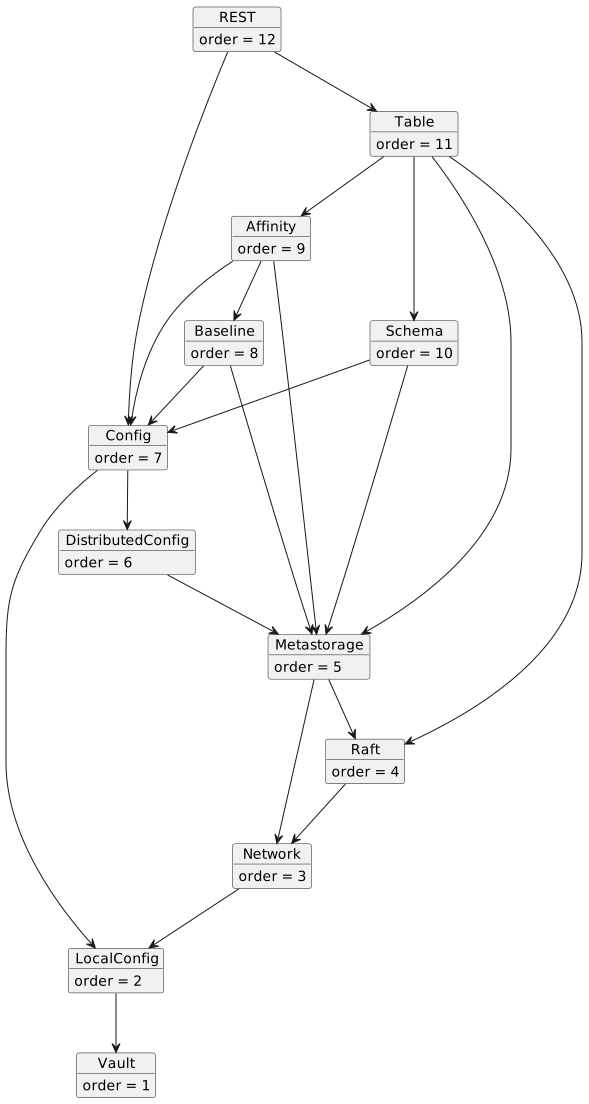
| For testability purposes, we require that component dependencies are defined upfront and provided at the construction |
| time. This additionaly requires that component dependencies form no cycles. Therefore, components form an acyclic |
| directed graph that is constructed in topological sort order wrt root. |
| |
| Components created and initialized also in an order consistent with a topological sort of the components graph. This |
| enforces serveral rules related to the components interaction: |
| * Since metastorage watches can only be added during the component startup, the watch notification order is consistent |
| with the component initialization order. I.e. if a component `B` depdends on a component `A`, then `A` receives watch |
| notification prior to `B`. |
| * Dependent component can directly call an API method on a dependee component (because it can obtain the dependee |
| reference during construction). Direct inverse calls are prohibited (this is enforced by only acquiring component |
| references during the components construction). Nevertheless, inverse call can be implemented by means of listeners or |
| callbacks: the dependent component installs a listener to a dependeee, which can be later invoked. |
| |
| <!-- |
| Change /svg/... to /uml/... here to view the image UML. |
| --> |
|  |
| |
| The diagram above shows the component dependency diagram and provides an order in which compomnents may be initialized. |
| |
| ## Cluster lifecycle |
| For a cluster to become operational, the metastorage instance must be initialized first. The initialization command |
| chooses a set of nodes (normally, 3 - 5 nodes) to host the distributed metastorage Raft group. When a node receives the |
| initialization command, it either creates a bootstrapped Raft instance with the given members (if this is a metastorage |
| group node), or writes the metastorage group member IDs to the vault as a private system-level property. |
| |
| After the metastorage is initialized, components start to receive and process watch events, updating the local state |
| according to the changes received from the watch. |
| |
| An entry point to user-initiated cluster state changes is [cluster configuration](../configuration/README.md). |
| Configuration module provides convenient ways for managing configuration both as Java API, as well as from ``ignite`` |
| command line utility. |
| |
| ## Reliable configuration changes |
| Any configuration change is translated to a metastorage multi-update and has a single configuration change ID. This ID |
| is used to enforce CAS-style configuration changes and to ensure no duplicate configuration changes are executed during |
| the cluster runtime. To reliably process cluster configuration changes, we introduce an additional metastorage key |
| |
| ``` |
| internal.configuration.applied=<change ID> |
| ``` |
| |
| that indicates the configuration change ID that was already processed and corresponding changes are written to the |
| metastorage. Whenever a node processes a configuration change, it must also conditionally update the |
| ``internal.configuration.applied`` value checking that the previous value is smaller than the change ID being applied. |
| This prevents configuration changes being processed more than once. Any metastorage update that processes configuration |
| change must update this key to indicate that this configuraion change has been already processed. It is safe to process |
| the same configuration change more than once since only one update will be applied. |
| |
| ## Reliable watch processing |
| All cluster state is written and maintained in the metastorage. Nodes may update some state in the metastorage, which |
| may require a recomputation of some other metastorage properties (for example, when cluster baseline changes, Ignite |
| needs to recalculate table affinity assignments). In other words, some properties in the metastore are dependent on each |
| other and we may need to reliably update one property in response to an update to another. |
| |
| To facilitate this pattern, Ignite uses the metastorage ability to replay metastorage changes from a certain revision |
| called [watch](TODO link to metastorage watch). To process watch updates reliably, we associate a special persistent |
| value called ``applied revision`` (stored in the vault) with each watch. We rely on the following assumptions about the |
| reliable watch processing: |
| * Watch execution is idempotent (if the same watch event is processed twice, the second watch invocation will have no |
| effect on the system). This is usually enforced by conditional multi-update operations for the metastorage and |
| deterministic projected properties calculations. The conditional multi-update should check that the revision of the key |
| being updated matches the revision observed with the watch's event upper bound. |
| * All properties read inside the watch must be read with the upper bound equal to the watch event revision. |
| * If watch processing initiates a metastorage update, the ``applied revision`` is propagated only after the metastorage |
| confirmed that the proposed change is committed (note that in this case it does not matter whether this particular |
| multi-update succeeds or not: we know that the first multi-update will succeed, and all further updates are idempotent, |
| so we need to make sure that at least one multi-update is committed). |
| * If watch processing initiates projected keys writes to the vault, the keys must be written atomically with the |
| updated ``applied revision`` value. |
| * If a watch initiates metastorage properties update, it should only be deployed on the metastorage group members to |
| avoid massive identical updates being issued to the metastorage (TODO: should really be only the leader of the |
| metastorage Raft group). |
| |
| In a case of a crash, each watch is restared from the revision stored in the corresponding ``applied revision`` variable |
| of the watch, and not processed events are replayed. |
| |
| ### Example: `CREATE TABLE` flow |
| We require that each Ignite table is assigned a globally unique ID (the ID must not repeat even after the table is |
| dropped, so we use the metastorage key revision to assign table IDs). |
| |
| To create a table, a user makes a change in the configuration tree by introducing the corresponding configuration |
| object. This can be done either via public [configuration API](TODO link to configuration API) or via the ``ignite`` |
| [configuration command](TODO link to CLI readme). Configuration validator checks that a table with the same name does |
| not exist (and performs other necessary checks) and writes the change to the metastorage. If the update succeeds, Ignite |
| considers the table created and completes user call. |
| |
| After the configuration change is applied, the table manager receives configuration change notification (essentially, |
| a transformed watch) on metastorage group nodes. Table manager uses configuration keys update counters (not revision) |
| as table IDs and attempts to create the following keys (updating the ``internal.configuration.applied`` key as was |
| described above): |
| |
| ``` |
| internal.tables.<ID>=<name> |
| ``` |
| |
| In order to process affinity calculations and assignments, the affinity manager creates a reliable watch for the |
| following keys on metastorage group members: |
| |
| ``` |
| internal.tables.* |
| internal.baseline |
| ``` |
| |
| Whenever a watch is fired, the affinity manager checks which key was updated. If the watch is triggered for |
| ``internal.tables.<ID>`` key, it calculates a new affinity for the table with the given ID. If the watch is triggered |
| for ``internal.baseline`` key, the manager recalculates affinity for all tables exsiting at the watch revision |
| (this can be done using the metastorage ``range(keys, upperBound)`` method providing the watch event revision as the |
| upper bound). The calculated affinity is written to the ``internal.tables.affinity.<ID>`` key. |
| |
| > Note that ideally the watch should only be processed on metastorage group leader, thus eliminating unnecessary network |
| > trips. Theoretically, we could have embedded this logic to the state machine, but this would enormously complicate |
| > the cluster updates and put metastorage consistency at risk. |
| |
| To handle partition assignments, partition manager creates a reliable watch for the affinity assignment key on all |
| nodes: |
| |
| ``` |
| internal.tables.affinity.<ID> |
| ``` |
| |
| Whenever a watch is fired, the node checks whether there exist new partitions assigned to the local node, and if there |
| are, the node bootstraps corresponding Raft partition servers (i.e. allocates paths to Raft logs and storage files). |
| The allocation information is written to projected vault keys: |
| |
| ``` |
| local.tables.partition.<ID>.<PARTITION_ID>.logpath=/path/to/raft/log |
| local.tables.partition.<ID>.<PARTITION_ID>.storagepath=/path/to/storage/file |
| ``` |
| |
| Once the projected keys are synced to the vault, the partition manager can create partition Raft servers (initialize |
| the log and storage, write hard state, register message handlers, etc). Upon startup, the node checks the existing |
| projected keys (finishing the raft log and storage initialization in case it crashed in the midst) and starts the Raft |
| servers. |
| |
| ### Stop node flow. |
| It's possible to stop node both when node was already started or during the startup process, in that case |
| node stop will prevent any new components startup and stop already started ones. |
| |
| Following method was added to Ignition interface: |
| ``` |
| /** |
| * Stops the node with given {@code name}. |
| * It's possible to stop both already started node or node that is currently starting. |
| * Has no effect if node with specified name doesn't exist. |
| * |
| * @param name Node name to stop. |
| * @throws IllegalArgumentException if null is specified instead of node name. |
| */ |
| public void stop(String name); |
| ``` |
| It's also possible to stop a node by calling ``close()`` on an already started Ignite instance. |
| |
| As a starting point stop process checks node status: |
| * If it's STOPPING - nothing happens, cause previous intention to stop node was already detected. |
| * If it's STARTING (means that node is somewhere in the middle of the startup process) - node status will be updated to |
| STOPPING and later on startup process will detect status change on attempt of starting next component, prevent further |
| startup process and stop already started managers and corresponding inner components. |
| * if it's STARTED - explicit stop will take an action. All components will be stopped. |
| |
| In all cases the node stop process consists of two phases: |
| * At phase one ``onNodeStop()`` will be called on all started components in reverse order, meaning that the last |
| started component will run ``onNodeStop()`` first. For most components ``onNodeStop()`` will be No-op. Core idea here |
| is to stop network communication on ``onNodeStop()`` in order to terminate distributed operations gracefully: |
| no network communication is allowed but node local logic still remains consistent. |
| * At phase two within a write busy lock, ``stop()`` will be called on all started components also in reverse order, |
| here thread stopping logic, inner structures cleanup and other related logic takes it time. Please pay attention that |
| at this point network communication isn't possible. |
| |
| Besides local node stopping logic two more actions took place on a cluster as a result of node left event: |
| * Both range and watch cursors will be removed on server side. Given process is linearized with meta storage |
| operations by using a meta storage raft. |
| * Baseline update and corresponding baseline recalculation with ongoing partition raft groups redeployment. |
