| --- |
| title: "Webhook" |
| description: > |
| Webhook Plugin |
| --- |
| |
| ## Overview |
| |
| An Incoming Webhook allows users to actively push data to DevLake. It's particularly useful when DevLake is missing the plugin that pulls data from your DevOps tool. |
| |
| When you create an Incoming Webhook within DevLake, DevLake generates a unique URL. You can post JSON payloads to this URL to push data to DevLake. |
| |
| As of v0.14.0, users can push incidents and deployments data required by DORA metrics to DevLake via Incoming Webhooks. |
| |
| ## Creating webhooks in DevLake |
| |
| ### Add a new webhook |
| To add a new webhook, go to the "Data Connections" page in config-ui and select "Issue/Deployment Incoming/Webhook". |
|  |
| |
| We recommend that you give your webhook connection a unique name so that you can identify and manage where you have used it later. |
| |
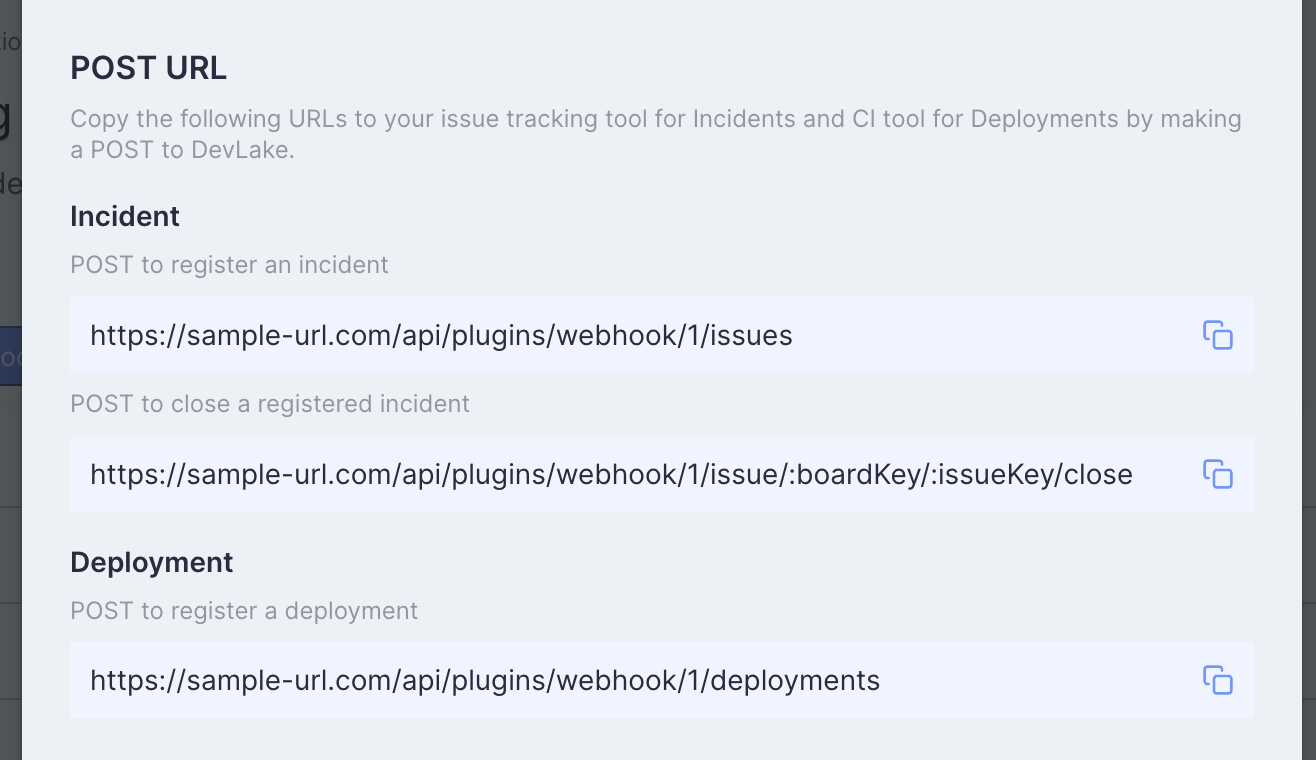
| After clicking on the "Generate POST URL" button, you will find four webhook URLs. Copy the ones that suit your usage into your CI or issue tracking systems. You can always come back to the webhook page to copy the URLs later on. |
| |
|  |
| |
| ## Deployments |
| |
| If your CI/CD tool isn't already supported by DevLake, you can insert curl commands as [Sample API Calls](https://devlake.apache.org/docs/Plugins/webhook#deployments-sample-api-calls) in your CI/CD script to post deployment data to DevLake. |
| |
| **Notice**: The URL shown in the screenshot and the following samples, `https://sample-url.com/...`, is just an example and should be replaced with the actual URL copied from your Config UI. |
| |
| #### Register a deployment |
| |
| `POST https://sample-url.com/api/plugins/webhook/1/cicd_tasks` |
| |
| The body should be a JSON and include columns as follows: |
| |
| | Keyname | Required | Notes | |
| | :---------: | :------: | ------------------------------------------------------------ | |
| | repo_url | ✔️ Yes | Repository url or other **unique** string | |
| | commit_sha | ✔️ Yes | commit sha | |
| | environment | ✖️ No | which type of machine did this task run in. one of `PRODUCTION` `STAGING` `TESTING` `DEVELOPMENT`. <br />Default is `PRODUCTION` | |
| | start_time | ✖️ No | Time, Format should be 2020-01-01T12:00:00+00:00<br />If absent, it is when DevLake receives the POST request. | |
| | end_time | ✖️ No | Time, Format should be 2020-01-01T12:00:00+00:00<br />`start_time` becomes required if end_time is provided. If absent, this column is null. | |
| |
| |
| ### Deployments Sample API Calls |
| |
| Sample CURL for the tasks starting and finishing in deploy pipelines: |
| |
| ``` |
| curl https://sample-url.com/api/plugins/webhook/1/deployments -X 'POST' -d '{"repo_url":"devlake","commit_sha":"015e3d3b480e417aede5a1293bd61de9b0fd051d","start_time":"2020-01-01T12:00:00+00:00","end_time":"2020-01-01T12:59:59+00:00","environment":"PRODUCTION"}' |
| ``` |
| |
| Read more in Swagger: https://sample-url.com/api/swagger/index.html#/plugins%2Fwebhook/post_plugins_webhook__connectionId_deployments. |
| |
| |
| |
| ### Sample Config in CircleCI |
| |
| The following demo shows how to post "deployments" to DevLake from CircleCI. In this example, CircleCI job 'deploy' is used to do deployments. |
| |
| |
| ``` |
| version: 2.1 |
| |
| jobs: |
| build: |
| docker: |
| - image: cimg/base:stable |
| steps: |
| - checkout |
| - run: |
| name: "build" |
| command: | |
| echo Hello, World! |
| |
| deploy: |
| docker: |
| - image: cimg/base:stable |
| steps: |
| - checkout |
| - run: |
| name: "deploy" |
| command: | |
| # record start before deploy |
| start_time=`date '+%Y-%m-%dT%H:%M:%S%z'` |
| |
| # some deploy here ... |
| echo Hello, World! |
| |
| # send request after deploy. Only repo_url and commit_sha are required fields. |
| curl https://sample-url.com/api/plugins/webhook/1/cicd_tasks -X 'POST' -d "{ |
| \"repo_url\":\"$CIRCLE_REPOSITORY_URL\", |
| \"commit_sha\":\"$CIRCLE_SHA1\", |
| \"environment\":\"PRODUCTION\", |
| \"start_time\":\"$start_time\" |
| }" |
| |
| workflows: |
| build_and_deploy_workflow: |
| jobs: |
| - build |
| - deploy |
| ``` |
| |
| |
| |
| ## Incident / Issue |
| |
| If you want to collect issue or incident data from your system, you can use the two webhooks for issues. |
| |
| #### Update or Create Issues |
| |
| `POST https://sample-url.com/api/plugins/webhook/1/issues` |
| |
| needs to be called when an issue or incident is created. The body should be a JSON and include columns as follows: |
| |
| | Keyname | Required | Notes | |
| | :-----------------------: | :------: | ------------------------------------------------------------ | |
| | board_key | ✔️ Yes | issue belongs to which board/project | |
| | url | ✖️ No | issue's URL | |
| | issue_key | ✔️ Yes | issue's key, needs to be unique in a connection | |
| | title | ✔️ Yes | | |
| | description | ✖️ No | | |
| | epic_key | ✖️ No | in which epic. | |
| | type | ✖️ No | type, such as bug/incident/epic/... | |
| | status | ✔️ Yes | issue's status. Must be one of `TODO` `DONE` `IN_PROGRESS` | |
| | original_status | ✔️ Yes | status in your system, such as created/open/closed/... | |
| | story_point | ✖️ No | | |
| | resolution_date | ✖️ No | date, Format should be 2020-01-01T12:00:00+00:00 | |
| | created_date | ✔️ Yes | date, Format should be 2020-01-01T12:00:00+00:00 | |
| | updated_date | ✖️ No | date, Format should be 2020-01-01T12:00:00+00:00 | |
| | lead_time_minutes | ✖️ No | how long from this issue accepted to develop | |
| | parent_issue_key | ✖️ No | | |
| | priority | ✖️ No | | |
| | original_estimate_minutes | ✖️ No | | |
| | time_spent_minutes | ✖️ No | | |
| | time_remaining_minutes | ✖️ No | | |
| | creator_id | ✖️ No | the user id of the creator | |
| | creator_name | ✖️ No | the user name of the creator, it will just be used to display | |
| | assignee_id | ✖️ No | | |
| | assignee_name | ✖️ No | | |
| | severity | ✖️ No | | |
| | component | ✖️ No | which component is this issue in. | |
| |
| More information about these columns at [DomainLayerIssueTracking](https://devlake.apache.org/docs/DataModels/DevLakeDomainLayerSchema#domain-1---issue-tracking). |
| |
| |
| |
| #### Close Issues (Optional) |
| |
| `POST https://sample-url.com/api/plugins/webhook/1/issue/:boardKey/:issueId/close` |
| |
| needs to be called when an issue or incident is closed. Replace `:boardKey` and `:issueId` with specific strings and keep the body empty. |
| |
| |
| |
| ### Issues Sample API Calls |
| |
| Sample CURL for Issue Creating : |
| |
| ``` |
| curl https://sample-url.com/api/plugins/webhook/1/issues -X 'POST' -d '{"board_key":"DLK","url":"","issue_key":"DLK-1234","title":"a feature from DLK","description":"","epic_key":"","type":"BUG","status":"TODO","original_status":"created","story_point":0,"resolution_date":null,"created_date":"2020-01-01T12:00:00+00:00","updated_date":null,"lead_time_minutes":0,"parent_issue_key":"DLK-1200","priority":"","original_estimate_minutes":0,"time_spent_minutes":0,"time_remaining_minutes":0,"creator_id":"user1131","creator_name":"Nick name 1","assignee_id":"user1132","assignee_name":"Nick name 2","severity":"","component":""}' |
| ``` |
| |
| Sample CURL for Issue Closing: |
| |
| ``` |
| curl http://127.0.0.1:4000/api/plugins/webhook/1/issue/DLK/DLK-1234/close -X 'POST' |
| ``` |
| |
| Read more in Swagger: https://sample-url.com/api/swagger/index.html#/plugins%2Fwebhook/post_plugins_webhook__connectionId_issues. |
| |
