

docs: add SECURITY.md
Apache Casbin (Incubating) is an effort undergoing incubation at the Apache Software Foundation (ASF), sponsored by the Apache Incubator PMC.
Incubation is required of all newly accepted projects until a further review indicates that the infrastructure, communications, and decision making process have stabilized in a manner consistent with other successful ASF projects.
While incubation status is not necessarily a reflection of the completeness or stability of the code, it does indicate that the project has yet to be fully endorsed by the ASF.
Python 3.9 or newer is required. See RELEASING.md for source verification, local tests and the Apache release process. Versions through 2.8.0 predate Apache incubation.






News: 🔥 How to use it with Django ? Try Django Authorization, an authorization library for Django framework.
News: Async is now supported by Pycasbin >= 1.23.0!
News: still worry about how to write the correct Casbin policy? Casbin online editor is coming to help! Try it at: https://editor.casbin.org/
Casbin is a powerful and efficient open-source access control library for Python projects. It provides support for enforcing authorization based on various access control models.
 |  |  |  |
|---|---|---|---|
| Casbin | jCasbin | node-Casbin | PHP-Casbin |
| production-ready | production-ready | production-ready | production-ready |
 |  |  |  |
|---|---|---|---|
| PyCasbin | Casbin.NET | Casbin-CPP | Casbin-RS |
| production-ready | production-ready | beta-test | production-ready |
write-article, read-log. It doesn't control the access to a specific article or log.resource.Owner can be used to get the attribute for a resource./res/*, /res/:id and HTTP methods like GET, POST, PUT, DELETE.In Casbin, an access control model is abstracted into a CONF file based on the PERM metamodel (Policy, Effect, Request, Matchers). So switching or upgrading the authorization mechanism for a project is just as simple as modifying a configuration. You can customize your own access control model by combining the available models. For example, you can get RBAC roles and ABAC attributes together inside one model and share one set of policy rules.
The most basic and simplest model in Casbin is ACL. ACL's model CONF is:
# Request definition
[request_definition]
r = sub, obj, act

# Policy definition
[policy_definition]
p = sub, obj, act

# Policy effect
[policy_effect]
e = some(where (p.eft == allow))

# Matchers
[matchers]
m = r.sub == p.sub && r.obj == p.obj && r.act == p.act
An example policy for ACL model is like:
p, alice, data1, read
p, bob, data2, write
It means:
We also support multi-line mode by appending ‘\’ at the end:
# Matchers
[matchers]
m = r.sub == p.sub && r.obj == p.obj \
  && r.act == p.act
Furthermore, if you are using ABAC, you can use the in operator like the following:
# Matchers
[matchers]
m = r.obj == p.obj && r.act == p.act || r.obj in ('data2', 'data3')
Note: the right-hand side is a normal Python tuple, so a single-element one MUST keep its trailing comma, e.g. ('data2',). Writing ('data2') makes it a plain string, and in then silently degrades to a substring match (data would match data2).
For more operators, you may take a look at simpleeval, the expression engine used by pycasbin.
What Casbin does:
{subject, object, action} form or a customized form as you defined, both allow and deny authorizations are supported.root or administrator. A superuser can do anything without explicit permissions.keyMatch can map a resource key /foo/bar to the pattern /foo*.What Casbin does NOT do:
username and password when a user logs in)CachedEnforcer, SyncedCachedEnforcer and AsyncCachedEnforcer expose the corresponding enforcer API with cached authorization decisions. For example:
import casbin

e = casbin.CachedEnforcer("model.conf", "policy.csv")
allowed = e.enforce("alice", "data1", "read")
Changes through the enforcer's policy-management API invalidate its cache. Changes to external data or directly to a model/role manager require invalidate_cache() or an application-appropriate set_expire_time(seconds). Conditional-role models bypass caching by default; setting a positive, finite expiry opts into a bounded staleness window. Zero, negative and non-finite expiries keep that bypass in effect. Async policy-management methods must be awaited, while enforce() stays synchronous.
Models, policies and regular-expression patterns are trusted configuration. regexMatch uses Python's regular-expression engine and does not guarantee a match timeout. ipMatch raises ValueError for a malformed request address; applications should validate addresses or treat that error as a denied request.
python -m pip install apache-casbin
The Python import stays import casbin. When migrating an existing environment, remove both legacy distributions before installing the Apache distribution:
python -m pip uninstall casbin pycasbin
python -m pip install apache-casbin
These distributions own overlapping casbin/ files and must not be installed together. Adapters that still declare a dependency on casbin or pycasbin can reinstall a legacy distribution; use a compatible adapter release declaring apache-casbin, or keep the existing environment until its migration is supported. The async adapter example below describes the API, not a claim that every published adapter has migrated its package dependencies.
https://casbin.apache.org/docs/overview/
You can also use the online editor (https://editor.casbin.org/) to write your Casbin model and policy in your web browser. It provides functionality such as syntax highlighting and code completion, just like an IDE for a programming language.
https://casbin.apache.org/docs/tutorials/
import casbin
e = casbin.Enforcer("path/to/model.conf", "path/to/policy.csv")
Note: you can also initialize an enforcer with policy in DB instead of file, see Policy persistence section for details.
sub = "alice"  # the user that wants to access a resource.
obj = "data1"  # the resource that is going to be accessed.
act = "read"  # the operation that the user performs on the resource.

if e.enforce(sub, obj, act):
    # permit alice to read data1
    pass
else:
    # deny the request, show an error
    pass
roles = e.get_roles_for_user("alice")
See Policy management APIs for more usage.
tests files for more usage.Casbin provides two sets of APIs to manage permissions:
We also provide a web-based UI for model management and policy management:
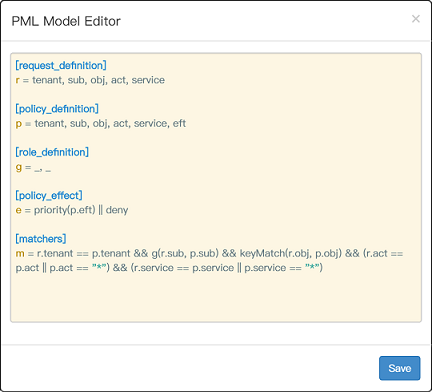
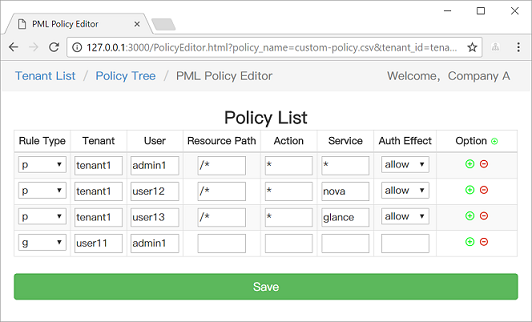
https://casbin.apache.org/docs/adapters/
https://casbin.apache.org/docs/role-managers/
If your code uses async / await and is heavily dependent on I/O operations, you can adopt Async Enforcer!
import asyncio
import os

import casbin
from sqlalchemy.ext.asyncio import create_async_engine, AsyncSession
from sqlalchemy.orm import sessionmaker

from casbin_async_sqlalchemy_adapter import Adapter, CasbinRule


async def get_enforcer():
    engine = create_async_engine("sqlite+aiosqlite://", future=True)
    adapter = Adapter(engine)
    await adapter.create_table()

    async_session = sessionmaker(engine, expire_on_commit=False, class_=AsyncSession)
    async with async_session() as s:
        s.add(CasbinRule(ptype="p", v0="alice", v1="data1", v2="read"))
        s.add(CasbinRule(ptype="p", v0="bob", v1="data2", v2="write"))
        s.add(CasbinRule(ptype="p", v0="data2_admin", v1="data2", v2="read"))
        s.add(CasbinRule(ptype="p", v0="data2_admin", v1="data2", v2="write"))
        s.add(CasbinRule(ptype="g", v0="alice", v1="data2_admin"))
        await s.commit()

    e = casbin.AsyncEnforcer("path/to/model.conf", adapter)
    await e.load_policy()
    return e
Note: you can see all supported adapters in Adapters | Casbin.
Built-in async adapters are available in casbin.persist.adapters.asyncio.
async def main():
    e = await get_enforcer()
    if e.enforce("alice", "data1", "read"):
        print("alice can read data1")
    else:
        print("alice can not read data1")
asyncio.run(main())
tests files for more usage.https://casbin.apache.org/docs/benchmark/
pycasbin leverages the default Python logging mechanism. The pycasbin package makes a call to logging.getLogger() to set the logger. No special logging configuration is needed other than initializing the logger in the parent application. If no logging is initialized within the parent application, you will not see any log messages from pycasbin. At the same time, when you enable log in pycasbin, you can specify the logging configuration through the parameter logging_config. If no configuration is specified, it will use the default log configuration. For other pycasbin extensions, you can refer to the Django logging docs if you are a Django user. For other Python users, you should refer to the Python logging docs to configure the logger.
| Model | Model file | Policy file |
|---|---|---|
| ACL | basic_model.conf | basic_policy.csv |
| ACL with superuser | basic_with_root_model.conf | basic_policy.csv |
| ACL without users | basic_without_users_model.conf | basic_without_users_policy.csv |
| ACL without resources | basic_without_resources_model.conf | basic_without_resources_policy.csv |
| RBAC | rbac_model.conf | rbac_policy.csv |
| RBAC with resource roles | rbac_with_resource_roles_model.conf | rbac_with_resource_roles_policy.csv |
| RBAC with domains/tenants | rbac_with_domains_model.conf | rbac_with_domains_policy.csv |
| ABAC | abac_model.conf | N/A |
| RESTful | keymatch_model.conf | keymatch_policy.csv |
| Deny-override | rbac_with_deny_model.conf | rbac_with_deny_policy.csv |
| Priority | priority_model.conf | priority_policy.csv |
Authz middlewares for web frameworks: https://casbin.apache.org/docs/middlewares/
https://casbin.apache.org/docs/adopters/
This project exists thanks to all the people who contribute.
This project is licensed under the Apache 2.0 license.
If you have any issues or feature requests, please contact us. PR is welcomed.
