
Configure AviatorScript to use interpreter mode for Android API 23+ compatibility

Co-authored-by: hsluoyz <3787410+hsluoyz@users.noreply.github.com>





News: still worry about how to write the correct jCasbin policy? Casbin online editor is coming to help! Try it at: https://casbin.org/editor/

jCasbin is a powerful and efficient open-source access control library for Java projects. It provides support for enforcing authorization based on various access control models.
 |  |  |  |
|---|---|---|---|
| Casbin | jCasbin | node-Casbin | PHP-Casbin |
| production-ready | production-ready | production-ready | production-ready |
 |  |  |  |
|---|---|---|---|
| PyCasbin | Casbin.NET | Casbin-CPP | Casbin-RS |
| production-ready | production-ready | beta-test | production-ready |
write-article, read-log. It doesn't control the access to a specific article or log.resource.Owner can be used to get the attribute for a resource./res/*, /res/:id and HTTP methods like GET, POST, PUT, DELETE.In jCasbin, an access control model is abstracted into a CONF file based on the PERM metamodel (Policy, Effect, Request, Matchers). So switching or upgrading the authorization mechanism for a project is just as simple as modifying a configuration. You can customize your own access control model by combining the available models. For example, you can get RBAC roles and ABAC attributes together inside one model and share one set of policy rules.
The most basic and simplest model in jCasbin is ACL. ACL's model CONF is:
# Request definition
[request_definition]
r = sub, obj, act

# Policy definition
[policy_definition]
p = sub, obj, act

# Policy effect
[policy_effect]
e = some(where (p.eft == allow))

# Matchers
[matchers]
m = r.sub == p.sub && r.obj == p.obj && r.act == p.act
An example policy for ACL model is like:
p, alice, data1, read
p, bob, data2, write
It means:
What jCasbin does:
{subject, object, action} form or a customized form as you defined, both allow and deny authorizations are supported.root or administrator. A superuser can do anything without explicit permissions.keyMatch can map a resource key /foo/bar to the pattern /foo*.What jCasbin does NOT do:
username and password when a user logs in)For Maven:
<dependency>
  <groupId>org.casbin</groupId>
  <artifactId>jcasbin</artifactId>
  <version>1.x.y (replace with latest version)</version>
</dependency>
jCasbin is fully compatible with Android API 23+ (Android 6.0 Marshmallow and later). The library uses AviatorScript in interpreter mode to ensure compatibility with older Android versions that don't support MethodHandle APIs (which require API 26+).
No special configuration is needed - jCasbin automatically uses interpreter mode for all platforms, making it safe to use on Android devices running API 23 and above.
https://casbin.org/docs/overview
You can also use the online editor (https://casbin.org/editor/) to write your jCasbin model and policy in your web browser. It provides functionality such as syntax highlighting and code completion, just like an IDE for a programming language.
https://casbin.org/docs/tutorials
New a jCasbin enforcer with a model file and a policy file:
Enforcer enforcer = new Enforcer("path/to/model.conf", "path/to/policy.csv");
Note: you can also initialize an enforcer with policy in DB instead of file, see Policy persistence section for details.
Add an enforcement hook into your code right before the access happens:
String sub = "alice"; // the user that wants to access a resource.
String obj = "data1"; // the resource that is going to be accessed.
String act = "read"; // the operation that the user performs on the resource.

if (enforcer.enforce(sub, obj, act) == true) {
    // permit alice to read data1
} else {
    // deny the request, show an error
}
Besides the static policy file, jCasbin also provides API for permission management at run-time. For example, You can get all the roles assigned to a user as below:
Roles roles = enforcer.getRoles("alice");
See Policy management APIs for more usage.
jCasbin provides two sets of APIs to manage permissions:
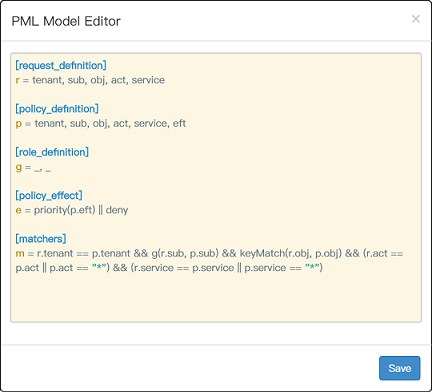
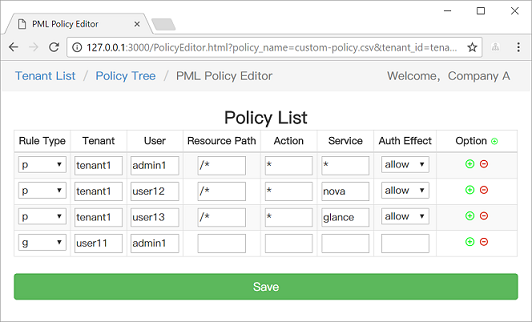
We also provide a web-based UI for model management and policy management:
https://casbin.org/docs/adapters
https://casbin.org/docs/role-managers
| Model | Model file | Policy file |
|---|---|---|
| ACL | basic_model.conf | basic_policy.csv |
| ACL with superuser | basic_model_with_root.conf | basic_policy.csv |
| ACL without users | basic_model_without_users.conf | basic_policy_without_users.csv |
| ACL without resources | basic_model_without_resources.conf | basic_policy_without_resources.csv |
| RBAC | rbac_model.conf | rbac_policy.csv |
| RBAC with resource roles | rbac_model_with_resource_roles.conf | rbac_policy_with_resource_roles.csv |
| RBAC with domains/tenants | rbac_model_with_domains.conf | rbac_policy_with_domains.csv |
| ABAC | abac_model.conf | N/A |
| RESTful | keymatch_model.conf | keymatch_policy.csv |
| Deny-override | rbac_model_with_deny.conf | rbac_policy_with_deny.csv |
| Priority | priority_model.conf | priority_policy.csv |
Authz middlewares for web frameworks: https://casbin.org/docs/middlewares
https://casbin.org/docs/adopters
We provide Spring Boot support, you can use casbin-spring-boot-starter to quickly develop in SpringBoot
In casbin-spring-boot-starter, we made the following adjustments:
https://github.com/jcasbin/casbin-spring-boot-starter
This project exists thanks to all the people who contribute.
This project is licensed under the Apache 2.0 license.
If you have any issues or feature requests, please contact us. PR is welcomed.

