
feat: Added bindings for `CachedEnforcer` (#129)

* feat: Added binding for CachedEnforcer

Signed-off-by: Yash Pandey (YP) <yash.btech.cs19@iiitranchi.ac.in>

* feat: Added bindings for CachedEnforcer

Signed-off-by: Yash Pandey (YP) <yash.btech.cs19@iiitranchi.ac.in>




News: Are you still worried about how to write the correct Casbin policy? Casbin online editor is coming to help! Try it at: http://casbin.org/editor/
| Operating Systems | Availability status |
|---|---|
| Windows (VS C++) | :heavy_check_mark: Available |
| Linux | :heavy_check_mark: Available |
| macOS | :heavy_check_mark: Available |

 |  |  |  |
|---|---|---|---|
| Casbin | jCasbin | node-Casbin | PHP-Casbin |
| production-ready | production-ready | production-ready | production-ready |
 |  |  |  |
|---|---|---|---|
| PyCasbin | Casbin.NET | Casbin-CPP | Casbin-RS |
| production-ready | production-ready | beta-test | production-ready |
write-article, read-log. It doesn't control the access to a specific article or log.resource.Owner can be used to get the attribute for a resource./res/*, /res/:id and HTTP methods like GET, POST, PUT, DELETE.In Casbin, an access control model is abstracted into a CONF file based on the PERM metamodel (Policy, Effect, Request, Matchers). So switching or upgrading the authorization mechanism for a project is just as simple as modifying a configuration. You can customize your own access control model by combining the available models. For example, you can get RBAC roles and ABAC attributes together inside one model and share one set of policy rules.
The most basic and simplest model in Casbin is ACL. ACL's model CONF is:
# Request definition
[request_definition]
r = sub, obj, act

# Policy definition
[policy_definition]
p = sub, obj, act

# Policy effect
[policy_effect]
e = some(where (p.eft == allow))

# Matchers
[matchers]
m = r.sub == p.sub && r.obj == p.obj && r.act == p.act
An example policy for ACL model is like:
p, alice, data1, read
p, bob, data2, write
It means:
What Casbin does:
{subject, object, action} form or a customized form as you defined, both allow and deny authorizations are supported.root or administrator. A superuser can do anything without explict permissions.keyMatch can map a resource key /foo/bar to the pattern /foo*.What Casbin does NOT do:
username and password when a user logs in)https://casbin.org/docs/en/overview
You can also use the online editor (https://casbin.org/editor/) to write your Casbin model and policy in your web browser. It provides functionality such as syntax highlighting and code completion, just like an IDE for a programming language.
https://casbin.org/docs/en/tutorials
(Assuming you have CMake v3.19 or later installed)
Clone/checkout to casbin/casbin-cpp:master
git clone https://github.com/casbin/casbin-cpp.git
Open terminal/cmd in the root directory of the project:
Note: On Windows, this command will also create Visual Studio project files in the /build directory.
mkdir build
cd build
cmake ..
After the project is configured successfully, build it:
cmake --build .
To install casbin library to your machine run:
cmake --build . --target install
casbin.lib to C:/Program Files/casbin-cpp/lib and the headers to C:/Program Files/casbin-cpp/include.casbin.a to usr/local/lib and the headers to usr/local/include.You can add the respective include and lib paths to the PATH environment variable to use casbin.
(OPTIONAL) To run the tests, issue the following command from /build:
ctest
Add the include directory of the project to the PATH Environment variable.
#include <casbin/casbin.h>
New a Casbin enforcer with a model file and a policy file:
casbin::Enforcer e("./path/to/model.conf", "./path/to/policy.csv");
Add an enforcement hook into your code right before the access happens:
std::string sub = "alice"; // the user that wants to access a resource.
std::string obj = "data1"; // the resource that is going to be accessed.
std::string act = "read"; // the operation that the user performs on the resource.

if(e.Enforce({ sub, obj, act })) {
    // permit alice to read data1
} else {
    // deny the request, show an error
}
Besides the static policy file, Casbin also provides API for permission management at run-time. For example, You can get all the roles assigned to a user as below:
std::vector<std::string> roles( e.GetImplicitRolesForUser(sub) );
Here's the summary:
#include <casbin/casbin.h>
#include <string>

void IsAuthorized() {
    casbin::Enforcer e("./path/to/model.conf", "./path/to/policy.csv");

    std::string sub = "alice"; // the user that wants to access a resource.
    std::string obj = "data1"; // the resource that is going to be accessed.
    std::string act = "read"; // the operation that the user performs on the resource.

    if(e.Enforce({ sub, obj, act })) {
        // permit alice to read data1
    } else {
        // deny the request, show an error
    }
}
Casbin provides two sets of APIs to manage permissions:
We also provide a web-based UI for model management and policy management:
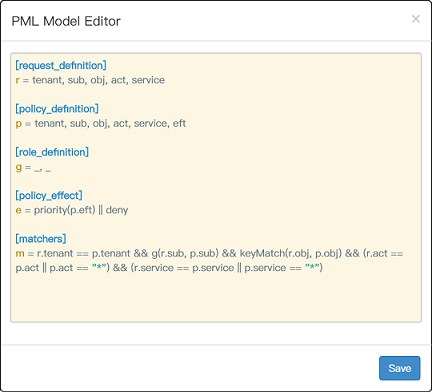
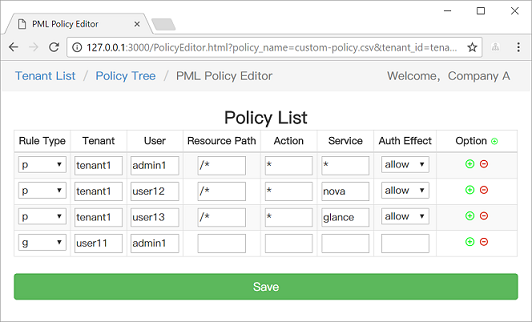
https://casbin.org/docs/en/adapters
https://casbin.org/docs/en/watchers
https://casbin.org/docs/en/role-managers
| Model | Model file | Policy file |
|---|---|---|
| ACL | basic_model.conf | basic_policy.csv |
| ACL with superuser | basic_model_with_root.conf | basic_policy.csv |
| ACL without users | basic_model_without_users.conf | basic_policy_without_users.csv |
| ACL without resources | basic_model_without_resources.conf | basic_policy_without_resources.csv |
| RBAC | rbac_model.conf | rbac_policy.csv |
| RBAC with resource roles | rbac_model_with_resource_roles.conf | rbac_policy_with_resource_roles.csv |
| RBAC with domains/tenants | rbac_model_with_domains.conf | rbac_policy_with_domains.csv |
| ABAC | abac_model.conf | N/A |
| RESTful | keymatch_model.conf | keymatch_policy.csv |
| Deny-override | rbac_model_with_deny.conf | rbac_policy_with_deny.csv |
| Priority | priority_model.conf | priority_policy.csv |
Authz middlewares for web frameworks: https://casbin.org/docs/en/middlewares
https://casbin.org/docs/en/adopters
Please read the contributing guide.
This project exists thanks to all the people who contribute.
Thank you to all our backers! 🙏 [Become a backer]
Support this project by becoming a sponsor. Your logo will show up here with a link to your website. [Become a sponsor]
This project is licensed under the Apache 2.0 license.
If you have any issues or feature requests, please contact us. PR is welcomed.
