| --- |
| title: Control API |
| --- |
| |
| <!-- |
| # |
| # Licensed to the Apache Software Foundation (ASF) under one or more |
| # contributor license agreements. See the NOTICE file distributed with |
| # this work for additional information regarding copyright ownership. |
| # The ASF licenses this file to You under the Apache License, Version 2.0 |
| # (the "License"); you may not use this file except in compliance with |
| # the License. You may obtain a copy of the License at |
| # |
| # http://www.apache.org/licenses/LICENSE-2.0 |
| # |
| # Unless required by applicable law or agreed to in writing, software |
| # distributed under the License is distributed on an "AS IS" BASIS, |
| # WITHOUT WARRANTIES OR CONDITIONS OF ANY KIND, either express or implied. |
| # See the License for the specific language governing permissions and |
| # limitations under the License. |
| # |
| --> |
| |
| control API 可以被用来: |
| |
| * 暴露 APISIX 内部状态信息 |
| * 控制单个 APISIX 的数据平面的行为 |
| |
| 默认情况下,control API 是启用的,监听 `127.0.0.1:9090`。你可以通过修改 `apisix/conf/config.yaml` 中的 control 部分来更改设置,如下: |
| |
| ```yaml |
| apisix: |
| ... |
| enable_control: true |
| control: |
| ip: "127.0.0.1" |
| port: 9090 |
| ``` |
| |
| 插件的 control API 在默认情况下不支持参数匹配,如果想启用参数匹配功能可以在 control 部分添加 `router: 'radixtree_uri_with_parameter'` |
| |
| 注意:control API server 不应该被配置成监听公网地址。 |
| |
| ## 通过插件添加的 control API |
| |
| APISIX 中一些插件添加了自己的 control API。如果你对他们感兴趣,请参阅对应插件的文档。 |
| |
| ## 独立于插件的 control API |
| |
| 以下是支持的 API: |
| |
| ### GET /v1/schema |
| |
| 引入自 2.2 版本 |
| |
| 使用以下格式返回被该 APISIX 实例使用的 json schema: |
| |
| ```json |
| { |
| "main": { |
| "route": { |
| "properties": {...} |
| }, |
| "upstream": { |
| "properties": {...} |
| }, |
| ... |
| }, |
| "plugins": { |
| "example-plugin": { |
| "consumer_schema": {...}, |
| "metadata_schema": {...}, |
| "schema": {...}, |
| "type": ..., |
| "priority": 0, |
| "version": 0.1 |
| }, |
| ... |
| }, |
| "stream-plugins": { |
| "mqtt-proxy": { |
| ... |
| }, |
| ... |
| } |
| } |
| ``` |
| |
| 只有启用了的插件才会被包含在返回结果中 `plugins` 部分。(返回结果中的)一些插件可能会缺失如 `consumer_schema` 或者 `type` 字段,这取决于插件的定义。 |
| |
| ### GET /v1/healthcheck |
| |
| 引入自 2.3 版本 |
| |
| 使用以下格式返回当前的 [health check](./tutorials/health-check.md) 状态 |
| |
| ```json |
| [ |
| { |
| "nodes": [ |
| { |
| "ip": "52.86.68.46", |
| "counter": { |
| "http_failure": 0, |
| "success": 0, |
| "timeout_failure": 0, |
| "tcp_failure": 0 |
| }, |
| "port": 80, |
| "status": "healthy" |
| }, |
| { |
| "ip": "100.24.156.8", |
| "counter": { |
| "http_failure": 5, |
| "success": 0, |
| "timeout_failure": 0, |
| "tcp_failure": 0 |
| }, |
| "port": 80, |
| "status": "unhealthy" |
| } |
| ], |
| "name": "/apisix/routes/1", |
| "type": "http" |
| } |
| ] |
| |
| ``` |
| |
| 每个 entry 包含以下字段: |
| |
| * name: 资源 ID,健康检查的报告对象。 |
| * type: 健康检查类型,取值为 `["http", "https", "tcp"]`。 |
| * nodes: 检查节点列表。 |
| * nodes[i].ip: IP 地址。 |
| * nodes[i].port: 端口。 |
| * nodes[i].status: 状态:`["healthy", "unhealthy", "mostly_healthy", "mostly_unhealthy"]`。 |
| * nodes[i].counter.success: 成功计数器。 |
| * nodes[i].counter.http_failure: HTTP 访问失败计数器。 |
| * nodes[i].counter.tcp_failure: TCP 连接或读写的失败计数器。 |
| * nodes[i].counter.timeout_failure: 超时计数器。 |
| |
| 用户也可以通过 `/v1/healthcheck/$src_type/$src_id` 来获取指定 health checker 的状态。 |
| |
| 例如,`GET /v1/healthcheck/upstreams/1` 返回: |
| |
| ```json |
| { |
| "nodes": [ |
| { |
| "ip": "52.86.68.46", |
| "counter": { |
| "http_failure": 0, |
| "success": 2, |
| "timeout_failure": 0, |
| "tcp_failure": 0 |
| }, |
| "port": 80, |
| "status": "healthy" |
| }, |
| { |
| "ip": "100.24.156.8", |
| "counter": { |
| "http_failure": 5, |
| "success": 0, |
| "timeout_failure": 0, |
| "tcp_failure": 0 |
| }, |
| "port": 80, |
| "status": "unhealthy" |
| } |
| ], |
| "type": "http" |
| "name": "/apisix/routes/1" |
| } |
| |
| ``` |
| |
| :::note |
| |
| 只有一个上游满足以下条件时,它的健康检查状态才会出现在结果里面: |
| |
| * 上游配置了健康检查。 |
| * 上游在任何一个 worker 进程处理过客户端请求。 |
| |
| ::: |
| |
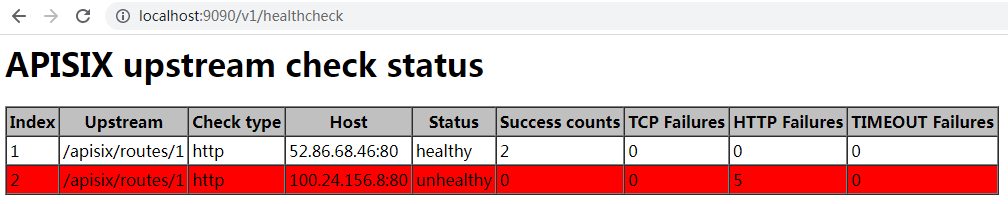
| 如果你使用浏览器访问该 API,你将得到一个网页: |
| |
|  |
| |
| ### POST /v1/gc |
| |
| 引入自 2.8 版本 |
| |
| 在 http 子系统中触发一次全量 GC |
| |
| 注意,当你启用 stream proxy 时,APISIX 将为 stream 子系统运行另一个 Lua 虚拟机。它不会触发这个 Lua 虚拟机中的全量 GC。 |
| |
| ### GET /v1/plugin_metadatas |
| |
| 引入自 3.0.0 版本 |
| |
| 打印所有插件的元数据: |
| |
| ```json |
| [ |
| { |
| "log_format": { |
| "upstream_response_time": "$upstream_response_time" |
| }, |
| "id": "file-logger" |
| }, |
| { |
| "ikey": 1, |
| "skey": "val", |
| "id": "example-plugin" |
| } |
| ] |
| ``` |
| |
| ### GET /v1/plugin_metadata/{plugin_name} |
| |
| 引入自 3.0.0 版本 |
| |
| 打印指定插件的元数据: |
| |
| ```json |
| { |
| "log_format": { |
| "upstream_response_time": "$upstream_response_time" |
| }, |
| "id": "file-logger" |
| } |
| ``` |
